

Managing meetings, appointments, and daily tasks is hard enough already. So, your calendar shouldn’t make it harder.
From color-coded schedules to task reminders, calendar apps like Google Calendar and Apple Calendar are more than digital diaries. They’re powerful tools designed to help you plan your day, maximize productivity, and, most importantly, save your sanity.
Still now, I’ve seen many people struggle to decide between Google Calendar and Apple Calendar.
At first glance, Google Calendar and Apple Calendar accomplish the same goal: keeping your schedule organized. But once you take a closer look, the differences become clearer, from cross platform flexibility and integrations to ecosystem advantages and collaboration tools.
So which one is actually better?
To help you make the right decision, this guide will show you the Google Calendar vs Apple Calendar. Further, you’ll learn which calendar app is the best-fit to keep your work and personal lives on track.
TL;DR. Google Calendar is better for teams and multi-device use, while Apple Calendar is simpler and private for Apple users. But tools like BookingPress make syncing both easy.
Quick Comparison: Google Calendar vs Apple Calendar
If you want the highlights first, this table breaks down the key differences between Apple Calendar vs Google Calendar real quick:
| Feature | Google Calendar | Apple Calendar |
| Best For | Teams, collaboration, multi-device users | Apple ecosystem users, simplicity lovers |
| Platform Availability | Web, Android, iOS, Windows, macOS | iOS, macOS, iPadOS, watchOS (web via iCloud) |
| User Interface | Functional, customizable, information-rich | Clean, minimal, visually streamlined |
| Integrations | Strong – Gmail, Google Meet, Slack, Zoom, Trello, Zapier | Best within Apple apps; supports Google & Outlook sync |
| Collaboration | Excellent sharing, scheduling, and team visibility | Basic sharing, better for personal use |
| Smart Features | AI scheduling suggestions, focus time, appointment slots | Travel time alerts, Siri voice scheduling |
| Offline Access | Available with limited functionality | Strong native offline support |
| Pricing | Free (with premium workspace options) | Free |
| Ideal Use Case | Businesses, remote teams, heavy schedulers | Individuals with the Apple ecosystem |
Difference Between Google Calendar and Apple Calendar (Quick Answer)
Google Calendar is a free digital and online calendar app by Google to organize your day-to-day schedule and keep track of it. On the other hand, Apple Calendar is also a free digital calendar yet it’s specially made for Apple devices such as iPhone, iPad and Mac.
The real difference between Google Calendar and Apple Calendar simply comes down to two things: Flexibility and Ecosystem.
- Google Calendar is made for collaboration, integrations and cross platform access. That’s the reason it manages to work smoothly across Android, iOS, web browsers and desktops.
- Apple Calendar is best for simplicity and deep Apple ecosystem integration. Thus, if you already use an iPhone, iPad or Mac, it gives you a smooth native feel with effortless syncing across devices.
Google Calendar vs Apple Calendar: Features Comparison
1. User Interface: Which Calendar Is Easier to Use?
At first glance, both calendars look smooth and clean. But the real question decision makers should ask is: Does the interface help you move faster or slow your scheduling down?
Because when you’re handling client bookings, internal meetings or back-to-back appointments, even a little UI friction leads to loss of productivity.
Thus, let’s see which calendar is ACTUALLY easy to use:
- Google Calendar uses a functionality-first design. You see more data, more controls and more scheduling context right in front of you the second you open it.
- On the flip side, Apple Calendar walks on the path of Apple’s signature philosophy: minimal, distraction free and visually calming.
The results are crystal clear that both calendars are well-designed but they optimize for very different working styles.
Google Calendar – Built for operational clarity
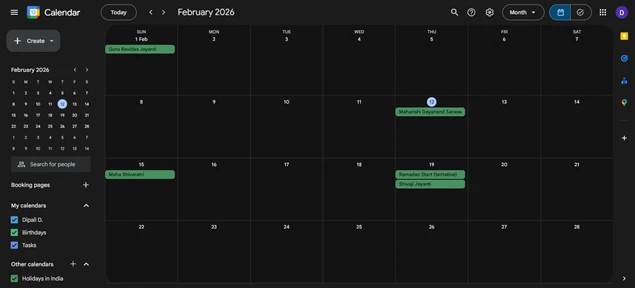
- Color coded calendars for easy multi schedule management.
- Multiple viewing options by day, week, month or agenda.
- Drag-and-drop editing reduces scheduling friction.
- Event details are visible without excessive clicking.
Apple Calendar – Built for cognitive ease
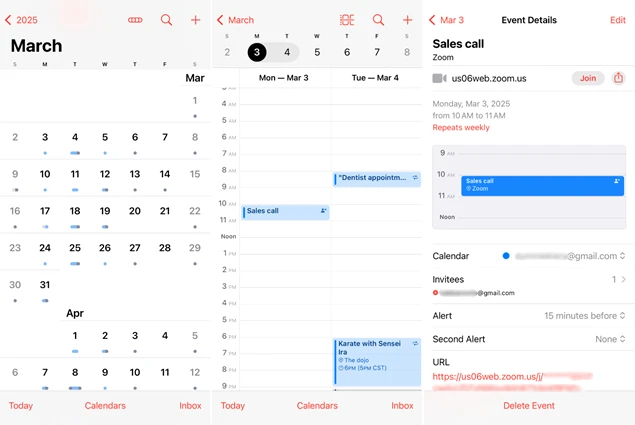
- Clean layout lowers visual fatigue.
- Native gestures feel super intuitive on Apple devices.
- Consistent beautiful UI across iPhone, iPad, and Mac.
- Fast event creation to make personal planning simple.
Strategic Verdict: If you like better customization, Google Calendar has the edge. If you enjoy a sleek and lightweight design, Apple Calendar got more beautiful visual experience.
2. Event Creation and Scheduling: Which Calendar Saves You More Time?
Creating an event sounds simple until you’re doing it 20+ times a day.
For service businesses, consultants and teams, scheduling speed directly impacts your operational efficiency. That’s why the faster you can create, edit and adjust your events, the fewer interruptions your workflow suffers.
So the smarter question isn’t “Which calendar can create events?” – Both can. The real question is: Which one reduces scheduling effort at scale?
Google Calendar lets you create events in seconds with smart suggestions for titles, locations and participants. Even recurring meetings are simple to set, and Google Meet links can be added automatically which is a biggest plus point for remote teams.
Apple Calendar, on the other hand, shines with its Travel Time feature, estimating how long it will take to reach your destination based on traffic. Further, Siri integration also allows hands free scheduling that can be surprisingly useful during busy workdays.
Thus, let’s see which calendar saves you more time:
Google Calendar – Built for scheduling velocity
- Smart suggestions auto-fill event details like location and contacts.
- “Add guests” is simple, making meeting coordination faster.
- Integrated Google Meet links generate right away.
- Appointment slots help with better structure availability with no more back-and-forth emails.
- Natural language input such as “Team call tomorrow at 10” speeds up creation.
Apple Calendar – Built for effortless entry
- Quick-add interface keeps event creation distraction free.
- Siri can schedule meetings via voice in seconds.
- Travel time automatically calculates when locations are added.
- Amazing native performance ensures smooth edits even offline.
Strategic Verdict: Google wins for speed and automation yet Apple stands out for contextual scheduling intelligence.
3. Notifications and Reminders: Which Calendar Keeps You Better Prepared?
Missed meetings don’t just disrupt your day. They simply damage credibility.
No matter whether you’re managing client appointments, internal check-ins or revenue-generating sessions, reminders are your safety net. The right notification system makes sure you show up prepared, not scrambling.
So don’t think “Which calendar sends reminders?” as both already do. Ask,” Which calendar prevents costly scheduling mistakes? A reliable calendar should prevent missed meetings.
Google Calendar offers fully customizable reminders via push notifications and email. Furthermore, you can set multiple alerts for the same event and adjust defaults to match your routine.
On the flip side, Apple Calendar keeps reminders simple but effective. Location based alerts and “time to leave” notifications are always helpful for in-person appointments.
Thus, let’s see which calendar keeps you better prepared for real:
Google Calendar – Built for proactive control
- Set multiple reminders for a single event.
- Choose notification types (push, email, desktop).
- Set default notifications so you never forget to add them.
- Get reminders across all synced devices instantly.
- Integrates with Gmail to surface travel plans, bookings, and reservations automatically.
Apple Calendar – Built for dependable nudges
- Clean notifications reduce alert fatigue.
- Location-based reminders notify you when it’s time to leave.
- Travel time alerts.
- Deep OS integration for consistent delivery across Apple devices.
Strategic Verdict: Advanced users will surely go for Google’s flexibility while Apple excels at practical and real-world reminders.
4. Team Collaboration & Productivity Integrations: Which Calendar Boosts Your Workflow?
This is the point where the gap between Apple Calendar and Google Calendar starts to become more noticeable.
Calendars are like the backbone of team productivity. Missed updates, double bookings and disconnected tools cost businesses time, money and credibility.
So the question for decision-makers is, “Which calendar actually keeps your team aligned and your workflow smooth?”
Google Calendar smoothly integrates with tools such as Gmail, Google Meet, Slack, Zoom and hundreds of productivity apps through automation platforms. Moreover, it also makes it easy to share calendars, create group events, check colleague availability and manage permissions
Meanwhile, Apple Calendar also integrates beautifully yet within Apple’s ecosystem only, such as Maps, Siri and Reminders. Yes, it supports sharing as well but its collaboration features are less robust and better suited for families or small groups only.
Things to Know: Apple Calendar also supports external calendars such as Google and Outlook, though a little bit of setup is needed.
Thus, here’s a clear difference between Google Calendar vs Apple Calendar:
Google Calendar – Built for team efficiency
- Real-time calendar sharing with a permissions management option.
- “Find a time” feature automatically detects open slots across team members.
- Integrates seamlessly with Gmail, Zoom, Slack, Trello, Zapier, Google Workspace apps and Project management tools for automated scheduling.
- Supports appointment slots for client booking.
Apple Calendar – Built for Apple ecosystem cohesion
- Basic calendar sharing with Apple ID contacts.
- Notifications propagate across iPhone, iPad, Mac, and Apple Watch.
- Integrates well with Apple Reminders, Mail, and Contacts.
- Connects smoothly with third party calendar subscriptions.
Strategic Verdict: For expansive workflows and collaborative scheduling, Google Calendar is the clear winner. On the other hand, Apple Calendar is best for Apple-first personal or small team use only.
5. Privacy and Security: Which Calendar Protects Your Data?
These days, when it comes to calendars, it’s not just about scheduling. For most businesses and people, it’s about trust!
Client appointments, sensitive project timelines and personal events sometimes carry confidential information. And all it takes is just one data breach or unauthorized access to turn your organization upside down, both financially and reputationally.
So the real question to ask: Which calendar keeps your data secure while giving you control over access?
As we all know, Apple Calendar positions itself as a privacy-first company, emphasizing on-device intelligence and minimal data tracking.
However, Google Calendar also offers strong security protections as well, yet its ecosystem is more data-driven which is something some people weigh very carefully.
In simple words, both calendar apps offer security but their approach and philosophy are different. Here’s how it is for businesses:
Google Calendar – Security with enterprise control
- Data is encrypted in transit and at rest on Google servers.
- Two-factor authentication (2FA) and SSO for businesses.
- Admin controls allow safe sharing of permissions and auditing.
- Integration with enterprise tools such as Workspace, Slack, and Zoom to maintain a secure workflow.
- Regular security updates and global compliance standards (GDPR, SOC 2, ISO 27001).
Apple Calendar – Privacy first design
- Events are end-to-end encrypted when synced via iCloud.
- Minimal data collection by default.
- Notifications and reminders are processed locally when possible.
- Seamless device-to-device encryption across iPhone, iPad, and Mac.
Strategic Verdict: Apple Calendar is a clear winner for privacy-focused businesses, while Google Calendar trades some privacy for collaboration and enterprise control, not negligence.
Which Is Better: Google Calendar or Apple Calendar?
For most professionals, teams, and multi-device users, Google Calendar is the better overall choice thanks to its integrations, collaboration tools and flexibility. However, Apple Calendar becomes super powerful if you are fully committed to the Apple ecosystem.
That’s why we’ve analyzed both the calendar app’s user interface, event creation, notifications, collaboration and security, to come to the right choice.
Yet we realised the better calendar choice obviously comes down to your workflow priorities. So….
Choose Google Calendar if:
- You work across multiple devices.
- Collaboration is part of your daily workflow.
- You rely on third-party productivity tools.
- You manage team schedules or client meetings.
Google Calendar is for decision-makers and teams who treat scheduling as a core operational tool.
Choose Apple Calendar if:
- You primarily use iPhone, iPad, or Mac.
- You want a clean and distraction free interface.
- Privacy is a major priority.
- You want smart features like travel-time alerts.
Apple Calendar is the best pick for individuals and small teams who prioritize simplicity, privacy and always work across Apple devices.
Best Calendar Tool for Businesses & Scheduling Teams – BookingPress
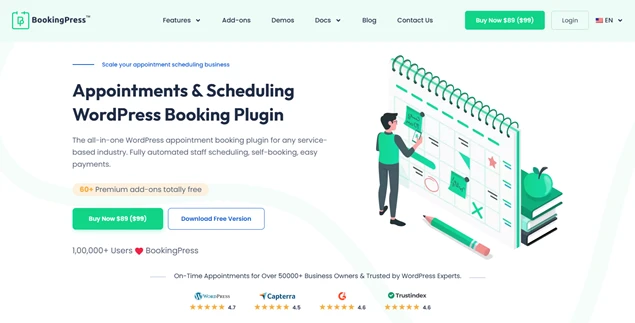
If you are a service-based business that has to manage appointments and bookings every day, BookingPress is your answer.
BookingPress is the best business-oriented WordPress appointment booking plugin. It makes scheduling appointments completely hassle-free and error-free for all service-based businesses.
This booking plugin smoothly syncs your bookings across both Apple Calendar and Google Calendar. So everyone in your business – you, your staff members and clients stay on the same page.
Plus, BookingPress sends notifications via WhatsApp, Email, SMS and Telegram automatically to lower your no shows and increase conversion. Besides, it comes with a robust set of features, such as:
- Fully automated staff scheduling.
- Customizable booking form to let clients book appointments from anywhere, anytime, 24/7.
- Accept on-site or online payment, full or deposit, via 21+ payment gateway + POS system.
- Create packages of multiple services and offer discounts in total via a coupon code.
- Detailed reports along with a centralized analytics dashboard.
- Flexible booking rules with real time availability.
Whether you’re running a salon, spa, coaching center, fitness studio, clinic, rental business, repair and maintenance or any other service business, BookingPress is the best booking calendar for you.
Can You Sync Google Calendar and Apple Calendar?
The answer is: Yes, you can sync and use both calendars together. However, it needs you to learn how syncing works, what’s supported and how to avoid common pitfalls. And that’s exactly what we’re here for.
How to Sync Google Calendar into Apple Calendar
- First, open “Settings” on your Apple device.
- Then go to Calendar > Accounts > Add Account.
- Here, select Google and sign in.
- At last, simply enable calendar syncing.
- And that’s all.
Pro Tip: Changes made in Apple Calendar won’t sync back to Google Calendar. It’s a one-way import. For two-way sync, consider using third party tools such as BookingPress.
How to Sync Apple Calendar to Google Calendar
- On iPhone, go to Settings > Calendar > Accounts > Add Account > sign in with a Google account and on “Calendars” toggle.
- On Mac, go to System Settings > Internet Accounts > Add Account > sign in with a Google account and on “Calendars” toggle.
Conclusion
In a nutshell, both Google Calendar and Apple Calendar are free, robust and user friendly calendars. They’re both good for creating, editing and syncing events across devices.
However, choosing between Apple Calendar vs Google clearly depends on individual needs and the ecosystem you are comfortable in.
- If you want to work with a shared professional calendar, Google Calendar works well because of its multi platform compatibility.
- If you’re an Apple user through, your eye will work well only with an Apple Calendar. Plus, it provides multiple features with an intuitive interface for you to implement in your personal and professional setup.
However, here’s one more thing to mention. If you use BookingPress, syncing your appointments between both calendars is easy.
BookingPress, the best WordPress booking plugin, bridges the gap between both calendars to make sure all appointments and events are automatically synced. Get BookingPress and sync your Google Calendar and Apple Calendar with zero effort.
You May Also Like:
- How to Import an ICS File into Google Calendar in Minutes
- 8 Best Google Calendar Alternatives in 2025 (Expert Picks)
- How To Sync Bookings with Apple Calendar Using BookingPress
FAQs
Google Calendar is better if you work with different devices such as Android or Windows, and need advanced collaborative features. Choose Apple Calendar only if you use Apple devices.
Yes, Google Calendar is generally better because it works perfectly on both iPhone and Android. It means you can work from everywhere and handle shared scheduling with ease.
No, Apple Calendar and Google Calendar are not the same. Despite both being Calendars for organizing and scheduling events, Apple Calendar works for Apple devices within the Apple ecosystem while Google Calendar works for every device.
Apple Calendar is sometimes called “iCal” for previous iterations of the OS
 14-day money-back guarantee