In modern societies, experience-based gifting is something actively booming. Buying physical gifts is no longer as exciting as it once was. A massage, a yoga class, a dance lesson, or even a language course – these are examples of fantastic gift ideas that create lasting memories.
From the customer’s perspective, giving an experience feels more thoughtful and personal. And it’s even more powerful when they’ve already tried your service and know it’s worth sharing.
From the service business point of view, these special gifting experiences can be sold through gift cards! They are easy to buy online and easy to give even to remote friends or family.
In this article, we’re keen to explain how digital gift cards can boost revenue for any service business – and how to set them up on your site without losing a moment!
Why Your Service Business Needs Gift Cards (10 Reasons)

Offering gift cards for booking websites is a proven way to increase revenue and customer engagement – but no need to take our word for it. Here are a few realistic reasons why gift cards have the potential to boost sales.
1. Instant Revenue Boost
You get paid upfront and simply expand your product and service line, encouraging active customers to buy more.
2. Attract New Customers Easier
Who is the potential buyer? The thing is, it’s not just someone you already served! People may buy experiences through gift cards for their friends and family from other countries – so it’s a nice way to attract those who buy presents remotely. Moreover, gift recipients often become long-term clients if they like your services.
3. Increase Average Order Value
First, your average customers can notice the gift card option and buy it, increasing their check. Next, people tend to spend more than the gift card value when booking.
4. Perfect For Last-Minute Buyers
Digital gift cards are an easy solution for customers who need a quick present – whether they have tried your service before or not.
5. Boost Repeat Visits
Those customers you’ve attracted through gift cards, may come back again; what’s more, they may even buy gift cards from you to give to other people.
6. Expand Your Audience Organically
Every gift card introduces your brand to someone new, not through pushy ads but through real services and first-hand experiences.
7. Reduce Seasonal Slumps
Gift cards sell especially well during holidays and special occasions.
8. Build Emotional Connection
Emotions are a great sales booster. With gift cards, you’re part of meaningful moments – birthdays, anniversaries, celebrations.
9. Flexible For Any Service Business
They deliver their magic across industries – from beauty salons to coaches, fitness trainers, tutors, and more. Anyone can use them.
10. Low Effort, High Roi
Once set up, gift cards require minimal ongoing management.
There are many meaningful experiences people love to give – and you can offer as a business:
- A relaxing spa session for a friend
- Tango coaching for a couple
- A fitness or yoga package
- A creative workshop or language lesson.
How Gift Cards for Booking Websites Work in BookingPress
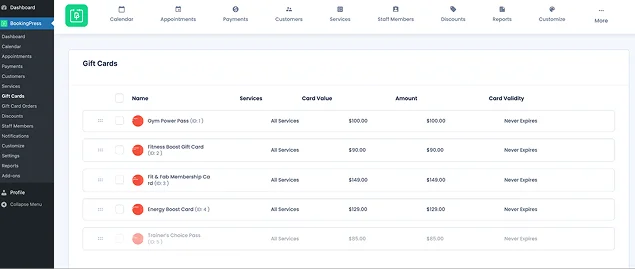
Gift cards are really easy to create, assign to specific services, and sell right from your WordPress site along with offering bookings via the appointment scheduling form. From a customer’s point of view, the process is incredibly simple:
1. They visit your website.
2. Choose a gift card.
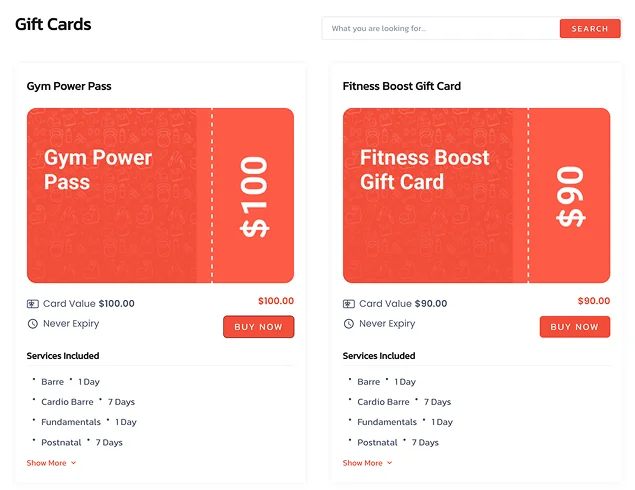
3. Enter recipient details (email + message).
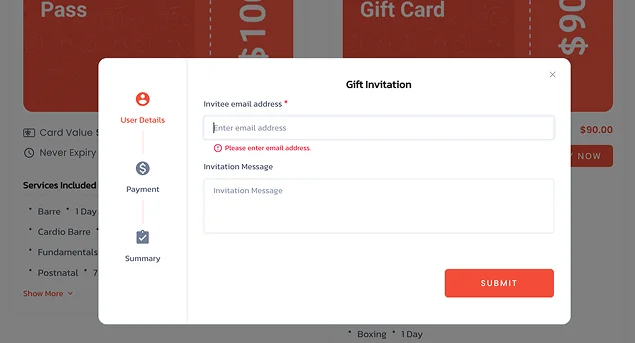
4. Complete the payment (online gateways only).
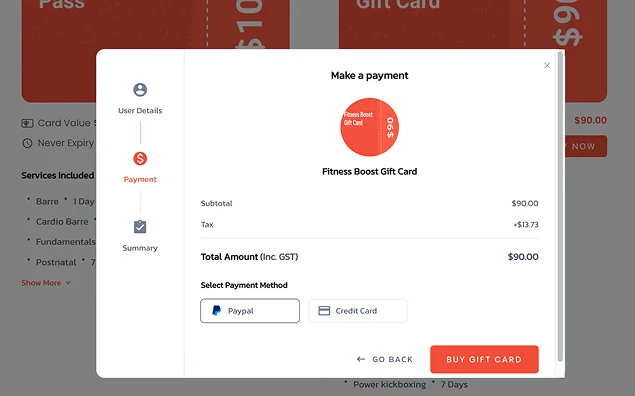
5. The recipient receives a gift code.
6. The code is used when booking an appointment as a simple discount code (yet inserted into a dedicated field at checkout). The amount is deducted automatically. Remaining balance (if any) can be used again (if enabled).
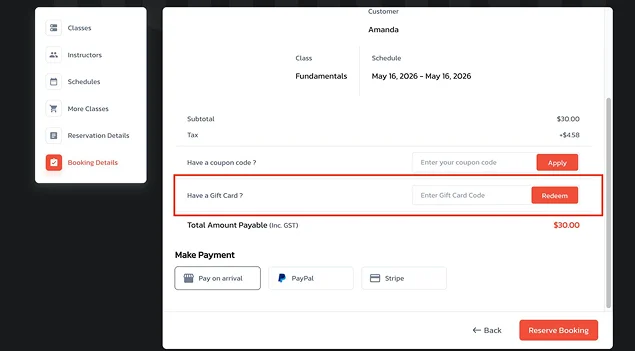
The recipient gets a gift card code along with a personalized message and instructions to redeem.
How to Create Gift Cards in BookingPress
To create service booking gift cards with BookingPress, you need to use a dedicated Gift Card addon. It will allow you to create and manage gift cards directly from your WordPress dashboard. Follow these steps to do so.
Step 1. Install the Gift Card Addon
- Log in to your BookingPress account
- Go to Access Passes > View Downloads
- Download the Gift Card addon
- Upload it to WordPress and activate it as a normal plugin.
Step 2. Create a New Gift Card
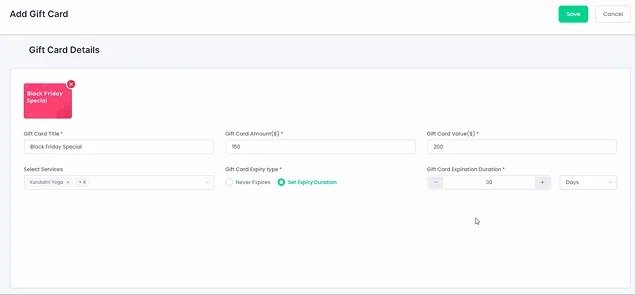
Go to BookingPress > Gift Cards > Add New
In this menu, you can configure the essential settings like:
- Title (Name your gift card)
- Amount / Value (define how much it’s worth)
- Expiry type – set expiration or allow it to never expire
- Expiration duration – optional time limit.
Many gift cards don’t need an expiration date, but if your service is tied to a specific season or event (summer outdoor yoga classes / holiday-themed spa packages), an expiry date prevents confusion later.
You can also set eligibility controls:
- Select specific services from those you already provide
- Assign staff members
- Choose packages (or apply to all by default).
Step 3. Configure Global Settings
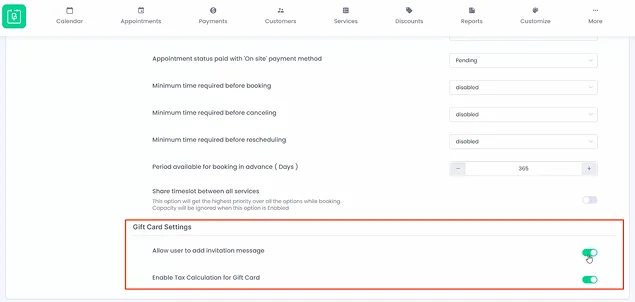
Go to BookingPress > Settings > General > find the Gift Card settings and apply your preferences:
- Allow invitation messages
- Enable multi-use gift cards (until balance runs out)
- Enable tax calculation
Step 4. Customize The Experience
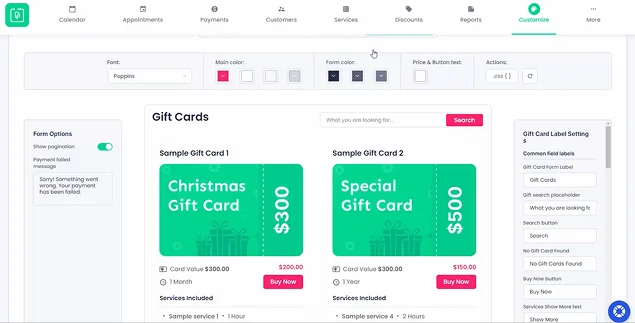
You can tailor everything. For example, to alter form labels, go to BookingPress > Customize > Forms.
Through the Notifications, you can update the content of your emails using handy placeholders that will replace pieces like %gift_card_code% or %gift_card_value% with the real booked values.
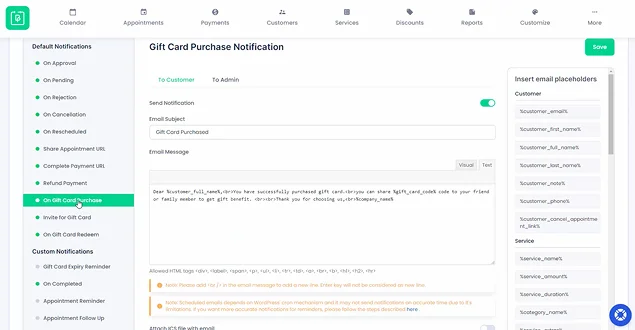
This way, you can customize purchase confirmation, invitation email to recipient, redemption notification, and expiry reminders.
Step 5. Add Gift Cards To Your Site
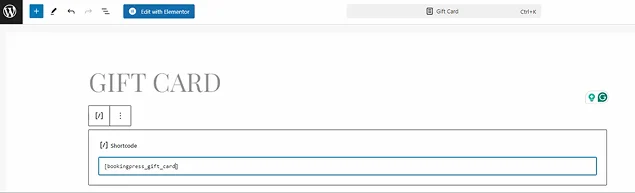
You can create a gift card page with the dedicated BookingPress shortcode by placing it anywhere: [bookingpress_gift_card].
However, there are also a few important limitations to know when providing gift cards in BookingPress:
- Gift cards cannot be combined with coupons
- Gift cards cannot be used with packages simultaneously
- If multi-use is disabled, remaining balance is lost after one use
- Only online payments are supported for purchase
- Gift cards are single-user redeemable
- Deposit payments are disabled when using gift cards.
Tips to Promote Your Gift Cards for Booking Websites & Boost Sales

Gift cards sell themselves well.. However, there are a few tricks you may need to perform to make your gift cards sell even better.
- Highlight on Your Homepage – Gift cards should be visible along with the main services. A banner or dedicated call to action with the text like “Give the Gift of Experience” can work.
- Create a Dedicated Landing Page – You may link the text from the home page to an extra gift card landing page, where you can explain the benefits and showcase your services visually and with key messages.
- Promote During Holidays – People love to buy experiences at special occasions, so focus on periods that make the most sense for your type of business and the nature of services.
- Use in Email Marketing – Send campaigns like “Last-minute gift idea”, or “Perfect present for someone special”, or “A new way to buy and gift our services”.
- Showcase Real Experiences – Use photos or testimonials from happy clients who have already tried gift cards.
- Add Gift Cards to Your Booking Flow – Mention them during checkout as an upsell or as an extra option.
- Use Social Media Creatively – Post ideas like “Tag someone who deserves this” or “Best gift for wellness lovers”.
- Make Them Visually Appealing – Use clean, elegant designs that feel like real gifts.
Let’s Sum up: Why Service Gift Cards are an Easy Way to Boost Bookings
Gift cards for booking websites are one of the simplest ways to increase revenue, attract new clients (even those who have never been customers of yours), and build stronger customer relationships. BookingPress, as a growth-oriented appointment scheduling plugin, gives you a simple way to create, sell, and manage digital gift cards, in full alignment with the services you offer. Ready to win the trust and hearts of your customers? Create your first gift card!
You May Also Like:
 14-day money-back guarantee