

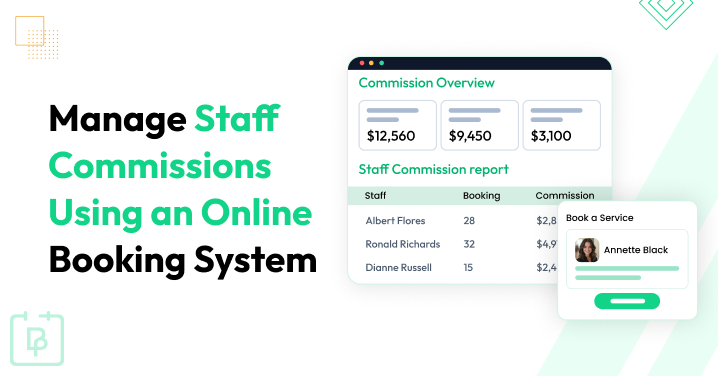
How much commission does each staff member need to get this month? If you have to open spreadsheets, check appointment histories, and calculate every employee’s earnings separately to answer that question, your commission management process needs a better approach.
Whether you run a salon, consultancy firm, real estate agency, home services, or auto-repair, managing staff commissions manually might work when you have only a few appointments. But as bookings increase, keeping commission records accurate becomes harder and more time consuming.
That’s exactly why managing staff commissions using your online booking system makes sense. BookingPress is a great example of how an online booking system can also manage your staff commissions. You don’t need any separate, expensive commission management software.
This WordPress online booking system lets you set commission rates, review earnings from completed appointments, and let staff members check their own commission details.
Want to make staff commission management easier? Let’s now look at five expert tips and see how you can automate the process with the right online booking system.
TL;DR: Bookings lets you manage staff commissions easily using its dedicated in-built Staff Commission add-on. This feature lets you set a standard default commission rate for all staff members as well as custom commission rates for specific staff members. Lastly, you can see how much you own your staff by simply looking at the Commission Report.
5 Expert Tips To Build a Winning Staff Commission System

Managing staff commissions is not just about deciding how much each employee should earn. You also need an accurate commission tracking system to track completed appointments, apply the right commission rates and make sure everyone of your teammates gets paid properly (That’s what they’re living on, after all).
Thus, if you still handle staff commission tracking manually, things can get pretty complicated as your service business grows.
More staff members = more appointments to track, different commission rates to manage, and more calculations to review before payroll.
So, how do you make a staff commission system that actually works for your business? Well, you don’t have to rack your brain as we’ve done that part for you. Below are five practical tips for making a winning employee commission strategy.
Why? Because before managing, you must learn how to make the right staff commission system.
1. Set Clear Commission Rates For Every Staff Member

The first step is to decide how much commission each staff member should earn and how you want to calculate it.
Without clear commission rules, you will just end up dealing with:
- Confusion
- Inconsistent calculations
- And unnecessary disagreements during payroll.
For instance, a salon pays its stylists 10% commission on completed services, and senior stylists get 15%. The same way, a fitness studio can offer trainers a fixed salary plus commission for each completed training session.
Both models can work. What matters is that you set the commission structure before applying it to your team.
Here are a few things to consider when setting your commission rates:
- Staff experience
Offer different rates to junior employees, senior staff or specialists.
- Service type
High value services and routine appointments need different commission percentages.
- Business profit margins
Make sure the commission rate leaves enough room to cover your operating costs.
- Commission rules
Clearly explain whether commissions apply to completed appointments, service sales or other eligible transactions.
Once you establish these rules, simply tell them to your staff members. Everyone must understand how their earnings are calculated and what they need to do to qualify for a commission
2. Track Staff Commissions For Completed Appointments

One of the most important parts of commission management is knowing which appointments qualify for a commission.
Just think about it. A customer books an appointment, but later cancels it. Should the assigned staff member still get a commission? What happens if the customer doesn’t show up? These are the kinds of details that matter when you calculate employee earnings.
For most appointment-based businesses, commissions should be tied to completed appointments rather than every booking created in the system. Otherwise, you will just end up calculating commissions for services that were never delivered.
So, to keep your records accurate, make sure you:
- Track each appointment’s status
- Apply commission rates only to eligible appointments
- Exclude cancelled bookings and no-shows when they don’t qualify for commission
- Review completed appointments before calculating staff earnings
You can manage these records in a spreadsheet, but again, that’s just inconvenient, and takes a lot of time when several staff members handle bookings throughout the day.
An online booking system can be much easier. For instance, BookingPress calculates staff commissions only after an appointment status is updated to Completed. This keeps your commission records connected to the actual appointments delivered by your business.
3. Keep Staff Bookings And Commission Records In One Place

Are you managing appointments in one tool, staff schedules in another… and commission calculations in a separate spreadsheet? Doesn’t that sound a bit messy already? Like just hearing it looks like a lot of hassle and now imagine doing it regularly for 100s of appointment data.
Keeping these details in one place helps a lot. We do it all the time.
An online booking system connects your appointment records with the staff members assigned to each service. When commission tracking is available in the same system, you can review booking details and earnings without manually matching info across multiple files.
For instance, a salon owner can use the booking records to check which stylist completed a service and then review the commission earned from that appointment. A cleaning business can follow the same approach for completed jobs assigned to its team members.
Besides, here are a few details worth keeping together:
- Staff member and assigned service.
- Appointment date and booking ID.
- Appointment completion status.
- Applicable commission rate.
- Calculated commission amount.
BookingPress brings several of these details together through its Staff Commission add-on and dedicated Commission Report. You can see booking IDs, appointment dates, staff members, and assigned services, plus earned commission amounts right from your WordPress dashboard.
This means less time spent matching appointment histories with commission spreadsheets, and more time managing your actual business operations.
4. Check Staff Commissions Before Payroll

Even if you have a perfect commission structure and organize online appointment booking software, don’t skip the final review before payroll. This might sound like a hassle at first, but trust me, it literally saves me a lot of money.
How? Because a small mistake in a commission rate, staff assignment or appointment record can affect how much an employee gets. And if you discover the problem after payments have been made, correcting it becomes more of a hassle itself.
A quick review at the end of each payroll period can help you catch these issues before they turn into bigger problems.
Thus before finalizing staff commissions, make sure to check:
- Completed appointments
- Commission rates
- Staff assignments
- Commission totals
- Unusual entries
Now you don’t need to check every record from scratch if your booking system already offers commission reports. Just simply use the available filters to review the staff members, services and dates.
You can open BookingPress → Reports → Commission Report and filter commission data by staff member, service, and date range. On top of that, you can just sort records by commission amount to find the entries that do need a closer look.
5. Let Staff Members Check Their Own Commission Earnings

Have your staff members ever asked you how much commission they earned last week? Or needed you to explain why their commission amount was different from what they expected?
These situations and questions are common, but don’t make it a daily habit. So what’s the solution? You stop answering staff members? Well, that might not end up well. Thus, one way to make commission management more transparent is to let employees check their own commission records from a proper web dashboard. Because systems rarely make mistakes unlike people.
When staff members can check their earnings themselves, they have a clearer understanding of how their commissions are calculated. They can see the available detail and raise questions about specific records rather than just relying completely on manual updates from the business owner.
This way can really lower your repetitive admin work.
If your online booking system supports staff access to commission details, check whether you can enable this option for your team. Make sure staff members can see only the information meant for them, rather than commission records belonging to other employees.
BookingPress offers this option via its Staff Member Dashboard. You can enable View Commission Details under BookingPress → Settings → Staff Member Settings → Commission. Once set, staff members can log in to their accounts and check their own earnings through the My Commission page.
This makes commission records easier to access plus gives your team more visibility into their earnings.
How To Manage Staff Commissions Automatically With BookingPress
Managing staff commissions in BookingPress is easy. No technical setup. No time consuming process.
If you already use BookingPress to accept online bookings, this barely takes 5-10 minutes to activate the Staff Commission addon and set things around. Let’s now see how:
Step 1. Enable The Staff Commission Add-on
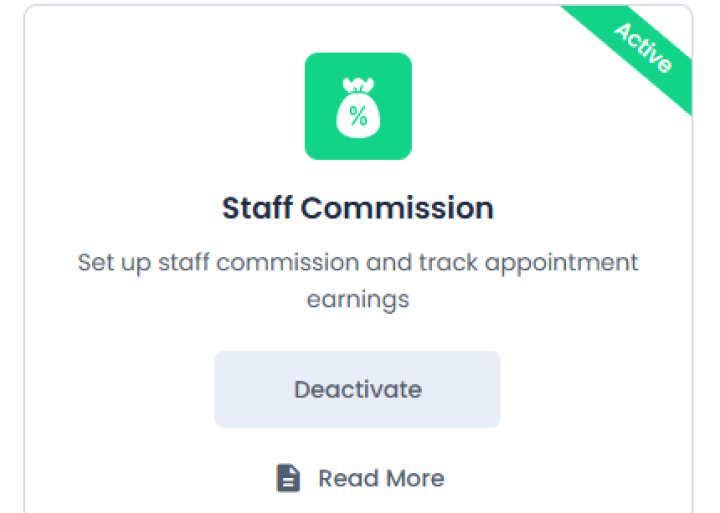
First things first, to start using staff commission tracking in BookingPress, you gotta activate the add-on, and which to be fair, is pretty simple.
- Go to BookingPress → Add-ons
- Find “Staff Commission“
- Click the Activate button
Step 2. Set a Standard (Default) Commission Rate
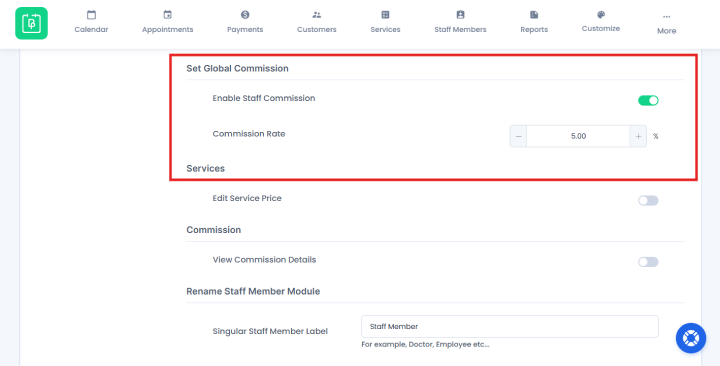
Decide on a standard payout rate for your team. For instance, 20% of the booking price). You can set this universal staff commission rate in the main general settings so it automatically applies to everyone.
Thus, here’s how to set default staff commission rate in BookingPress:
- After activating addon, go to the Settings → Staff Members.
- Now scroll down till the Set Global Commission section.
- Toggle on the “Enable Staff Commission” option underneath.
- Now, set the commission rate in percent.
- Save the settings.
And…that’s all! Your BookingPress online booking system will now automatically track commissions and assign them to the right staff member, of course, after the appointment is completed.
Step 3. Customize Rates For Specific Staff
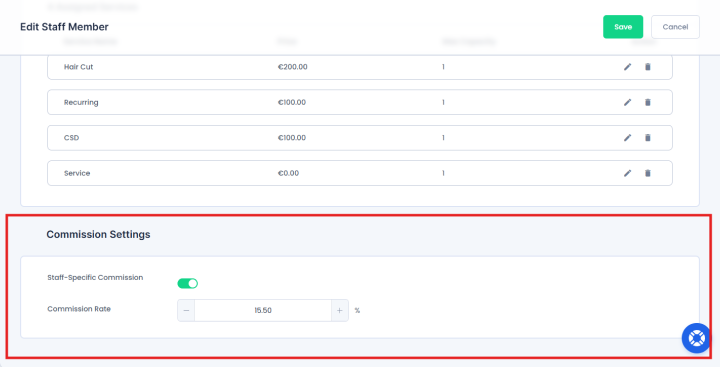
What if a senior staff member earns a higher commission than a junior staff member? Well, then you can easily override the default commission rule.
So, if some of your employees earn more or less than the standard rate, here’s how to change it for an individual employee:
- Head to the Staff Members list inside your BookingPress system
- Edit a specific person’s profile
- Toggle on the “Staff-specific commission” option beneath the Commissions Settings
- Type in their unique commission rate like to 30% rather than 20%
- Save the changes
Step 4. Review Commission Reports
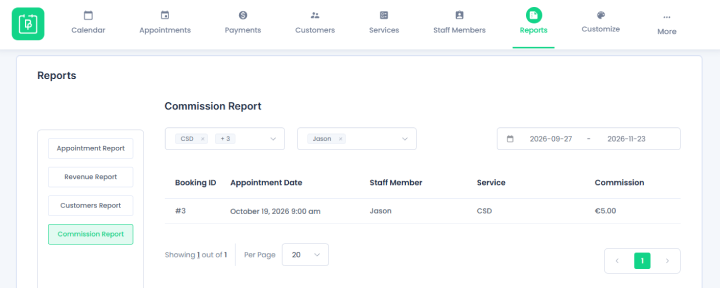
Wanna see how much you own?
When clients book appointments, BookingPress does the math in the background. So, when payday arrives, you just look at the math.
This WordPress appointment booking plugin gives you a total commission report which you can sort and filter by service, staff member and date range.
Here’s how it goes:
- Go to BookingPress → Reports → Commission Report.
- Here you will see a clean spreadsheet showing:
- Booking ID
- Appointment Date
- Staff member names
- Service
- Exact commission amount you need to pay them.
Best of all, you can also filter this by the specific time periods like below to match your payroll cycle:
- Today
- Yesterday
- Tomorrow
- This week
- Last week
- This month
- Last month
- This Year
Step 5. Allow Staff To View Their Own Commissions
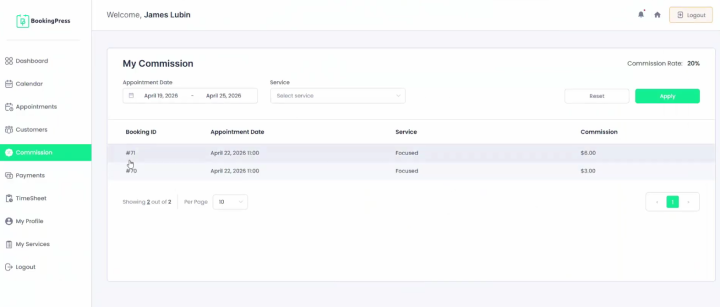
To save yourself from answering “How much commission did I make this week?”, you can let your team log in and check themselves.
In the Staff Commission Settings, look for the permission toggle that says something like “View Commission Details“. Simply turn it on.
This will allow each of your staff to view their commission report from their own BookingPress staff member dashboard.
Make Staff Commission Management Easier With BookingPress
BookingPress is an all-in-one appointment booking system for WordPress that lets you manage staff commissions with no pain. Rather than juggling multiple tools for each task, it’s better to have one online booking system do it all.
This Staff commission addon is also easy to set up. It adds staff commission tracking, reporting and management features right into your existing booking system, so you can deal with more important tasks.
To sum up, here’s what you get:
- Real-time staff payment tracking
- Automatic commission calculation on completed appointments
- General or staff-specific commission rates
- Accurate staff-to-service reporting
- No more manual spreadsheet math work
- Keep all data inside your website.
Forget the hassle of manual staff commission calculations. BookingPress can take care of it for you.
Related articles:
- 9 Best WordPress Affiliate Plugins for 2026 (Tested & Compared)
- How to Offer Personalised Booking with Multi-Staff Selection
- 9 Practical Ways to Improve Staff Efficiency in Service Industry
FAQs
Staff commission management is a process of tracking, calculating and paying extra bonus money (commissions) to employees based on the appointments they’ve completed.
Online booking system is a software that lets your visitors or clients book your service and pay for the appointment directly from your WordPress site. This saves you time as clients now don’t have to call, email or visit you in-person just to book a time slot.
BookingPress is an online booking system that gives you the best way to track staff commissions. Its Staff Commission addon automates the tracking and calculation, letting you set the custom commission rate, which your teammates or employees can see directly from their own staff member dashboard.
Just download and install BookingPress on your WordPress setup. This will let you create an online booking system right inside your existing WordPress business website with zero coding. If you’re a small business, you can also start with its forever free Lite version.
 14-day money-back guarantee