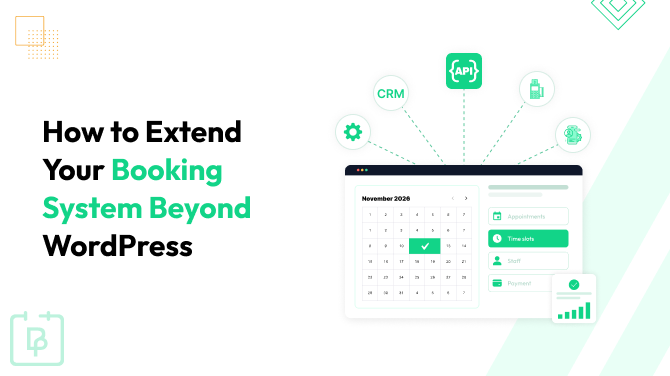
When you need to bridge BookingPress with external services outside WordPress – the tools you trust and use daily, including custom apps – you can do that using REST API, a powerful and scalable method.
Your goal integration might be anything related to operations, customer management, payments, reporting, automation – you name it. You might want to sync your bookings and clients to your CRM, to a custom mobile app for client bookings, or even dashboards and accounting systems. So, anything that can’t be easily connected to your WordPress booking plugin can actually be connected via the REST API, enabling you to use the scheduling tools from BookingPress outside WordPress.
BookingPress already provides your developers with all they need through the REST API add-on. It will help your desired integration to be built faster with less external documentation. Worth saying, far from every booking plugin for WordPress provides the same level of API integration – if any at all!
In this article, we’re explaining more about how it works.
TL;DR: The BookingPress REST API allows you to connect your WordPress booking system with external tools such as CRMs, mobile apps, dashboards and custom platforms.
Availability Of The REST API In BookingPress
Since this feature is normally used by developers who know how to build custom platform connections with REST API, your BookingPress plugin must be upgraded to the Enterprise Plan (has many advanced features). This plan unlocks the access pass to the REST API add-on, which allows you to generate API keys, set permissions, and fully use the key features of BookingPress on external platforms.
Key Benefits Of API In General
Using the REST API from BookingPress to enable the usage of the latter on external platforms is one of the best available methods. It has tons of benefits:
- Simple and well-readable architecture to simplify integration for any developer.
- Truly scalable since requests can work across multiple servers, and new servers can be added for heavier workloads.
- Flexible and language-agnostic thanks to the standard HTTP nature.
What Makes BookingPress’ API Particularly Good?
API by BookingPress is very developer-friendly and focuses on the common business operations to cover many real-life scenarios.
- The docs are consistent so that your developers will be able to predict endpoints.
- This API has a resource-oriented design, which is fully focused on business objects.
- REST API by BookingPress uses a lot of proper HTTP methods (GET, POST, DELETE) and not just POST. Your developers will often understand how our API works without reading much documentation.
- Secure and easy authentication through API keys and rate limiting.
- Well-organized BookingPress API documentation with request examples and WordPress developer hooks.
What Features Of BookingPress Can Be Integrated Through The REST API?
With the REST API by BookingPress, you get all the key tasks done and features packaged. These are not all the tools you normally access in the plugin, but the core booking data is certainly fully under your control.
Your developers can build API operations around such common things as creating, viewing, cancelling, rescheduling and updating bookings; you may also integrate processes related to accessing customer and service relationships. These are the core appointment management capabilities that the BookingPress REST API supports.
The API exposes the following resources (resource is fundamental for REST), most of which you can create, delete, and view:
- Appointments
- Customers
- Staff Members
- Categories
- Services
- Payments
- Locations
- Coupons
- Packages
- Gift cards
Some are key features, others are add-ons.
With all this accessible through API, your developers can build custom booking frontends, mobile booking apps, external admin dashboard, CRM synchronization, reporting system, and other powerful interfaces.
How To Perform BookingPress API Authentication
BookingPress provides an easy and secure authentication system for your developer, where the workflow typically includes:
1) Storing API key
2) Sending header
3) Calling endpoints
This is a typical simple API-key authentication with permission controls, rate limiting, and IP restrictions.
Basically, here is what the process takes:
Step 1: Install the REST API Add-on From The BookingPress Account
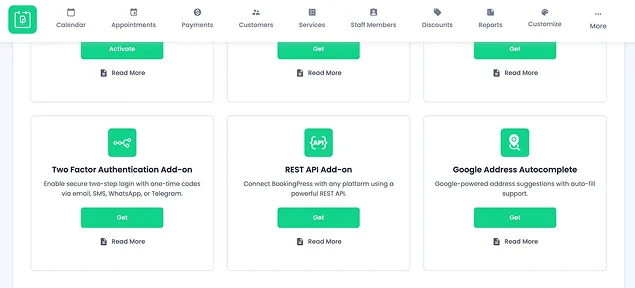
Install and activate the add-on, then open BookingPress → Settings → API Settings to configure API access.
Step 2. Generate An API Security Key
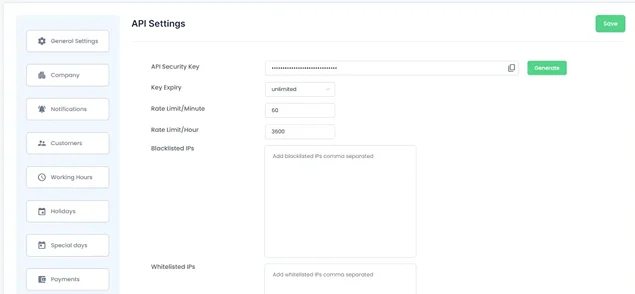
In the API Settings, there is a Generate API Security Key button. BookingPress generates a security key that acts as the credential for all API requests. You will also find settings to configure:
- Key expiration (1, 2, 3 years, or unlimited)
- Rate limits per minute
- Rate limits per hour
- IP whitelist
- IP blacklist
Step 3. Enable Permissions
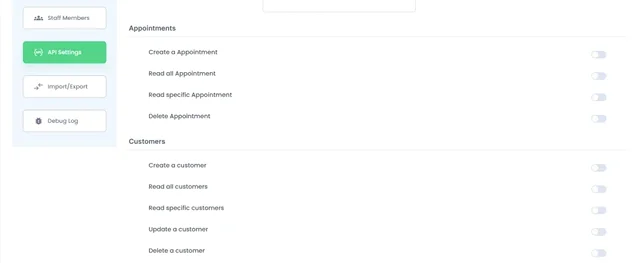
Many APIs allow for the key to automatically get full access, but BookingPress lets you enable permissions by resource. For example, for appointments, you can only enable creating and reading, while for customers – all the actions.
When a request arrives, BookingPress performs checks like ‘is the API key present?’, ‘is the key valid?’, ‘is the rate limit exceeded?’, etc.
How It Works
Your developers will need to construct the workflow that will function like the following:
- Sending an HTTP request from a client to a specific URL on the server, including a method (like GET or POST) and any necessary data or headers.
- The server receives the request, validates the client’s identity and permissions, and performs the requested action (e.g. creating an appointment).
- The server sends back an HTTP status code along with the requested data.
- The data is transferred as a “representation” of the resource.
The BookingPress REST API makes this process doable and smooth.
Concluding: Extend Your BookingPress Booking System Beyond WordPress
BookingPress REST API was specifically designed to be secure and easily manageable by developers. If you are looking to take your appointment booking plugin outside WordPress – like to mobile apps, custom frontends, CRM integrations, or dashboards, it’s easy. You get a simple BookingPress extension, clean API docs, and fully secure foundation for the further development.
Finally, let’s list the key benefits of employing BookingPress and its REST API add-on for your operations:
- Perform familiar BookingPress actions outside WordPress, in custom apps and dashboards.
- Customize permissions for selected resources.
- Use secure API authentication and rate limiting.
- BookingPress’ appointments, customers, services, payments, locations, etc. are exposed via API.
- Use a large number of WordPress action hooks for customization.
Related articles:
 14-day money-back guarantee