

What if your booking plugin isn’t actually built around the way you take bookings?
That’s a question worth asking before replacing WooCommerce Bookings, or choosing it in the first place.
Many businesses already using WooCommerce usually go with this WooCommerce extension – WooCommerce Bookings; only to later regret it.
Our comparison found that WooCommerce Bookings takes a detailed, WooCommerce centered approach to booking management. You get extensive control over availability, resources, pricing, durations and other booking rules. But that level of control can also make the system harder to configure and manage.
The 2.7/5 user rating on WooCommerce official website reflects those frustrations perfectly. It has difficult availability management, complicated resource rules, a high learning curve for clients, extra costs for certain functionality and technical problems.
So instead of asking which plugin has the longest feature list, we asked a different question:
What happens when we give each plugin the same booking problem?
A customer needs to book a one hour service. The business needs working hours, holidays, staff availability, payments, confirmations, cancellations and a manageable admin workflow. That perspective reveals much more about the best WooCommerce Bookings alternatives than a feature checklist ever could.
In this comparison, we looked at seven WooCommerce Bookings alternatives through the lens that matters most: how well does each one fit the actual booking workflow of a business?
Let’s get into the list.
TL;DR: After testing all the top alternatives to WooCommerce Bookings plugin, BookingPress is the best overall WooCommerce booking plugin thanks to its rich feature set and modern SaaS-like user interface at a budget-friendly cost.
Why Look For an Alternative To WooCommerce Bookings?
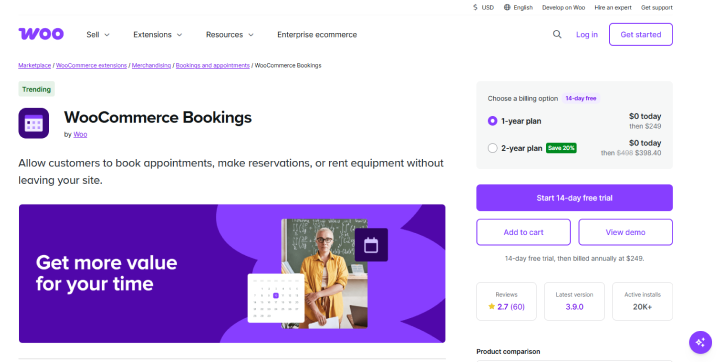
Many WordPress beginners, agencies and business owners start looking for an alternative to WooCommerce Bookings when its product-style booking workflow doesn’t match the way they actually take appointments.
Think about a typical appointment-based business. A customer wants to pick a service, choose an available time, provide their details and confirm the appointment. They aren’t necessarily shopping for a physical product; they’re booking someone’s time.
WooCommerce Bookings approaches this through the WooCommerce product system. That works well when your business needs customers to book a product, resource or time based offering. But for a business that mainly manages appointments, staff schedules and service availability, the workflow can feel…less natural.
And that’s not the only reason businesses consider alternatives. When out team of experts did the evaluation, we found several areas where WooCommerce Bookings can become more demanding to set up and manage.
Here are the main ones…
WooCommerce Bookings Has a Steep Learning Curve
WooCommerce Bookings has a steep learning curve when you need to configure detailed booking rules, availability, resources and pricing.
When we tested the plugin, we found that creating a booking isn’t simply about choosing a date and time. You need to think through how the product’s availability works, how long bookings last, when customers can book, what resources are involved and which rules should apply.
That flexibility can be valuable for complex booking scenarios. But if you’re setting up a straightforward appointment system, the number of configuration decisions can make the process feel heavier than expected.
This becomes even more important for agencies. You’re not only learning the system yourself but also need to explain it to the client who will manage bookings after the website goes live.
Managing Availability Can Get Complicated
Managing availability is one of the areas where WooCommerce Bookings can become difficult, especially when you have multiple schedules, resources or exceptions to manage.
A simple business might have availability from Monday to Friday, 9 AM to 5 PM. But real booking scenarios rarely stay that simple.
You may need to account for:
- Different working hours on different days
- Holidays and days off
- Staff availability
- Resource availability
- Booking duration
- Buffer time between bookings
- Different availability rules
- Multiple resources sharing the same schedule
When we tested these scenarios, the challenge wasn’t whether WooCommerce Bookings could handle them. It’s how many rules you need to think through to get the availability working exactly as intended.
For businesses with complex booking requirements, that flexibility can be useful. For simpler appointment businesses, it can create unnecessary configuration work.
Some Booking Features Require Additional Extensions
WooCommerce Bookings doesn’t include every booking related capability in its core plugin. Some requirements need extra WooCommerce extensions.
This matters when you’re calculating the actual cost of running your booking system.
For example one reviewer specifically criticized the additional cost of adding basic deposit features for rental bookings. If your business needs a feature that’s handled through a separate extension, your total cost isn’t simply the price of WooCommerce Bookings.
So when comparing alternatives, don’t look at the base license alone.
Compare the cost of the complete setup you actually need.
Agencies Have To Consider Client Training
If you’re an agency building booking websites for clients, the plugin’s learning curve doesn’t end when you finish the setup.
You also have to consider how easily your client can manage the system afterward.
When a client needs to update availability, change schedules, manage resources, or troubleshoot a booking rule, a complicated backend can translate into more training and support requests.
That’s why we think ease of administration should be part of the total cost of a booking plugin.
Let’s say your WooCommerce Bookings plugin may work perfectly once all set, but if your client struggles to manage it independently, your agency will spend more time providing ongoing support.
Your Business May Need a Different Booking Model
This is perhaps the biggest reason to consider a WooCommerce Bookings alternative.
Not every business takes bookings in the same way.
- A salon needs customers to book a service with a particular staff member
- A consultant needs clients to select a meeting duration and available time
- A rental business needs customers to reserve equipment for a specific period
- A WooCommerce store needs customers to book a particular product or resource
These are all booking businesses, but they don’t have the same booking workflow.
That’s why we didn’t choose the alternatives in this guide simply by counting features. We looked at what each plugin is actually built around, and how that approach fits the way different businesses take bookings.
This is also exactly where the seven alternatives start to separate themselves.
The 5 Best WooCommerce Bookings Alternatives Compared
| Plugin | Best For | Appointment Booking | Staff Management | WooCommerce Integration | Calendar Sync | Pricing | Free Version |
| 🥇BookingPress | Service & appointment businesses | ✓ Excellent | ✓ Advanced | ✓ Yes | ✓ Google, Outlook & Apple | From $89/year | ✓ |
| 🥈YITH Booking & Appointment | Bookable products, rentals & accommodation | ✓ | ✓ Resources | ✓ Native | ✓ Google & iCal | $249.99/year | ✗ |
| 🥉PluginHive Bookings & Appointments | Flexible & complex booking rules | ✓ | ✓ | ✓ Native | ✓ Google, Outlook & iCal | From $149/year | ✗ |
| 4️⃣ ARB | Budget-conscious WooCommerce stores | ✓ | ✓ Basic | ✓ Native | ✓ Google Calendar* | From $55 one-time | ✗ |
| 5️⃣LatePoint | Dedicated appointment scheduling | ✓ Excellent | ✓ Advanced | ✓ Yes | ✓ Google, Outlook & Apple* | From $99/year | ✓ |
1. BookingPress : Best WooCommerce Bookings Alternative For Appointments
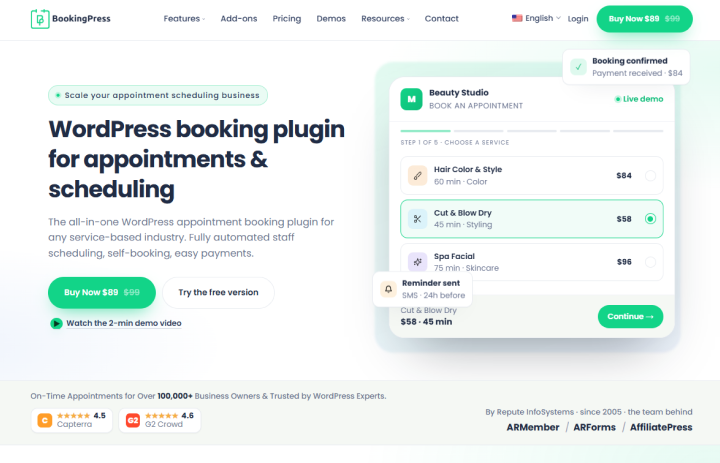
BookingPress takes a different approach to WooCommerce Bookings plugin. Being considered one of the best WooCommerce Bookings alternatives, this plugin is built around services, staff, schedules and appointments. That makes it particularly appealing if your business sells someone’s time rather than a physical product.
When we looked at BookingPress for a typical appointment scenario, the workflow felt simple and easy. Let’s say a customer needs to book a 60 minute consultation with a specific staff member for next Tuesday. The business needs to control working hours, avoid double bookings, collect customer details, take payment, and send a confirmation.
BookingPress makes this process follow a more natural appointment flow. You create the service, assign the appropriate staff member, configure their availability and let customers pick an available date and time. From there, they enter their details, make a payment if needed and receive their booking confirmation.
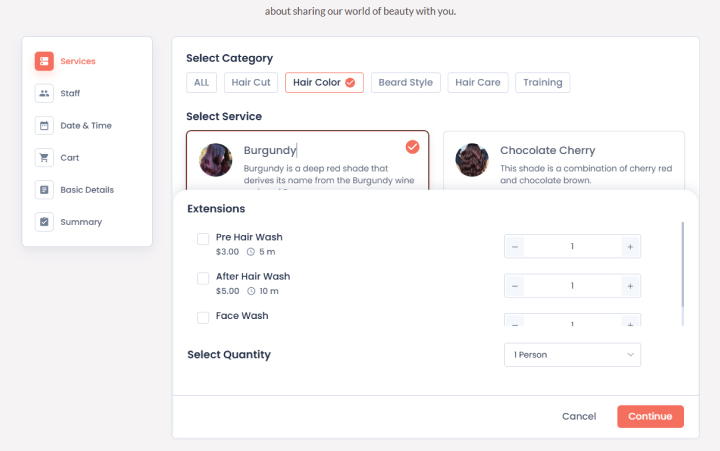
The advantage becomes more obvious when you have multiple staff members or more complicated schedules. Rather than thinking only about which WooCommerce product is being booked, you’re managing the actual people and services behind the appointments.
Key Features:
- Customizable multi-step booking forms
- Individual staff schedules and availability
- Multiple locations and service providers
- Google, Outlook, and Apple Calendar synchronization
- Email, SMS, WhatsApp, and Telegram notifications
- 22+ payment gateways such as Stripe, PayPal, Razorpay, and POS
- Support for individual, group and recurring appointments
- Coupons, taxes, invoices and payment management
- Integrations with WooCommerce, Zoom, Zapier, Mailchimp, Elementor and more
- 60+ add-ons for extending the booking system
BookingPress vs WooCommerce Bookings
| Feature | BookingPress | WooCommerce Bookings |
| Main strength | Appointment & service booking (core focus) | Bookable products in a WooCommerce store |
| Appointment booking | ✓ Native, core use case | ✓ Supported, but as one booking type among many |
| Service based booking | ✓ Built for services, durations, pricing | ✓ Via “bookable product” set up as a service |
| Staff management | ✓ Advanced: per-staff schedules, pricing, leave, commissions (via add-ons) | ✓ Staff as a resource type; works, but less specialized |
| Full or deposit payment options | ✓ Native | ⚠️ Possible but via extra extensions which gets more expensive |
| Resource booking | ✓ Via staff, services and locations; advanced logic via Resources addon | ✓ Core strength: rooms, equipment, vehicles, staff, etc. |
| Individual staff availability | ✓ Per-staff calendars, special days, and location hours | ✓ Via staff resources; can require more manual setup |
| Multi location support | ✓ Dedicated Location add-on: branches, per location staff & forms | ⚠️ Possible, but usually via multiple products or extra extensions |
| Recurring appointments | ✓ Recurring Appointments addon (weekly, monthly, custom) | ✓ Supported for bookable products (e.g., weekly sessions) |
| Group appointments / classes | ✓ Group bookings with per-person pricing & capacity | ✓ Group bookings via “persons” setting & capacity |
| Payment gateways | ✓ 22+ built-in gateways (Stripe, PayPal, Razorpay, Square, Mollie, and more.) | ✓ Uses WooCommerce gateways, depending on your WooCommerce setup |
| Calendar sync | ✓ Two-way sync with Google, Outlook, and Apple Calendar (via add-ons) | ⚠️ Possible via extensions or custom work; less turnkey |
| WooCommerce integration | ✓ Deep integration on paid plans: bookings as WooCommerce products, cart/checkout, coupons, memberships, and subscriptions via add-ons | ✓ Native; it is a WooCommerce extension |
| Automation & notifications | ✓ Email, SMS, WhatsApp and Telegram reminders with automated workflows | ⚠️ Similar automation may require additional extensions or custom setup |
| Pricing model | Freemium: free core + paid plans (~$89/year) with 45 to 60+ addons bundled | Paid only (~$249/year for a single site via WooCommerce Marketplace) |
| Best for | Service & appointment businesses wanting a complete scheduling system | WooCommerce stores selling bookable products alongside other items |
Where BookingPress Has the Edge
BookingPress’s biggest advantage is its focus on appointment based businesses.
The booking process feels more natural for businesses such as salons, clinics, consultants, tutors, fitness studios and home service providers. Staff schedules, services, availability, payments and customer appointments can all be managed from the same system.
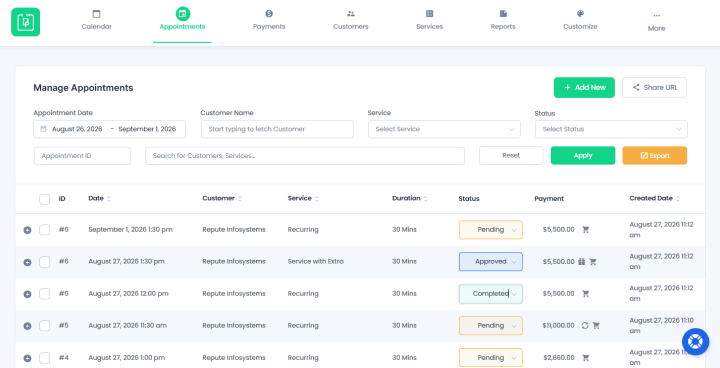
User friendliness + modern SaaS-like dashboard is also worth complimenting. Its centralized analytics dashboard allows you to track your complete appointment business. Even your customers and staff members get their own dedicated dashboards to manage their upcoming bookings.
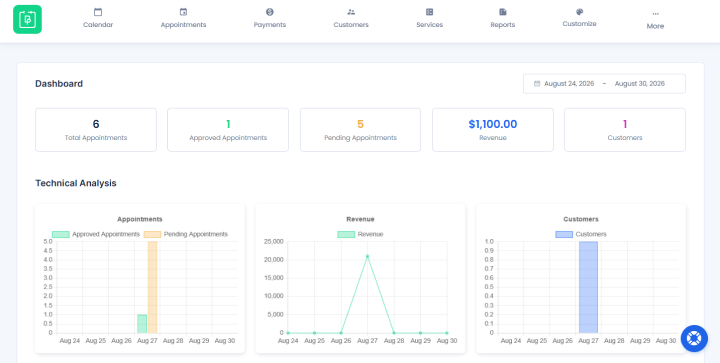
And if you already use WooCommerce, you don’t necessarily have to choose between the two. BookingPress can integrate with WooCommerce when you want to connect your appointment system with your existing store.
Where BookingPress May Not Be the Best Fit
BookingPress isn’t necessarily the best option if your business only needs a basic calendar where customers can select a date and submit a reservation.
Best For:
- Salons and spas
- Clinics and healthcare businesses
- Consultants and coaches
- Fitness and wellness businesses
- Tutors and trainers
- Legal and professional services
- Photographers and creative professionals
- Home service businesses
- Businesses managing multiple staff members or locations
In simple words, BookingPress is best when customers are booking people and services.
Pricing
- Free version available
- The premium plan starts at $89/year only, with options for lifetime licenses starting at $229 only as a one time payment.
Our Verdict: BookingPress is one of the powerful WooCommerce Bookings alternatives for appointment based businesses. It puts services, staff and availability at the center of the booking experience which can feel much more natural than managing appointments through a product focused workflow.
All in all, if you’re running a salon, clinic, consulting business, fitness studio, or any other service business, BookingPress is a top choice. But if you’re only want a very basic calendar, or complete WooCommerce only solution, one of the other alternatives on this list may suit you better.
2. YITH Booking And Appointment: Best For WooCommerce Bookable Products
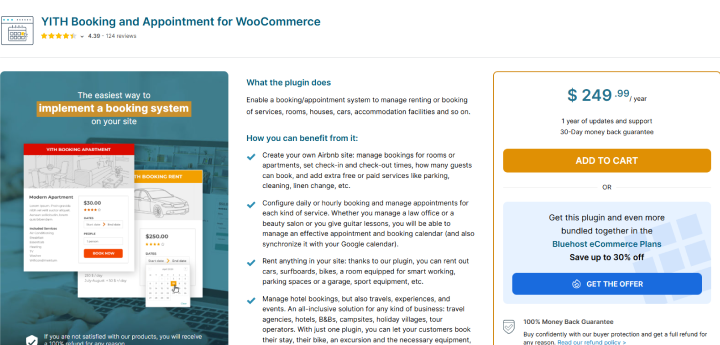
YITH Booking and Appointment is another one of the top WooCommerce Booking plugin that turns your WooCommerce products into bookable products with their own availability, pricing and booking rules, making it useful if your business already relies fully on WooCommerce and customers are essentially booking something you sell.
For example, imagine you run a small vacation rental business. A customer wants to book a room for three nights, choose their check-in and check-out dates, add an optional service such as breakfast, and complete the payment through your existing WooCommerce checkout.

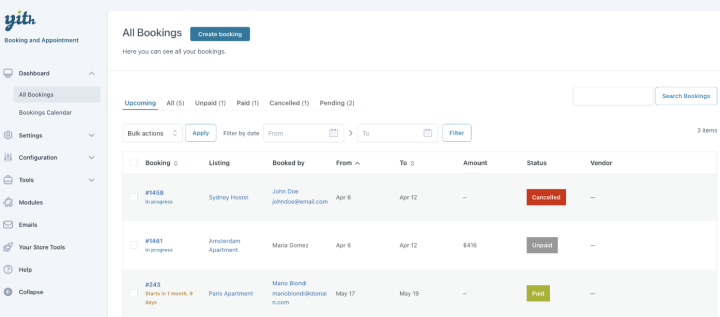
YITH handles this kind of workflow naturally. You can set when the product is available, set booking duration and pricing rules, manage availability and let customers pick their time and dates straight from the product page. Furthermore, you can track all upcoming appointments from its centralised dashboard.
Key Features:
- Flexible booking durations.
- Unlimited custom categories with individual pricing rules and capacity limits
- Resources management.
- Dynamic pricing and discounts.
- Integrate with Google Maps for location mapping.
- Buffer times to set time gaps.
- Full day and overnight logic.
- Smooth WooCommerce integrations for payment, tax management and checkout blocks.
- Automated email notifications.
YITH Booking and Appointment vs WooCommerce Bookings
| Feature | YITH Booking and Appointment | WooCommerce Bookings |
| Main strength | Bookable WooCommerce products and services | Bookable products in a WooCommerce store |
| Appointment booking | ✓ | ✓ |
| Service-based booking | ✓ | ✓ |
| Rental booking | ✓ | ✓ |
| Hourly/daily bookings | ✓ | ✓ |
| Seasonal pricing | ✓ | ✓ |
| Optional extras | ✓ | ✓ |
| People/resources | ✓ | ✓ |
| WooCommerce integration | ✓ Native | ✓ Native |
| Payment gateways | ✓ WooCommerce gateways | ✓ WooCommerce gateways |
| Best for | WooCommerce stores with varied bookable products | Stores wanting WooCommerce native booking functionality |
Where YITH Has the Edge
YITH’s biggest advantage is how naturally it fits into a WooCommerce product catalog.
Thus if you’re already comfortable managing products in WooCommerce, the learning curve can feel more familiar. You can create a bookable product, configure its availability, set pricing rules, and let customers complete the booking through the same store experience they already use.
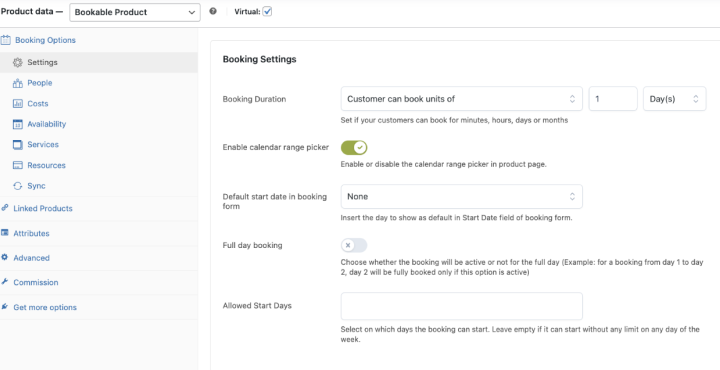
A rental company for example can have regular products alongside rental products without needing to completely change how its store works.
Where YITH May Not Be the Best Fit
YITH may not be the best choice if your business is mainly about managing people, staff schedules and appointments rather than bookable products.
A salon with several employees for example will find an appointment first plugin such as BookingPress more natural because the workflow starts with services and staff rather than products.
Best For:
- Hotels and accommodation businesses
- Rental businesses
- Tours and activities
- Equipment rentals
- WooCommerce stores selling bookable products
- Businesses offering products with optional extras
Pricing
- No free version available
- The paid plan starts from $249.99/year
Our Verdict: YITH Booking and Appointment is a good WooCommerce Bookings alternative when your business revolves around bookable products. It doesn’t try to completely move away from the WooCommerce product model. Instead, it builds booking features around it. That’s exactly what makes it a good fit for rentals, accommodation, tours and stores that want customers to book products directly from their WooCommerce storefront.
But again, if you are trying to escape WooCommerce Bookings extension due to its pricing, this plugin won’t do justice either. Having no free version and expensive paid plan, small growing businesses may look for other plugins on the list.
3. PluginHive Bookings And Appointments: Best For Flexible WooCommerce Bookings
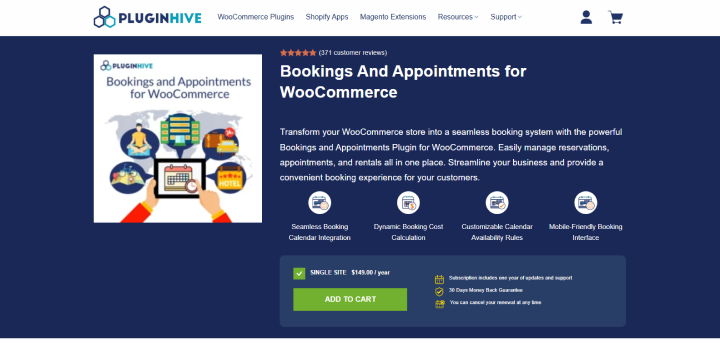
We really enjoyed testing PluginHive Bookings and Appointments on our WordPress staging site. The setup itself was a breeze, and it handles different durations, pricing rules, customers, resources and multiple booking scenarios from within your WooCommerce store.
When we looked at it through a real booking scenario, its flexibility became the main attraction.
Imagine a business where customers can book a service for one or two hours, select how many people are attending, choose additional options, and even make recurring bookings.
That’s more complicated than simply asking someone to pick a date and click Book.
PluginHive gives you more control over these different booking conditions. You can set booking durations, availability, pricing, resources and additional customer information based on what you’re selling.
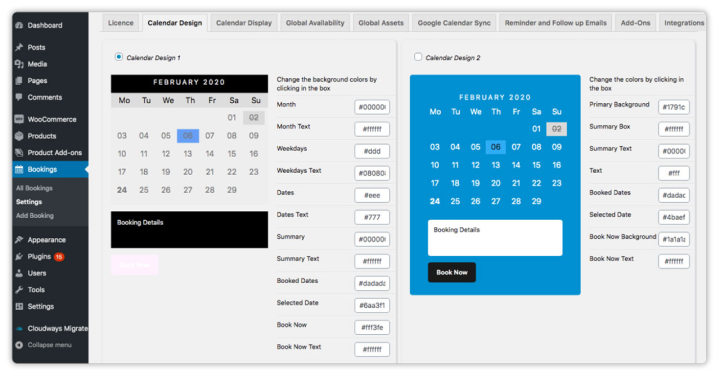
This makes it useful for businesses where every booking doesn’t follow exactly the same rules.
Key Features:
- Hourly, daily and custom booking durations.
- Recurring bookings.
- Multiple bookings.
- Person-based pricing.
- Flexible pricing rules.
- Resource management.
- Custom booking fields.
- Automatic notifications via Email only.
- Google Calendar integration.
- Full or deposit payments via WooCommerce.
PluginHive vs WooCommerce Bookings
| Feature | PluginHive Bookings & Appointments | WooCommerce Bookings (Official) |
| Main strength | Very flexible booking rules for mixed models (appointments, rentals, hotel-style, classes) inside WooCommerce | Native WooCommerce extension focused on simple, stable “bookable products” |
| Booking types | Minute, hour, day, month; single day, multi-day, date range, time slot, start to end time; hotel check-in/out style | Minute, hour, day, month; single day, multi-day, date range; basic time-slot bookings |
| Hourly bookings | ✓ Full support, including slots that cross midnight | ✓ Supported |
| Daily bookings | ✓ Single/multi-day and flexible date ranges | ✓ Supported |
| Recurring bookings | ✓ Supported via booking rules (e.g., weekly/monthly patterns) | ✓ Supported for bookable products |
| Multiple bookings per product | ✓ Multiple time slots / date ranges per order | ✓ Supported |
| Person-based pricing | ✓ Different rates for adults, children, custom guest types; group pricing | ✓ “Persons” setting with per-person pricing |
| Dynamic pricing | ✓ By duration, people, day of week, time of day, season, specific dates; complex rules without extra add-ons | ✓ Basic dynamic pricing (by duration, persons, some date rules); advanced scenarios often need extra setup or extensions |
| Resource management | ✓ Resources/assets with auto-assign or customer selection; global asset syncing to prevent double-booking shared resources | ✓ Resources (rooms, equipment, staff) with availability; solid but less “asset pooling” focus |
| Staff management | ✓ Per-staff schedules, pricing rules, and availability; good for multi-staff services | ✓ Staff as a resource type; works well for simple staff scheduling |
| Buffer periods | ✓ Preparation/cleaning time between bookings; last-minute and booking window controls | ✓ Buffer time supported |
| Custom fields / add-ons | ✓ Custom booking fields and add-ons supported | ✓ Possible via extensions or custom fields; less built-in “booking form” focus |
| Calendar sync | ✓ Two-way Google Calendar + Outlook + iCal/Apple Calendar | ⚠️ One-way Google sync officially; fuller two-way sync usually needs extra extensions or custom work |
| WooCommerce integration | ✓ Deep WooCommerce integration (bookable product type, cart/checkout, coupons, taxes) | ✓ Native; it is the official WooCommerce Bookings extension |
| Admin workflow | ✓ Admin approval before confirmation, cancellations with time limits, reminders & follow-up emails | ✓ Basic booking management; advanced workflows often need extra extensions |
| Best for | Businesses that need flexible, complex booking rules (rentals + appointments + hotel-style, multi-staff, dynamic pricing) | WooCommerce stores that want stable, native bookable products without heavy rule complexity |
| Typical price (single site) | ~ $149/year (all features in one plugin) | ~ $249/year (official WooCommerce.com pricing) |
Where PluginHive Has the Edge
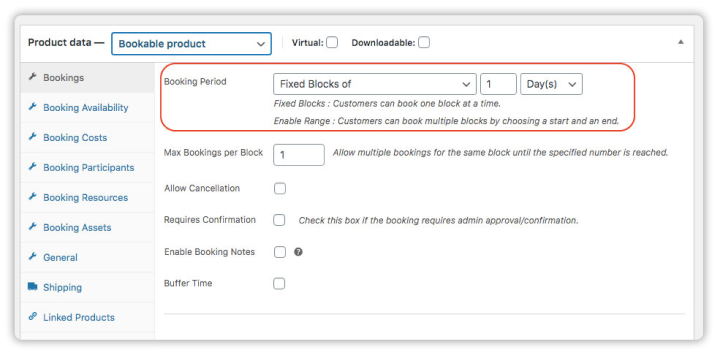
Flexibility is where PluginHive stands out. You can make booking rules around the way your business actually operates. This can be useful for businesses dealing with different booking durations, customer quantities, pricing conditions or resources.
Where PluginHive May Not Be the Best Fit
All that flexibility comes with more configuration. Thus if you only need a simple appointment calendar for a small business, you may not need this level of control. An appointment focused plugin can provide a more smooth experience with fewer settings to work through.
Best For:
- Service businesses
- Rental businesses
- Hotels and accommodation
- Tours and activities
- Businesses with complex pricing
- Businesses with different booking durations
- WooCommerce stores needing flexible booking rules
Pricing
- No free version available
- The premium plan starts from $149/year.
Our Verdict: PluginHive can be worth considering as a flexible WooCommerce appointment booking plugin. If your bookings got different durations, customers, resources, pricing rules or recurring schedules, the additional control can be valuable. But for a simple appointment business, you will find an appointment first plugin easier to set up.
4. ARB: Best For Stores That Want To Stop Paying Yearly
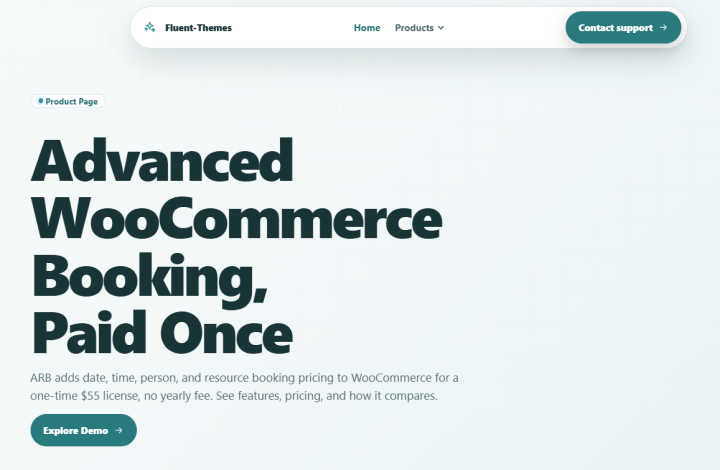
ARB takes a little different approach to the WooCommerce booking problem.
One of its biggest attractions is simple: you can avoid another recurring yearly software cost with its one time license model.
For small businesses, this can make a surprisingly big difference.
Let’s say you’re running a WooCommerce store and need customers to book appointments or reservations. You need availability management, booking forms, payments and notifications, but you don’t want to keep paying a subscription every year just to keep your booking system running.
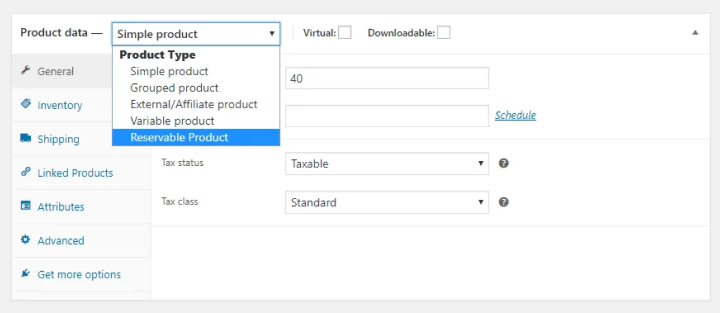
That’s where ARB becomes interesting.
The plugin adds appointment and reservation functionality directly to WooCommerce which allows your customers to pick available dates and times as part of the booking process.
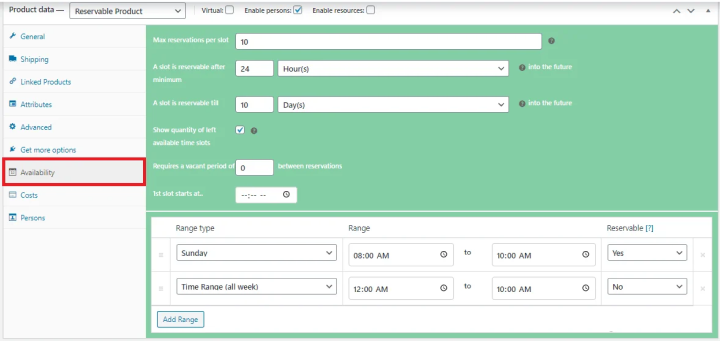
Key Features:
- Appointment and reservation booking logic for WooCommerce only
- Keep bookings inside WooCommerce from product page to checkout
- Different prices for people, dates, durations, or resources
- Custom booking forms
- WooCommerce payment gateways
- Manage staff, rooms, equipment, and person pricing clearly
- Translation-ready
- Automatic email notifications
- Customer reservation management
- Google Calendar and SMS add-on support
ARB vs WooCommerce Bookings
| Feature | ARB (Appointment, Reservation & Booking) | WooCommerce Bookings (Official) |
| Main strength | Affordable, one time purchase WooCommerce booking solution for appointments and reservations | Official WooCommerce extension focused on stable, native “bookable products” |
| Appointment booking | ✓ Supported (time-slot-based appointments) | ✓ Supported (bookable product with time slots) |
| Reservation booking | ✓ Date/time reservations and multi-day options | ✓ Date/time reservations and multi-day options |
| Booking calendar | ✓ Front-end booking calendar + admin calendar | ✓ Availability calendar on product + admin booking calendar |
| WooCommerce integration | ✓ Adds booking fields to standard products; cart/checkout via WooCommerce | ✓ Native; adds a dedicated “Bookable product” type to WooCommerce |
| Custom booking options | ✓ Custom fields, extra services, person/resource options (varies by version) | ✓ Built-in settings + extensions/custom fields for advanced forms |
| Payment integration | ✓ Uses WooCommerce gateways such as Stripe and PayPal | ✓ Uses all WooCommerce gateways |
| Email notifications | ✓ Booking confirmation and reminder emails | ✓ Booking confirmation emails; advanced reminders often require extensions |
| Pricing model | One time purchase (CodeCanyon license; $55 typical) | Annual subscription ( $249/year for 1 site via WooCommerce.com) |
| Updates & support | 6 months included by default; can be extended via Envato | Included while the subscription is active; updates tied to an active license |
| Best for | Budget conscious WooCommerce stores that want core booking features with a one time fee | Stores that want the official, long term supported WooCommerce booking solution |
Where ARB Has the Edge
The biggest advantage is its one time pricing model. For businesses that plan to keep the same booking system for several years, that can make ARB sounds pretty attractive.
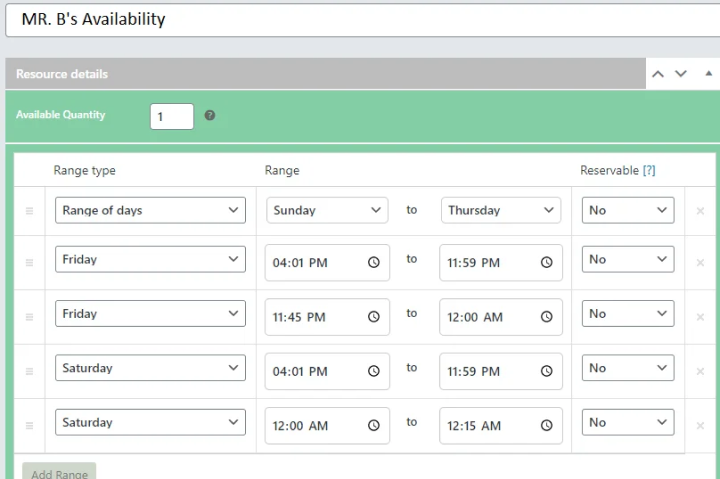
Moreover, ARB is built specifically for WooCommerce so it fits naturally into an existing WooCommerce store. It adds booking fields and calendars to your products meanwhile using your existing WooCommerce checkout, taxes and gateways
Where ARB May Not Be the Best Fit
ARB makes the most sense when cost and WooCommerce compatibility are high priorities.
If you’re looking for a highly polished appointment management system with advanced staff scheduling, sophisticated automation and a large ecosystem of integrations, you may want to consider one of the dedicated appointment plugins such as BookingPress or LatePoint on this list.
Best For:
- Small WooCommerce stores
- Budget-conscious businesses
- Businesses wanting a one-time purchase
- Basic-to-moderate appointment booking
- WooCommerce stores that want to avoid recurring costs
Pricing
- No free version available
- The regular license starts from $55 for one time only.
Our Verdict: ARB is worth the shot if your biggest concern with WooCommerce Bookings is the ongoing cost. It’s surely not the most advanced appointment platform on this list, but its one time pricing makes it an interesting alternative for WooCommerce store owners who want booking features without another yearly expense.
5. LatePoint: Best For Appointment Scheduling

LatePoint is a highly rated WordPress appointment scheduling which is famous for its clean user experience.
When we opened the LatePoint, the standard WordPress dashboard sidebar and top bar completely disappeared. This leaves you with a dedicated app-like environment. The customer-facing booking form is also smooth and modern, plus moves from step to step without lags.
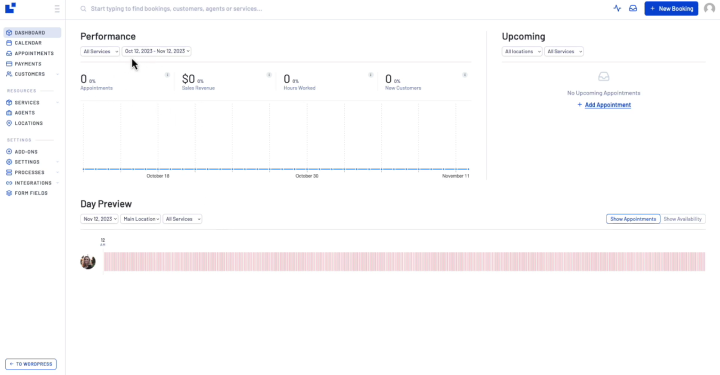
Best of all, it features an event based workflow builder. You can visually set up email or SMS notifications (via Twilio) triggered by specific actions without needing third party tools like Zapier.
The only downside we noticed is its lack of built-in advanced business tools found in other systems (like BookingPress) such as gift cards, staff commissions and staff tipping options. Moreover, unlike BookingPress, the free version felt too limited. No Customer dashboard, all payment gateways locked except Stripe, and no 2-way sync calendars.
Key Features:
- Smooth Step by step wizard
- Fully responsive design
- Easy book, cancel and reschedule
- Custom agent dashboards
- Flexible staff work hours
- Multi-location support
- Native PayPal and Stripe
- Smooth checkout via WooCommerce cart system
- Automatic email and SMS alerts
- Two-way sync with Google Calendar
LatePoint vs WooCommerce Bookings
| Feature | LatePoint | WooCommerce Bookings (Official) |
| Main strength | Modern, appointment first scheduling with a polished front end booking flow | Native WooCommerce extension for selling bookable products (appointments, rentals, classes) |
| Service booking | ✓ Core focus (services, durations, extras, packages) | ✓ Supported via “bookable product” configured as a service |
| Staff management | ✓ Appointment focused: per-staff (agent) schedules, services, holidays, buffers | ✓ Staff as a resource type; works well for simple staff scheduling |
| Individual schedules | ✓ Per-agent calendars, custom working hours, time off, blackout dates | ✓ Per-resource (including staff) availability rules |
| Custom booking forms | ✓ Custom fields, service extras, step-by-step wizard | ✓ Possible via built-in options + extensions/custom fields |
| Group appointments | ✓ Supported in Pro (group sessions, capacity limits) | ✓ Supported via “persons” setting and capacity |
| Recurring appointments | ✓ Supported in Pro (weekly/monthly patterns) | ✓ Supported for bookable products |
| Customer dashboard | ✓ Built-in customer portal to view, reschedule, and cancel bookings (Pro) | ⚠️ No dedicated customer dashboard; customers manage bookings via My Account / order history |
| Online payments | ✓ Stripe, PayPal, Square, Razorpay, etc. + WooCommerce integration for all WC gateways (Pro for many) | ✓ Uses all WooCommerce payment gateways |
| Calendar integrations | ✓ Two-way Google, Outlook, Apple Calendar sync (Pro) | ⚠️ One-way Google sync officially; fuller two-way sync usually needs extra extensions |
| WooCommerce integration | ✓ Optional: bookings can create WooCommerce orders; uses WC gateways/taxes | ✓ Native; adds a dedicated “Bookable product” type to WooCommerce |
| Best for | Appointment-based businesses that care about the front-end booking experience and self-service | WooCommerce stores selling bookable products alongside other items, with simpler appointment needs |
| Pricing model | Freemium: free core + Pro plans ( $99-$499/year; lifetime options available) | Annual subscription ($249/year for 1 site via WooCommerce.com) |
Where LatePoint Has the Edge
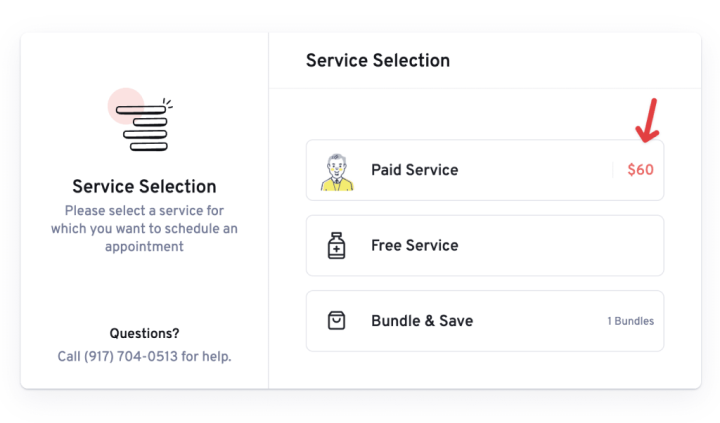
LatePoint’s biggest strength is its appointment-first experience. The system makes sense when your business revolves around services and service providers. Thus you can manage staff, schedules, customers and appointments; no need to think every service as a WooCommerce product
Where LatePoint May Not Be the Best Fit
If your business is mainly a WooCommerce store selling physical products, rentals or bookable inventory, LatePoint is not the most natural option.
Best For:
- Consultants
- Coaches
- Salons and spas
- Clinics
- Agencies
- Freelancers
- Professional services
- Appointment-based businesses
Pricing
- Free version available
- The premium plan starts at $99/year.
Our Verdict: LatePoint is a one of the great picks if you’re looking for a dedicated appointment scheduling experience rather than a booking system built around WooCommerce products. The best part is it won’t necessarily be the right tool for every WooCommerce store, but for businesses selling services and managing people, its appointment first approach can feel much more natural.
Final Verdict: Which WooCommerce Bookings Alternative Should You Choose?
There’s no single best WooCommerce Bookings alternative for every business. The right choice will always be the one that depends on:
- What you’re booking
- How your customers book
- Wow much control you need over staff, availability, payments and resources.
If you’re running a service based business where customers book people, services or appointments, BookingPress is our top recommendation. Its appointment first approach makes it easier to manage staff schedules, services, availability, payments, notifications and recurring or group appointments without forcing everything into a product-based workflow.
If your business is built around bookable WooCommerce products, YITH Booking and Appointment or PluginHive will be the better fit. They work naturally with the WooCommerce product and checkout ecosystem. Plus gives you more flexibility around booking rules, pricing and resources.
For businesses that want to avoid recurring yearly costs, ARB is worth considering because of its one time licensing model. LatePoint is another strong choice if your priority is a dedicated appointment scheduling experience rather than product rentals.
And if you want to stay with the official WooCommerce ecosystem, WooCommerce Bookings is still one of the most capable options when your booking model revolves around products, resources or more complex availability rules.
The easiest way to choose:
- Booking people and services? → BookingPress
- Booking WooCommerce products? → YITH or PluginHive
- Want a one time license? → ARB
- Focused on appointment scheduling? → LatePoint
- Want the official WooCommerce solution back? → WooCommerce Bookings
Ultimately, don’t just pick a WooCommerce booking plugin a plugin simply because it has the longest feature list. Choose the one that makes your actual booking workflow easier to set up, easier for customers to use, and easier for your team to manage.
Related Articles:
 14-day money-back guarantee