

“How to secure my WordPress website?”
This is one of the most searched questions in 2026. WordPress is powering more than 43% of the web with a history of 23 years, yet is it not secure? If it would be 100% secure, you and I wouldn’t be here asking this question.
If you’re here searching for the best WordPress security practices and ways to safeguard your new or existing website against all possible cyber threats, that’s literally impossible (unless your site can only be viewed and used in a closed room with no internet access, windows or doors.).
Since WordPress is nearly used by half the websites available on the internet, that popularity is also a great opportunity, but for hackers. WordPress faces nearly 90,000 attacks every minute, ranging from brute force login attempts to malware injections and plugin vulnerabilities.
At BookingPress, I’m a WordPress enthusiast who has worked on many WordPress projects and plugins for two decades. So, I think I’m the best possible person to answer all your questions regarding WordPress security.
Although you can’t keep a website hundred percent safe (That’s a hard truth), there are still many best defense ways against MOST WordPress security threats which I will discuss in this blog.
No generic advice. No fluff. So, without any further ado, let’s get into it!
TL;DR: WordPress Security Checklist
– Use a layered security strategy, not a single security plugin
– Keep WordPress, plugins, themes, and the server updated
– Secure the hosting, operating system, web server, and database
– Protect accounts with strong credentials, 2FA, and login controls
– Lower plugin risk and scrutinize third-party code
– Use firewalls and traffic filtering at the appropriate layers
– Maintain off-site backups and a recovery plan
– Understand PHP security, OWASP, and how the stack actually works
– Track the site and reduce unnecessary exposure
– Test and review security before website launch
How Secure Is a WordPress Website In 2026?
WordPress core itself is highly secure in 2026. However, the ecosystem surrounding it has become a primary target for automated cyber threats. Because WordPress powers over 43% of the internet, it remains a massive “gold mine” for hackers.
Afterall, even WordPress’s own security team works day-and-night to identify and resolve security issues across the WordPress core software, harden the software against threats such as the OWASP Top Ten, and provide guidance across the ecosystem.
However, that doesn’t lower the nature of risk. Over 92% to 96% of all successful breaches stem from third-party plugins and themes, not the WordPress core software. Still I’m the kind of person who also cares for the rest 8% to 4% vulnerabilities that do have a chance of happening due to WordPress itself.
Thus, let me show you the reality ground of the WordPress security 2026:
- The 5-Hour Race: Data from 2026 security reports reveals that the median time between a public vulnerability disclosure and mass bot exploitation is just 5 hours. Attackers weaponize flaws almost right away.
- Supply Chain and Zero-Days: Hackers are increasingly targeting premium plugins and developer update channels to inject malicious code directly into legitimate updates. Nearly half of the vulnerabilities disclosed recently had zero patches available at launch.
- Persistent In-Memory Malware: Advanced malware (like the Lock 360 strain) can live directly in a server’s active memory. Traditional cleanups that only delete compromised files are failing because the memory-resident code simply rewrites the malware back onto the disk.
That’s exactly why I’ve done my best to dig deeper into the internet to give you the real, proven WordPress security strategies that we actually use for our own WordPress websites.
WordPress itself is not vulnerable, its ecosystem is. And running away is not an option because no matter which CMS you use, the cyber threats are almost the same.
Before moving forward with the best WordPress security practices, below are the few questions I’ve been commonly asked:
Is WordPress Safe From Hackers?
The answer is not at all. Anecdotally, our agency has been working with WordPress for over 20 years and the number of websites I’ve seen compromised because of an issue in core is precisely zero. The number of WordPress websites I’ve seen hacked were mostly because an admin forgets the standard Security protocols.
How Often Is WordPress Hacked?
Industry reports for 2026 states around 13.000 WordPress sites are hacked every day, which equals to about 4.7 million sites per year. But over 91% of these vulnerabilities happen due to third-party plugins and themes.
Is WordPress Secure Enough?
Yes, indeed. WordPress is secure for most websites, provided you manage and maintain it properly. This means you must use the right WordPress security practices and strategies.
What Are The Most Common Security Vulnerabilities In WordPress?
The most common security vulnerabilities in WordPress stem overwhelmingly from third-party plugins and themes which accounted for 91% of newly logged ecosystem vulnerabilities. Yet apart from that, below are some common vulnerability classes:
- Cross-Site Scripting (XSS)
- Broken access control
- SQL Injection (SQLi)
- Cross-site Request Forgery (CSRF)
- Remote Code Execution (RCE) and Unsafe deserialization
- Server-Side Request Forgery (SSRF)
Besides, here are some more attack vectors and trends in 2026:
- Brute-Force and Credential Stuffing: Automated botnets continuously hammer login pages, XML-RPC, and the REST API using leaked databases or default credentials
- In-Memory and Core file Injection: Modern attacks mostly write code directly into legitimate core, plugin or theme files (or stay resident in server memory like Lock360).
- Component Split: Plugins and themes account for the vast majority of threats with premium components sometimes carrying a higher density of known exploited vulnerabilities (KEVs) due to lower public code scrutiny.
- Rapid Weaponization: High-severity flaws are mostly weaponized by automated tools within hours of public disclosure.
Is WordPress Outdated In 2026?
No, WordPress is not outdated in 2026. If it would be, we would be here having this website powered by WordPress. WordPress still powers over 43% of all websites in the world including some of the big giants like The White House, NASA, The New York Times, Microsoft News, TechCrunch, and Sony Music.
The reason this debate surfaced the internet is due to WordPress plugin bloat and security issues (which I’ll show you how to fix further in this guide). Plus, some technical developers argue that modern high-scale apps lean toward headless architectures or custom JavaScript frameworks rather than traditional monolithic PHP templates.
Overall, WordPress still leads the way thanks to its full data ownership, massive ecosystem, modern editing and affordable flexibility. Moreover, it commands roughly 62.8% of the global CMS market. Best of all, this data far outpaces competitors like Shopify (~5.4%) or Wix (~4%).
How To Check If a WordPress Site Is Hacked?
Here are some common warning signs to see if your WordPress site is hacked:
- Unexpected Redirects.
- Google Safe Browsing Warnings.
- Unknown Admin Users.
- Modified Files or Core Discrepancies.
- Spam Content & Links.
- Hosting Suspension.
If you don’t see the signs, you can always use a quick security scan.
How To Secure Your WordPress Website: 10 Best Practices You Should Follow
1. Use a Layered Security Strategy, Not a Single Security Plugin
If you think installing a WordPress security plugin is enough to protect your website against hackers, don’t fall into this trap.
I’ve seen many security plugins claiming they secure your WordPress site 100%. That’s simply just not possible.
A WordPress security plugin can detect and avoid some level of cyber threats, but it can’t take care of everything happening across your WordPress website, server, database and hosting environment.
That’s exactly why you need a layered security strategy that covers different parts of your website. Thus here’s what you should focus on:
01 WordPress core security
Keep your WordPress installation updated and follow the recommended security practices by the WordPress official security team – always.
02 Plugin and theme security
Use trusted extensions, remove unnecessary ones, and address known vulnerabilities.
03 Account security
Use strong, unique passwords, enable two-factor authentication (2FA) and assign user roles.
04 Server security
Make sure your hosting environment, operating system, web server and database are properly maintained and secured.
05 Monitoring and recovery
Keep an eye on any activity that looks Sus and maintain reliable backups so you can recover if something goes south.
The idea is simple. If one security measure fails, the other layers should still help lower the damage.
And yes, you can use security plugins like Wordfence, Sucuri or MalCare as part of this strategy. Just don’t make the mistake of assuming that installing one of them automatically makes your whole website secure.
2. Keep WordPress, plugins, Themes, And The Server Updated
One of the easiest ways to expose your WordPress website to security risks is to keep running outdated software, tools and plugins. Sure, your site is going to need many plugins because WordPress doesn’t offer many features by default. And there’s nothing wrong with it.
I’m not here to tell you not to install any WordPress plugins, but only those who have a good reputation in the market and a good number of active installations.
For instance, WordPress doesn’t have an in-built form builder. That’s why we use trusted form plugins only like ARForms for creating our contact forms, survey forms, registration forms and login forms. Similarly, WordPress core also doesn’t have an in-built appointment system (and don’t get me started on custom coding it ALL; that’s gonna take years), that’s why our team of experts launched BookingPress.
This WordPress appointment booking plugin turns your simple WordPress site into a complete online booking system. Trusted by 100,000 service business and with a solid rating of 4.6 on Trustpilot, BookingPress maintains and updates regularly to give you a smooth and secure experience.
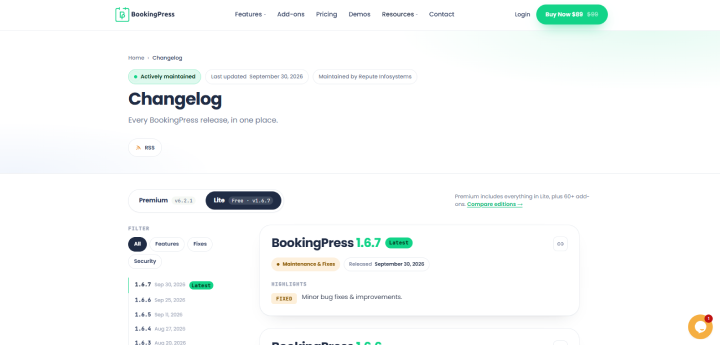
Unlike other plugins that only update their paid version, BookingPress team updates both its premium and lite free versions regularly. Plus, it gives you all the details of what it fixed publicly.
Apart from this, WordPress regularly releases updates to improve functionality, fix bugs, and address security vulnerabilities. Plugin and theme developers also release updates to fix known issues and improve compatibility.
But here’s another problem: not everyone installs these updates on time.
When a vulnerability becomes publicly known, attackers can use that details to target websites that haven’t applied the necessary fixes. Thus, delaying any security update leaves your site exposed to threats that could otherwise have been avoided.
And if your hosting provider manages the server updates, confirm what they actually maintain. Never just assume every component is automatically covered.
The bottom line? Keeping your tools updated isn’t a one-time task. It’s an ongoing security responsibility. So yes, WordPress websites do need time to time maintenance.
3. Secure The Hosting, Operating System, Web Server, And Database
Most WordPress beginners focus only on the WordPress dashboard when thinking about website security. But your website doesn’t operate in isolation.
Behind every WordPress website, there’s a technology stack that includes hosting infrastructure, an operating system, a web server, a database, PHP and WordPress itself. And if even one of these components are poorly set or vulnerable, your website will be at risk, despite your WordPress dashboard looking perfectly secure.
That’s why securing your WordPress website also means securing the environment in which it runs.
Choose hosting that takes security seriously
Your hosting provider plays a very important role in protecting your website. Thus when choosing WordPress hosting, look for:
When choosing WordPress hosting, look for:
- Supported operating systems and server software
- Appropriate isolation between customer accounts
- Regular server security updates
- Secure access to hosting control panels and databases
- Reliable backup and recovery options
- A clear process for reporting and handling security incidents
Remember, cheap hosting isn’t automatically insecure, and expensive hosting isn’t automatically secure. What matters is how the environment is set, maintained, and managed.
If you’re curious who our hosting partners are, here you go.
Secure your server and database
If you manage your own server, you also need to think about operating-system updates, web-server configuration, database permissions, and file access.
Besides, you need to protect sensitive configuration files, including `wp-config.php` and avoid exposing database credentials or other secrets through publicly accessible files.
If you’re using managed WordPress hosting, some of these responsibilities can belong to your hosting provider. But, you should still understand what’s covered by the provider and what you need to handle yourself.
My advice is simple from this point. Don’t treat hosting as a place where you simply upload WordPress files and forget about everything else. Your hosting environment is one of the most important layers of your website’s security.
4. Protect Accounts With Strong Credentials, 2FA, And Login Controls
Your WordPress website can have the best hosting, updated software, and a properly set firewall but weak account security can still give attackers an opportunity to get inside.
First of all, stop using predictable passwords. And never reuse the same password across multiple websites.
Create a strong, unique password for every account with access to your WordPress installation. And..if you are having a hard time remembering them, just use a password manager.
Lastly, you can use login protection mechanisms to limit repeated failed login attempts and make automated password-guessing attacks more difficult.
But… don’t stop there.
- Avoid predictable usernames and remove unnecessary accounts.
- Give users only the permissions required for their responsibilities.
- Review administrator accounts periodically.
- Track suspicious login attempts and unexpected account changes.
The goal is simple. Make it harder for unauthorized people to enter your website, and limit what they can do if an account is compromised.
5. Reduce Plugin Risk And Scrutinize Third-Party Code
Plugins are one of the biggest reasons WordPress is so flexible. You can add appointment booking, membership management, payment gateways, forms and… countless other features. No need to build everything from scratch!
But that flexibility comes with a responsibility: every plugin and theme you introduce becomes another component you need to evaluate and maintain.
Installing more plugins doesn’t automatically make a website insecure. The real concern is whether those plugins are:
- Trustworthy
- Necessary
- Maintained
- Configured properly.
Thus before installing a new plugin, ask yourself a few questions.
- Do I actually need it? Avoid installing extensions that add unnecessary or duplicate features you already have
- Who developed it? Check the developer’s reputation and source of software..
- Is it maintained? Review its update history, compatibility information and available support.
- Are there known vulnerabilities? Look for relevant security advisories.
- Does it introduce unnecessary complexity? If a simpler implementation can achieve the same result with fewer dependencies, then go for that
Apart from this, remove plugins and themes that you no longer use. And please, don’t download premium plugins or themes from random websites offering them for free. You have no reliable way to assume that the files haven’t been modified to include malicious code.
What about custom code? Well….the same principle applies to custom PHP code, snippets and third party integrations.
Poorly written code can introduce vulnerabilities even when the rest of your WordPress installation is properly maintained.
If you’re developing custom features, make sure to follow secure coding practices and review the code appropriately before deploying it.
6. Maintain Off-Site Backups And a Recovery Plan
Even after implementing the best WordPress security practices, you can’t just guarantee (no one can) that your WordPress website will never be compromised or experience a technical failure.
That’s exactly why you need a recovery plan.
Backups won’t necessarily stop an attack. But sure they restore your website after a security incident, failed update, accidental deletion or server problem.
But, there’s a big difference between having backups and having backups you can actually restore.
What should you back up?
At a minimum, your WordPress backups should cover:
- WordPress files
- The database
- Custom code and configuration
Store backups away from your live website
If your backups exist only on the same server as your website, an attacker who compromises that environment may also be able to delete or damage those backups.
That’s why you should maintain copies in a separate, appropriately secured location, such as an off-site backup service or cloud storage.
You should also consider:
- How frequently backups run
- How long backup copies are retained
- Who can access or delete them
- Whether backup data is encrypted where appropriate
- How quickly you need to restore the website after an incident
Test your recovery process
This is the part many website owners overlook.
A backup that has never been restored successfully is an untested backup. You don’t want to discover that your recovery process is broken when your website is already down.
Periodically test restoring your files and database in a staging environment. Make sure the restored website works and that important functionality is intact.
Don’t wait for a security incident to figure out how to recover your website. Prepare for it before it happens.
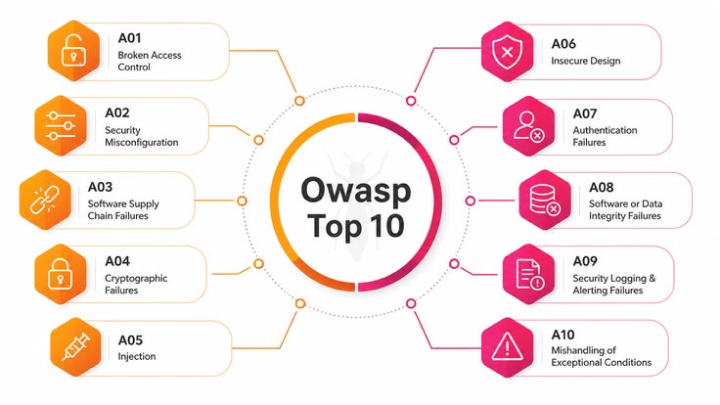
7. Understand PHP Security, OWASP, And How The Stack Actually Works
Now this is where I want to take the discussion beyond the common WordPress security checklist you see everywhere on the internet.
To be honest, the only reason I felt the need to create this guide is because most other WordPress guides were missing it or not covering it up properly.
If you’ve read other articles about securing WordPress, you’ve mostly seen the same recommendations repeated everywhere: install a security plugin, use a strong password, enable 2FA and keep everything updated.
These recommendations matter, but there’s a much bigger picture.
WordPress is a web application built with PHP, supported by a database and a web-server environment. Thus Its security depends on how its code handles requests, processes user input, checks permissions and interacts with other systems.
Thus if you’re developing WordPress websites or managing security for your clients, understanding the underlying technology stack can make a real difference.
Learn the basics of web application security
You don’t need to become a cybersecurity specialist. But you should understand the common types of vulnerabilities that can affect web applications.
For example:
- Cross-site scripting (XSS).
- SQL injection (SQLi).
- Broken access control.
- Cross-site request forgery (CSRF).
- Remote code execution (RCE).
- Server-side request forgery (SSRF).
Use OWASP as a learning resource
The OWASP Top 10 is a useful starting point for understanding major web application security risks.
If you’re a WordPress developer, take the time to understand how these risks relate to PHP applications, custom plugins, forms, APIs and third party integrations.
You should also become familiar with the security responsibilities associated with your server stack, whether it uses a LAMP or LEMP architecture or another supported configuration.
For developers building custom functionality, this knowledge is actually valuable. It helps you look beyond whether a feature works and consider whether it can be abused.
And if you’re managing a WordPress agency, don’t assume that knowing how to build a website automatically means knowing how to secure the entire environment.
The real difference between installing security tools and understanding security is knowing why a control exists, what risk it addresses, and how to verify that it works.
8. Monitor The Site And Reduce Unnecessary Exposure
Securing your WordPress website isn’t a task you complete once and forget about.
New vulnerabilities appear, users change, plugins receive updates, and website configurations evolve. Thus even if you’ve implemented strong preventive measures, you still need a way to identify suspicious activity and respond when something goes south..
That’s where monitoring comes in. Now depending on your website and hosting environment, you should consider monitoring:
- Repeated failed login attempts
- Unexpected administrator accounts or permission changes
- Unusual modifications to WordPress core, plugin or theme files
- Malware scan results and suspicious files
- Unusual traffic patterns and server errors
- Relevant security advisories affecting your installed software
- Hosting alerts about suspicious activity or potential compromises
Tools such as Wordfence and other security monitoring solutions can help you identify certain problems. Server-level tools and centralized logs can provide additional visibility where they’re supported and properly configured.
However, installing a monitoring tool isn’t enough. Someone needs to review important alerts and know what to do when a potential issue is identified.
Disable what your website doesn’t need
Another useful way is to lower unnecessary exposure.
For instance, you may be able to disable XML-RPC if your website doesn’t need it, avoid public directory browsing and restrict access to sensitive files or services.
On top of that, you should review which endpoints and services need to remain accessible from the internet.
But be careful because disabling a feature without understanding its purpose can break legitimate things as well. XML-RPC, for example, may be required by certain integrations or workflows.
Similarly, tools such as fail2ban can help block repeated unwanted connections in suitable server environments, while IP restrictions may be appropriate for specific administrative interfaces.
So, understand what needs to be exposed, monitor what’s happening and lower unnecessary opportunities for attackers.
Final Thoughts: How To Secure Your WordPress Site
In a nutshell, WordPress is secure, only if you use it the right way. To secure your WordPress site, you don’t have to become a security expert, but you do need to be proactive.
The first step towards WordPress security is following these security tips.
And if you want trustworthy and reliable WordPress plugins, BookingPress team offers the best appointment booking solution for WordPress on the market.
Related articles:
 14-day money-back guarantee