

Got a specific integration in mind that BookingPress doesn’t natively support? Even with 22+ payment gateways and 60+ premium addons, that can happen.
No single WordPress booking system can cover every business’s unique stack or workflow. And that’s exactly why BookingPress offers you a REST API add-on.
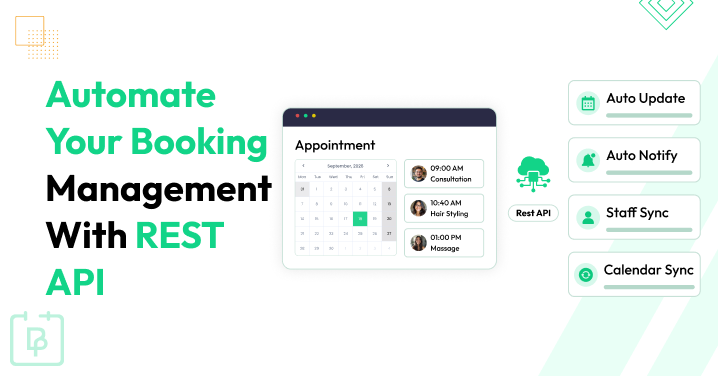
BookingPress REST API automates your booking management by enabling two-way, custom communication: it can instantly push booking data out of its system to any software you use, or allow external software to securely create, update, or delete bookings inside your WordPress site without a human opening the dashboard.
In simple words, it acts like a universal bridge to “talk” to external software in real time to automate your appointment management.
Is this the missing piece your booking system needs?
Read on to explore what the BookingPress REST API can do, discover practical ways to use it, and see how it automates your booking management, even if you’re not tech-savvy.
TL;DR: The BookingPress REST API is an add-on that lets your WordPress site connect to other (non-WordPress) apps and share booking data automatically. It automates your daily booking management task, plus you don’t have to open your WordPress dashboard every time you want to make an update or just check a new appointment.
What Is The BookingPress REST API?
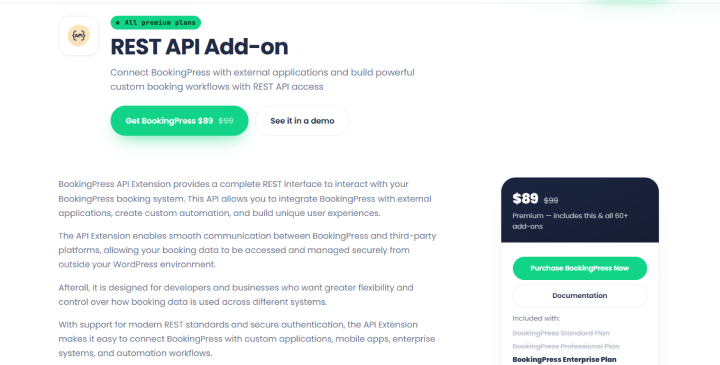
BookingPress REST API is an add-on that offers a full REST interface for the BookingPress WordPress booking plugin. This addon lets developers, tech-savvy WordPress users and service-based business owners connect their booking system to external applications and custom workflows.
In simple words, think of BookingPress as a house, and the REST API as a front door or messenger service. Normally, customers book from your WordPress website itself. But now, with the REST API, other programs (such as custom phone apps, a CRM database, or an automation tool) can knock on that door to read or change booking info automatically.
If you’re a complete non tech-savvy person, below are some things to know:
What Is An API?
API stands for Application Programming Interface
Think of an API as a messenger between two software applications. It lets them communicate (talk) and exchange info without needing to know all the internal details of each other.
What Is REST?
REST stands for Representational State Transfer.
REST is a set of architectural principles for designing APIs. A REST API allows applications (like BookingPress )to talk over a network, commonly using HTTP (The same basic protocol that browsers use to load websites).
What Is The WordPress REST API?
WordPress has a built-in REST API that lets other applications interact with WordPress content and supported functionality, and BookingPress has its own REST API that does the same with Booking data instead of WordPress content like posts or pages.
Do You Need Coding Knowledge To Use The BookingPress REST API?
Not always! You don’t need complete coding skills to use the BookingPress REST API. In fact, setting it up from the BookingPress side needs no coding at all. However, for the full automation of your booking management, this depends on how you plan to connect it to other systems. While the API itself is built for programmatic interaction, some modern automation tools do make it accessible to non-developers.
Think you’re not tech-savvy enough? No worries! You don’t need to use the REST API to run a highly automated, professional booking system. BookingPress already offers built-in, completely visual tools that do the exact same automated tasks with zero coding.
However, if you still want to use the BookingPress WordPress REST API to allow external applications – like a custom mobile app, a corporate database, or a third party software, to safely “connect” to your booking system and manage your appointments, calendars, and customer data from outside your WordPress site, it’s not a big deal.
BookingPress offers beginner friendly documentations, a dedicated REST API Detail Guide, video tutorials, and excellent tech customer support. Plus, the configuration on BookingPress side is quite simple, barely takes 3-4 steps.
Wondering what you can exactly do with the BookingPress REST API? Let’s find out…
What Can You Do With The BookingPress REST API?

The best thing about the BookingPress REST API is that it gives you more flexibility in how you access and manage your booking data. So for those who don’t only want to rely on the BookingPress analytics dashboard, you can connect the booking info with external applications and build workflows around your business needs.
For instance, you want to review appointments without logging into WordPress, share customer details with your CRM, or show booking details in a custom new dashboard (which is not in WordPress). For this scenario, the BookingPress REST API can help you build these all connections (Depending on the available endpoints and the application you’re connecting).
Here are some of the main things you can explore with the BookingPress REST API.
Create, View And Delete Appointments
Appointments are the core of every booking management system. And if you’re managing multiple services, staff members and customers, checking and updating everything manually can become time consuming.
So the best way? Connect appointment data with other applications and manage supported appointment operations via API requests.
For instance, let’s say you run a salon and want to see all your upcoming appointments in a separate new dashboard. Thus, the simplest thing you can do is build a custom dashboard that retrieves (GETS) appointment data from BookingPress and shows it in one place you want.
Similarly, a developer can connect a custom application to supported appointment operations which allows authorized users to create, update, or delete appointments without manually performing each action from the WordPress dashboard.
Work With Customer And Staff Information
Appointment management isn’t just about bookings. You also need to keep track of customers, staff members and the services they provide.
For instance, if you manage a healthcare clinic, a salon, or a consulting business, you want to access customer details from a separate application or show staff-related booking details in a custom interface.
The BookingPress REST API lets you connect customer and staff information with external systems. Using BookingPress, you can allow permissions for:
- Create a customer or staff info
- Read or list all customers and staff data
- Read or list specific customer or staff member details
- Update a customer or staff info
- Delete a customer
This can be very useful when you’re building a custom dashboard, connecting a business database or simply making a workflow that needs access to booking-related records.
Let’s say you already use a CRM to manage customer relationships. So, instead of maintaining separate customer records manually, you could build an integration that uses the API to retrieve the required information and transfer it to your CRM.
This doesn’t mean customer records will automatically synchronize as soon as you activate the add-on. You still need to set the connection and decide which information should be transferred, as well as when the workflow should run.
Access Other Booking Information
Apart from appointments, customers, and staff, your booking system contain other information that you need for daily operations, such as:
- Services
- Categories
- Locations
- Payments
- Coupons
- Packages
- Gift Cards
… And other available records.
For instance, if you want to build a custom booking interface for your business, you may want to have service information and show the available options in your own application. The same way, if you want to prepare a booking report, you may need access to appointment or payment data to calculate the figures you’re interested in.
The advantage? You can build around the information your business actually needs.
How Can The BookingPress REST API Help Automate Your Daily Work?

Knowing what the BookingPress REST API does is one thing. Let’s see how you can use it to automate routine booking tasks.
The idea is simple: Rather than manually transferring data between different tools or opening your WordPress dashboard for every small task, you can simply connect BookingPress with the applications you already use and build a workflow around your booking data (and its way simpler than it looks).
Here are a few practical examples to help you understand where to start.
Keep Customer Records In Sync With Your CRM
If you already use a CRM to manage customer relationships, you probably know how frustrating it can be to maintain customer information in two different places.
Although BookingPress already integrates with CRMS like FluentCRM and WP Fusion, if you want the booking data to integrate with your custom CRM, this takes no time thanks to BookingPress REST API addon.
With the BookingPress REST API, you can build a custom integration that retrieves supported customer and appointment data and transfers it to your CRM. Plus, you can even set the workflow to update the relevant records when required.
This way your team can spend less time managing duplicate records and more time working with customers.
Create Custom Appointment Management Workflows
Every business has its own way of managing appointments, and sometimes, the default booking process isn’t enough to cover all your requirements (though it is for most businesses).
For instance, you run a consulting business where every new appointment needs to be reviewed by your team before the next step can happen. You may want to send the booking details to an internal system, create a task for a staff member or update a separate database.
And for exactly those things, the BookingPress REST API addon exists. You can simply create custom workflows around supported appointment operations and connect your booking system with the applications that handle the rest of your business processes.
On top of that, you could also develop a custom application that allows authorized users to create, view or update appointments without accessing the standard WordPress dashboard.
The best part? You’re not limited to the exact workflow that comes with your booking plugin. You can work with a developer to build a process that fits your business requirements.
Just remember that the API provides the connection and supported operations. The actual workflow – such as deciding when a task should be created or which application should receive the data, needs to be configured separately.
Generate Daily or Weekly Booking Reports

How many appointments did your business get this week? Which services were booked most frequently? How many appointments were assigned to each staff member?
If you regularly check these numbers, you know that collecting the information manually can take time, especially when you’re managing a busy booking website.
Sure, BookingPress comes with its own centralized analytics dashboard plus integrates natively with Google Analytics 4 (GA4) via its Conversion Tracking addon to track and analyze:
- Purchase Statistics Tracking Report
- Booked Services Names Tracking Report
- Purchase Journey Tracking Report
- Item wise Revenue Report
However, if you’re someone who needs more than this, the BookingPress REST API can help you retrieve supported booking data and use it to build custom reports outside the WordPress dashboard.
You could use this information to review appointment volumes, compare booking activity across services, or understand how your business is performing over time.
Of course, the API doesn’t automatically generate a finished report for you. You need a connected application, script or automation workflow to process the data and present it in a useful format.
But once you’ve done that process, you can lower repetitive reporting work and make it easier to access the numbers you need.
Connect BookingPress With Other Business Applications
Your booking system is probably only one part of your business workflow. You may also use spreadsheets, communication tools, databases, customer management software or other applications to handle your daily operations.
The problem? These tools don’t always share information with each other automatically. And thankfully, this is where a REST API integration can help.
Thus by simply connecting your BookingPress booking system with any compatible external applications, you can use booking information in other parts of your workflow. Plus, you can use an automation platform or custom developed app to handle the communication between these systems.
Apart from that, BookingPress also offers dedicated integrations for platforms such as Make, n8n, and Zapier. These have their own configuration options, and are a more convenient starting point when your goal is to connect BookingPress with supported applications.
Thus before building a custom integration from scratch, first check whether an existing BookingPress integration already covers your needs. If it doesn’t, the REST API gives you another way to explore a custom solution.
Build a Custom Booking Dashboard or Mobile App

Sometimes, you don’t want to connect BookingPress with an existing application. You want to build something of your own.
The BookingPress REST API can help with the connection between your custom mobile app and the booking system. Your developer easily uses supported API endpoints to manage the booking data and build an interface that fits your workflow.
This is useful when the default BookingPress interface doesn’t provide the exact experience your business needs (though that’s rarely the case since most BookingPress already comes with a modern, SaaS-style interface that works for most businesses).
The important thing to understand is that the REST API provides the foundation, not the finished application. You’ll still need to develop the dashboard or mobile app, connect it securely to BookingPress and decide how the data should be shown or managed.
But if your business needs a more customized booking experience, this flexibility can be a useful starting point.
How Does BookingPress REST API Automation Work?
How does booking data move from BookingPress to another application? and how can that data help automate your daily tasks? Let’s understand this with a simple example as follows
For instance, a customer named Sanaya books an appointment for a haircut via your WordPress website. The next step? BookingPress booking system will store the appointment details, such as time, service, customer, assigned staff member, used coupon, and more.
Now, if you want those details to appear in your CRM, use them to prepare a daily booking report, or simply show that in your custom mobile app, here’s how the process can work…
- A customer books an appointment
The customer visits your site, picks a service, selects an available time slot and completes the booking.
- BookingPress stores the booking information
After the appointment is created, BookingPress stores that data in your WordPress booking system.
- The integration retrieves the required data
A configured integration or your custom app can use the BookingPress REST API to request that exact appointment information – remember this whole process happens automatically.
- The connected application performs an action
After the integration gets that booking data, it processes it as per your workflow, be it simply reading data using GET, updating it using POST/PUT or deleting it.
- You spend less time on repetitive tasks
After you finally set up and connect your custom application or CRM to BookingPress using the REST API addon, you don’t have to manually copy appointment details between applications. Just let the workflow handle everything.
This can make your booking management process more automated and lower repetitive work. Plus, you now don’t have to open WordPress every time to manage your appointments.
How To Get Started With The BookingPress REST API
Step 1: Install And Activate The Add-on
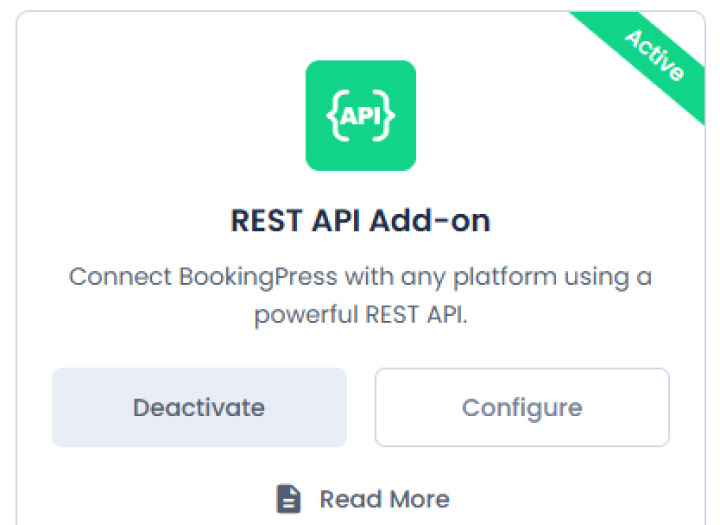
Assuming you already have your BookingPress Enterprise version installed, activated and all ready to accept online appointments, you can simply activate the “REST API” addon the same way you activated the rest of the BookingPress addon.
- Go to the BookingPress → Add-ons.
- Scroll down till you see the “REST API Add-on” under Feature Add-ons section.
- Click Activate.
After activating the add-on, simply click on the Configure. This will redirect you to REST API Settings.
Step 2: Set Up Your API Access
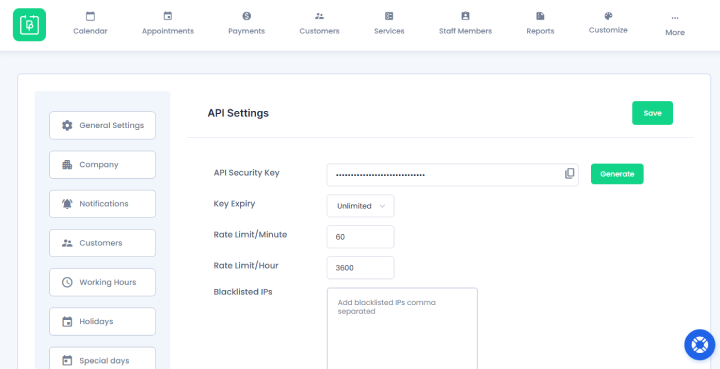
First of all, in API Settings, you have to make a unique password (API Key). Thus, all the external programs can log into your booking system safely.
To do that, just click the Generate button next to the API Security Key option and copy your API key. You can paste it to external software or an application to connect BookingPress with it.
Next, you can also configure settings such as:
- Key expiration (1, 2, 3 years or unlimited)
- Rate limits per minute
- Rate limits per hour
- IP whitelist
- IP blacklist
Step 3: Enable Permissions
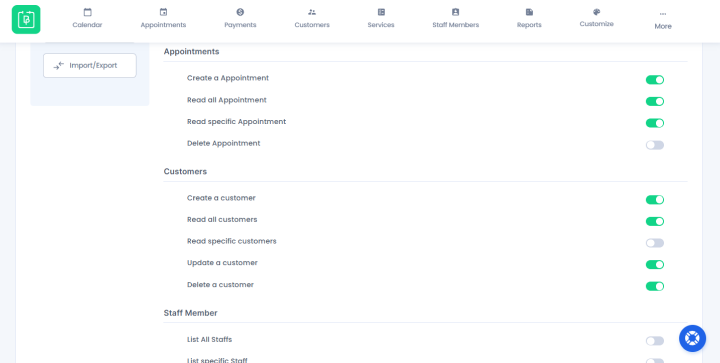
Many WordPress booking plugin APIs offer all-or-nothing access, but BookingPress lets you manage permissions for each resource separately, giving you a more controlled approach.
For instance, for appointments, you can only allow the external system to only read and create an appointment, while for customers and service data – all the actions (GET, POST, PUT, DELETE).
At the end, don’t forget to Save all the settings.
Step 4: Test The API With a Simple Request
Always do a quick test (that’s what smart developers do) to make sure your WordPress site is successfully talking to the outside world – external software or system.
- Download a free testing tool like Postman or use a simple command-line tool.
- Set the request type to GET.
- Enter your test URL which mostly looks like this: https://yourwebsite.com (replace yourwebsite.com with your actual site domain).
- In the “Headers” or “Authorization” section of your tool, paste the API Key you generated in Step 2.
- Click Send.
If everything is set up right, you’ll get a status code of 200 OK and a list of appointment services written in text (JSON format). If you do not, generate or check your API key again.
Conclusion: Turn BookingPress Into a More Connected Booking System
BookingPress REST API was specifically built to make your booking management more flexible and easier to automate. If you are looking to connect your booking system with external applications – such as custom CRMs, reporting tools, dashboards, or mobile apps, it’s actually easy. You get a simple BookingPress extension, dedicated API documentation, and a secure foundation for further development.
Finally, let’s list the key benefits of employing BookingPress and its REST API add-on for your booking management:
- Manage appointments and booking information outside WordPress, in custom apps and dashboards
- Connect customer and staff information with external applications
- Automate repetitive booking management tasks with custom workflows
- Access supported booking data to create daily or weekly reports
- Customize API permissions and use secure authentication, rate limiting, and IP restrictions for better control
Related articles:
- How To Extend Your Booking System Beyond WordPress With BookingPress REST API
- Top Booking System Integrations Every Business Should Use
- Top 5 Booking Automations You Can Do Using BookingPress
FAQs
No, the BookingPress REST API doesn’t automatically automate bookings, but gives you a way to automate your booking management. You first need to activate the addon, connect it with your external system or app, and allow booking data to be read, updated, or managed. After this, you don’t have to open your WordPress dashboard every time just to check an information.
Yes, of course! You can use the BookingPress REST API with no coding at all by connecting it to a no-code automation platform or simply to its built-in integrations extension like Bits Flows and Zoho Flow.
Yes, you can connect BookingPress to Make, n8n and Zapier using its native dedicated addons.
Yes, indeed. BookingPress REST API add-on lets you easily create, read and delete appointments.
 14-day money-back guarantee