Single staff booking works…until your service needs more than one person. Then everything starts to fall apart. Customers get confused, bookings go wrong and your team spends time fixing what shouldn’t be broken.
You might try to manage it manually, but without a staff selection booking system, mistakes and scheduling conflicts are hard to avoid.
The best approach is to get an online booking system that matches how your service actually works. One where customers can select the right staff combination with no confusion.
BookingPress makes this possible. So, how do you set it up? What features matter most? And how do you keep everything simple for both your team and your customers? Let’s find out!
TL;DR: Multi-staff bookings only become messy when your system can’t handle them. With BookingPress Multi-Staff Addon, your clients get to see clear staff selection, pre-set requirements and one unified appointment that leaves no room for confusion, avoids errors and keeps everything smooth for both your team and your customers.
Let Customers Select Multiple Staff in One Booking
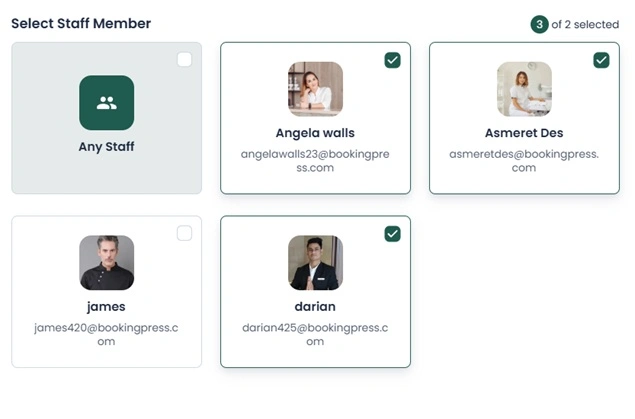
If your service needs more than one staff member, your booking system should allow it. Simple. With BookingPress’s multi staff addon, your customers can select multiple staff members in a single appointment with zero confusion or guesswork.
BookingPress Multi-Staff Addon = One service → Multiple staff → Same time → One booking.
No more “Who else is needed for this service?” moments. When BookingPress got your back, everything was clear during booking.
Here’s what changes when you enable this:
- Customers can choose more than one staff for the same service.
- The booking system guides them based on service requirements.
- All selected staff are assigned to one appointment automatically.
- No manual coordination after booking.
This is where a staff selection booking system makes a real difference. No need to fix anything, any bookings later. You and your clients get it right the first time.
For your customers, it feels simple. For your team, it removes unnecessary back-and-forth. And for your business, it means no more booking errors nor any scheduling conflicts.
In simple words, BookingPress Multi-Staff Addon allows multiple staff members to be assigned to a single service within one appointment.
Set How Many Staff Members a Service Needs
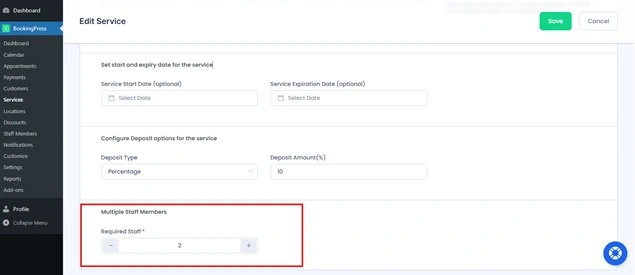
Not every service needs the same number of people. Letting customers pick multiple staff is useful. But without limits, it can create confusion. What if a service needs exactly 2 staff….but a customer selects 1? Or 4?
In the service business, everyone has different needs. Some bookings only need one staff member. Others need two, three or even more. That is why your booking system should let you define the staff requirement per service.
BookingPress makes this possible. You can set how many staff members a service needs before the booking even starts. That means the system already knows what kind of team the appointment needs.
No more underbooked or overbooked services! With this BookingPress Multi-Staff Addon, you can:
- Match the right number of staff to each service.
- Make sure customers select the correct number before booking.
- Avoid incomplete or invalid bookings automatically.
- Keep every appointment aligned with your service workflow.
It also makes the complete booking flow feel more professional.
Your customer does not need to wonder who should be selected or how many people are needed. BookingPress handles that part for them.
That is what makes a personalised booking system work well. It gives structure to the booking process without making it harder for the customer nor for your staff and you.
Show Clear Staff Selection on the Booking Form
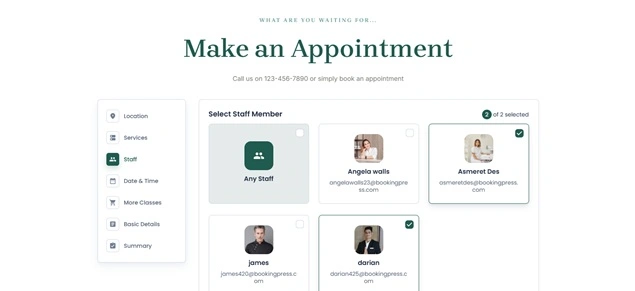
If your booking form isn’t clear, customers will get confused. And confused customers never complete bookings.
That’s why when multiple staff are involved, clarity becomes even more important. Customers need to see who they are selecting, and why. With a staff selection booking system, you can show staff options directly on the booking form in a simple & structured way. No hidden steps. No guessing.
So, here’s what that looks like:
- Staff members are clearly listed during the booking process.
- Customers can easily select one or multiple staff as needed.
- The system follows the service rules you set (like required staff count).
- The selection step feels natural.
This small change makes a big difference.
This way, you can make your new clients feel more confident because they know exactly who they’re booking. Plus, your team gets accurate bookings without needing to double-check. And your personalised booking system becomes easier to use, even for first time users.
Assign All Selected Staff to One Appointment
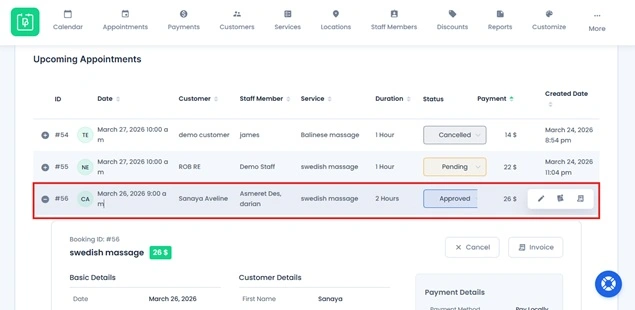
Handling multiple staff for one service should not mean handling multiple bookings. But that’s exactly what happens in many systems. You end up creating separate appointments for each staff member. Now you’re tracking the same booking in different places.
That’s where things start to break. Missed updates. Confusion. Double work. Thus, you need a system where everything stays connected such as BookingPress.
These WordPress appointment booking plugins come with advanced staff management. So, when a customer selects multiple staff, all of them are assigned to a single appointment. One booking. One reference. One clear schedule.
No splitting. No manual linking. No extra steps. This creates a smooth workflow for your team. Plus,
- You track one appointment rather than multiple entries.
- All selected staff are automatically linked to the same booking.
- Updates, reschedules, or cancellations apply everywhere at once.
- No risk of one staff being updated while another is missed.
It also makes daily operations easier. Your staff knows exactly which appointment they are part of. Your admin sees everything in one place. And your reports stay accurate because nothing is scattered.
- For customers, it feels simple. They book once, and everything is handled.
- For your business, it keeps your schedule up-to-date, always.
That’s the real advantage of a personalised booking system like BookingPress. It doesn’t just allow multi staff booking, it keeps it structured, connected and easy to manage.
Handle Pricing Based on Staff Selection Automatically
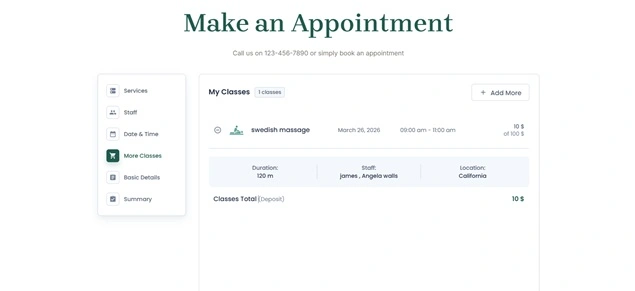
Pricing gets tricky the moment more than one staff member is involved. Who do you charge for? Do you add prices together? Pick one? Adjust manually?
If your system doesn’t handle this clearly, you end up with billing mistakes, confused customers and extra admin work after every booking.
But, not with BookingPress. This appointment booking plugin for WordPress manages all pricings automatically based on the staff member selection. You can set how pricing should work, and the system applies it right away during booking.
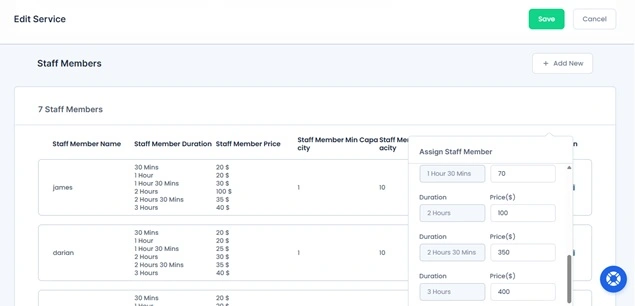
Let’s say if a staff member charges $10 for 1 hour hair spa, while another member charges $20 for 1 hour hair spa, BookingPress system will apply the highest price among the selected staff, at the end of the total. No calculations needed from your side.
- No manual price adjustments after booking.
- No confusion about how much the customer gotta pay.
- Consistent pricing logic across all bookings.
- No billing errors.
It also improves the customer experience. Your clients can see the final price upfront while selecting staff.
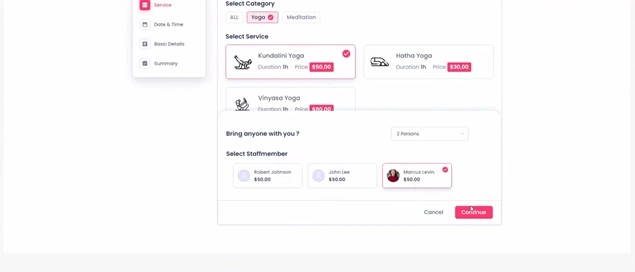
For your team, it removes decision making from the process, as they don’t need to figure out pricing rules or double-check amounts. The system does it for them.
That’s the strength of a BookingPress personalised booking system. It not only manages staff selection, but also keeps pricing accurate, automatic and completely hassle-free.
Manage Multi-Staff Bookings Without Confusion
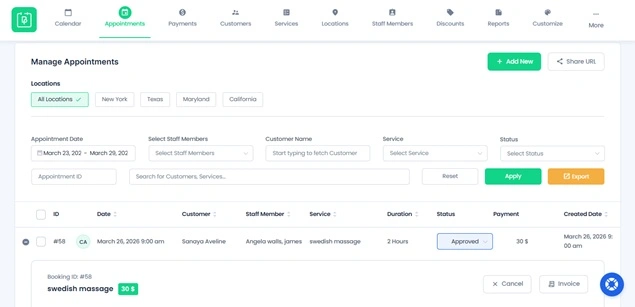
Handling bookings with multiple staff can quickly get messy.
- Who is assigned to which service?
- Are all staff available at the same time?
- Is everything tracked in one place?
Without a proper booking system, this mostly leads to confusion, missed details and unnecessary back-and-forth. That’s where BookingPress makes things simple.
No need to manage separate entries nor need to coordinate manually with anyone. Everything is handled in one place using BookingPress. When a customer selects multiple staff members for a service, the system keeps it all connected under a single appointment. No scattered bookings. No guessing.
You can easily see:
- Which staff members are assigned.
- What service they’re part of.
- And when the appointment is scheduled.
Everything stays clear and organized from start to finish. This means your team works better together, mistakes are reduced, and your booking process feels smooth, even when multiple people are in.
Where Multi-Staff Booking Works Best (Real Use Cases)
Not every service needs more than one professional. But when a single service depends on teamwork, things can get complicated fast.
That’s exactly where the BookingPress Multi-Staff Booking Addon fits in. It allows your clients to book one service that needs multiple staff members at the same time, in a single appointment.
Thus, here’s where it works best:
Clinics & Healthcare Procedures

Some treatments needs simultaneous support from multiple professionals such as:
- A doctor performing a procedure with a nurse assisting.
- A physiotherapy session involving a lead therapist and support staff.
BookingPress Multi-Staff booking allows you to have:
- All required staff are assigned to the same appointment.
- Sync staff availability automatically.
- No risk of missing team members during the session.
This makes sure everything goes smoothly even during critical procedures.
Salon Services That Require Multiple Experts Together

Certain premium services needs parallel work, not separate sessions such as:
- Bridal preparation where hair and makeup happen at the same time.
- Spa treatments where two therapists work at the same time.
With multi-staff booking:
- Clients book one service.
- Multiple professionals are assigned to deliver it together.
- No need for separate bookings.
Expert Insight: This is not for booking hair + makeup as separate services. It is only for one combined, single service that needs to be delivered by multiple staff at the same time, in the same one service.
Fitness Sessions with Co-Trainers

Some training formats rely on multiple trainers present in the same session like:
- Personal training with a strength coach + mobility expert.
- Rehabilitation sessions with two trainers are needed together.
With multi-staff booking:
- Both trainers are booked for the same time slot.
- Scheduling conflicts are eliminated.
- Session quality improves due to coordinated delivery.
High-Touch Consulting or Onboarding Sessions

Some business services needs multiple team members present together such as:
- Client onboarding calls with a strategist + technical specialist.
- Enterprise consulting sessions involving multiple experts.
In that scenario, with multi-staff booking:
- All needed team members are assigned automatically.
- Clients book a single session.
- No need for manual coordination or separate invites.
Conclusion: Make Complex Bookings Feel Simple
The problem was never your service. It was your booking system not matching how your service actually works.
Once you allow customers to select the right multiple staff members, set clear requirements and keep everything inside one appointment….the chaos disappears.
- No more confusion.
- No more fixing bookings manually.
- No more scheduling conflicts.
That’s what a personalised booking system should do. It should guide the customer, support your team, and keep every booking accurate from the start.
With BookingPress, you’re not just adding a feature. You’re fixing the complete booking experience. And when booking becomes simple, your operations become smoother, your team works better and your customers trust you more than ever.
Still curious? Here’s what to read next:
 14-day money-back guarantee