BookingPress vs LatePoint: Which Booking Plugin Truly Wins?


LatePoint is a booking plugin that works for typical service businesses who need automated bookings, including gyms, salons, and personal coaches.

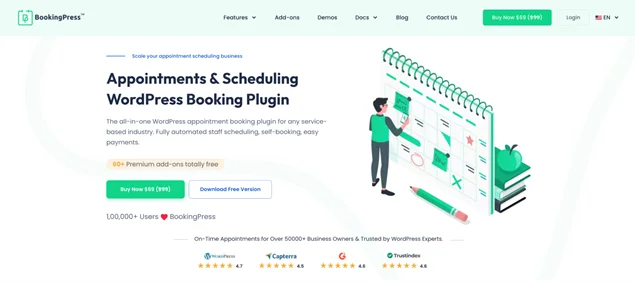
On the other hand, BookingPress is a long-standing appointment scheduling WordPress plugin. It has proven to work for thousands of businesses in niches similar to LatePoint’s target market: services, rentals, classes, and more.
If they sound so similar, where should you be careful when comparing BookingPress vs LatePoint?
We’ve done some BookingPress vs. LatePoint comparison work for you! Pay attention to specific use cases and features.
BookingPress vs Latepoint: Who Can Use the Plugins?
The fundamentals and specifics of the plugins always allow you to see in which cases and real businesses you can apply them.
Are you a multi-location language school? The plugin should support teacher assignment to the location and group booking when many people can join a class, also virtually.
Are you a beauty salon? Make sure customers can select multiple services for a booking or even customize the length of their appointment (e.g. for a massage). This one should also upsell well, for example, offer extra supplementary products or services automatically.
Spoiler, spoiler – these plugins offer such things and even more!
| Booking type & business | LatePoint | BookingPress |
| Hourly/timeslot bookings | Yes | Yes |
| All day bookings(hotels, rental shops, venues) | Yes | Yes |
| Virtual meetings | Automated Zoom linksGoogle Meet | Automated Zoom linksGoogle Meet |
| Service bundles | Yes | Yes |
| Group bookings (yoga classes, cinema, concert) | Limited | Yes |
| Multiple services in a single order (salons, classes, repair) | Yes | Yes |
| Multiple locations | Yes | Yes |
| Event bookings (ticketing) | No | No |
| Waiting lists (clinics, salons, teachers) | No | Yes |
| Automated buffer times | Yes | Yes |
| Subscriptions (gym memberships) | No | No |
| Recurring appointments | Yes | Yes |
As you can see, both WordPress booking plugins are created with many businesses in mind, understanding their needs.
The best use case scenario for both plugins is a service or appointment scheduling niche, where the timeslots are within 24 hours, and clients can choose the needed duration, multiple services and dates, whether 1:1, for a group, or even select recurring visits.
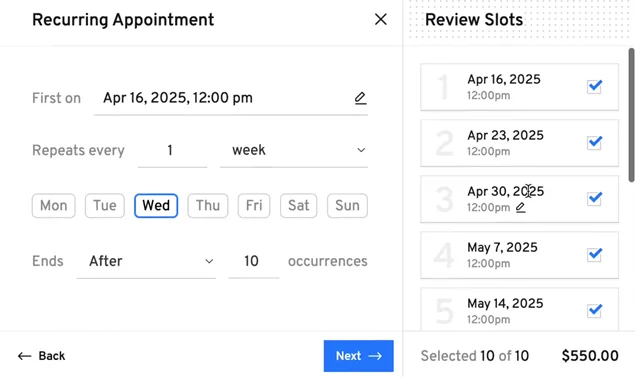
BookingPress allows you to avoid any gaps and no-shows with many built-in settings, as well as add-ons included for free with Pro plans.
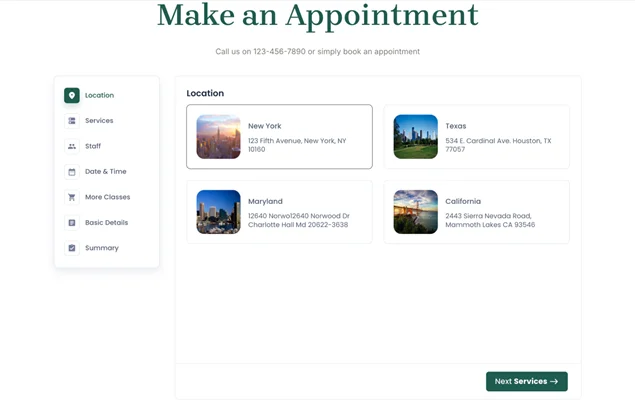
Various flexibility features for staff availability, booking periods, appointment durations, and scheduling are included with BookingPress.
BookingPress vs Latepoint: Taking Online Payments
Once you’ve figured out if the plugin covers your business operation scenario, it’s crucial to see if you can monetize it online. In particular, accept payments via gateways that are popular in your region, take deposits if needed, work with offline payments (and record them accordingly in the backoffice), or even take card payments at your place using a POS.
Here we work with real giants of WordPress, because they offer multiple payment gateway integrations and smooth online payments!
Let’s firstly take a look at general price settings controls and then jump to the actual gateways that are ready to work for your business in clicks after a simple connection.
Setting prices and taking payments
What are the price setup options in these WordPress appointment booking plugins?
| Price settings | LatePoint | BookingPress |
| Online payments | 10+ gateways integrated | 20+ gateways integrated |
| Offline payment (cash on site) | Yes | Yes |
| Flat deposit | Included with Pro plans | Included with Pro plans |
| Deposit % | Included with Pro plans | Included with Pro plans |
| POS support for digital payments on site | No | Stripe POS |
| Price per bundle instead of per item | Yes | Yes |
| Sell service extras | Yes | Yes |
| Online staff tipping | No | Yes |
| Time-based discounts | No | Yes (Happy hours add-on) |
| Discounts via coupons | Included with Pro plans | Included with all paid plans |
| Appointment duration-based price | Yes | Yes |
| Dynamic (conditional) discounts | Included with Pro plans | In Professional & Enterprise plans |
| Taxes | Included with Pro plans | Included with all paid plans |
| Invoices | Included with Pro plans | Included with all paid plans |
| Gift cards | No | In Professional & Enterprise plans |
| Refunds | Yes | Yes |
| Cart (multiple bookings) | Yes | Yes |
When customizing your prices based on various conditions, both plugins show great respect to your needs.
LatePoint delivers a nice bunch of key price customization tools, including essentials like taxes, coupons, invoices, and deposits.
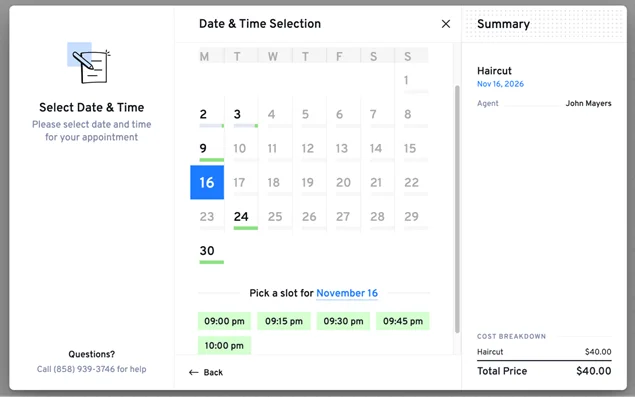
At the same time, BookingPress definitely has a better accent on marketing and upselling capabilities, giving you more options to sell, for example:
- Sell service extras with ease.
- Set the special price of the day.
- Enable online tipping.
- Offer gift cards.
- More advanced discounting options.
- Sell services in bundled packages.
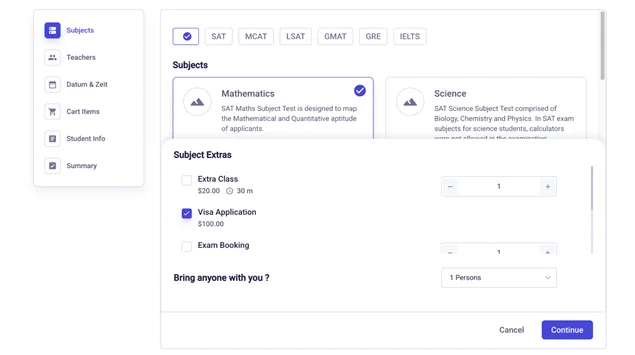
Payment Gateways Compared: LatePoint vs BookingPress
Let’s now get more specific and compare the payment gateways available in BookingPress vs LatePoint out of the box so that you know if it works for your customers.
| Payment method | LatePoint | BookingPress |
| PayPal | Included with Pro plans | Included with free and paid plans |
| On-site payments | Included with Pro plans | Included with paid plans |
| Square | Included with Pro plans | Included with paid plans |
| Authorize.Net | Included with Pro plans | Included with paid plans |
| Stripe | Included with Pro plans | Included with paid plans |
| WooCommerce support | Included with Pro plans | Included with paid plans |
| SureCart support | Included with Pro plans | No |
| POS support | No | Stripe POS |
| Mollie | Included with Pro plans | Included with paid plans |
| 2Checkout | No | Included with paid plans |
| Razorpay | Included with Pro plans | Included with paid plans |
| Braintree | Included with Pro plans | Included with paid plans |
| Klarna | No | Included with paid plans |
| Skrill | No | Included with paid plans |
| PayFast | No | Included with paid plans |
| Flutterwave | Included with Pro plans | No |
| PagSeguro | No | Included with paid plans |
| WordPay | No | Included with paid plans |
| PayUMoney | No | Included with paid plans |
| Paystack | Included with Pro plans | Included with paid plans |
| Paddle | No | Included with paid plans |
| Mercado Pago | Included with Pro plans | Included with paid plans |
| ECPay | No | Included with paid plans |
| PayMongo | No | Included with paid plans |
| Airwallex | No | Included with paid plans |
The conclusion is very simple. BookingPress can cover many more regional payment gateways, which makes it more suitable for businesses around the globe, especially in non-English countries. What’s more, unlike LatePoint, BookingPress allows you to enable PayPal payments even with a free plugin version.
Booking Forms & Customer Experience
When it comes to designing your booking form, both plugins are generous and really well made, allowing you to have a nice-looking form without any changes, as well as add custom tweaks, including via popular WordPress page builders.
| Form features | LatePoint | BookingPress |
| Customizable form design | Yes, including with WP blocks | Yes, including with WP blocks and other builders |
| Custom checkout fields | Yes | Yes |
| Staff selection | Yes | Yes |
| Service photo and text | Yes | Yes |
BookingPress is front-end customization oriented, letting you easily control what comes first in the form instead of a fixed wizard flow. LatePoint relies on the WordPress block editor and shortcodes to help you achieve the needed experience.
Customer experience
Will your customers be satisfied with the booking experiences? Will it help them achieve their goals or make changes when needed?
Can the form upsell your offerings and meet the needs of your target audience? Take a look at a few key features to decide.
| Customer experience | LatePoint | BookingPress |
| Booking form | Multi-step wizard | Multi-step wizard |
| Add to personal calendar at checkout | Yes | Yes |
| Personal customer account | Login, view bookings, reschedule, cancel, add to personal calendar, message staff | Login, view bookings, reschedule, cancel, ‘book again’ option |
| Customer login | Email, phone number, guest booking (without account) | |
| Customers can choose appointment duration (not pre-fixed slots) | No | Yes |
| Book multiple services in the cart | Yes | Yes |
| Multiple staff per appointment | No | Yes |
Apps and integrations
BookingPress is well known for its wide range of integrations. Some of them allow you to send automated notifications, others are for email marketing, etc. Most importantly, they are all already available for instant connection.
- Notifications: Emails, SMS (36 providers), WhatsApp, Telegram.
- Email marketing: Mailchimp, AWeber, Omnisend.
- Calendar apps: Google Calendar, Outlook, Apple Calendar.
- Video meetings: Google Meet, Zoom.
- More: ARMember, Zapier, Conversion Tracking.
As for LatePoint, it gives you only the essentials: WhatsApp, Mailchimp, Twilio for SMS, Zoom, Zapier and Google Calendar.
Admin tools
Admin tools and calendars for scheduled appointments and meetings are crucial for your productivity.
Both BookingPress and LatePoint allow you to manage your clients and payments with ease – view bookings, statuses, and payments; add payments, reschedule, and cancel bookings.
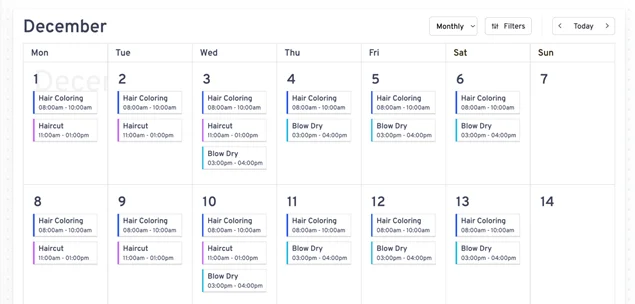
In addition to accepting online bookings, you can record payments, clients, and bookings manually. It’s better to test out features in the demo account.
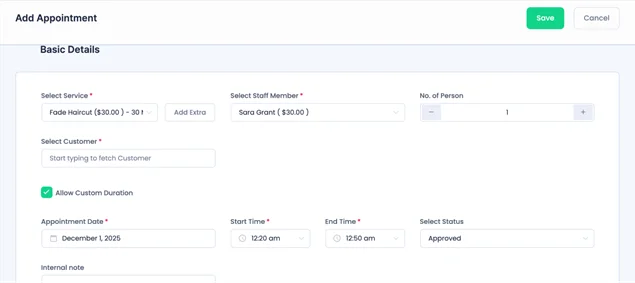
For admins, be sure, there is a great workflow – from the common backoffice to individual staff accounts, where they can manage bookings, send booking URLs, view their agenda, etc.
Cost
You now know the capabilities of these WordPress appointment booking plugins, but will you get the best value for your money? The good thing is, prices are pretty straightforward.
| Cost | LatePoint | BookingPress |
| Pay every year | 1 site: $995 sites: $249100 sites: $499 | 1 site: $793 sites: $129Up to 20 sites: $249 |
| Free version | Available | Available (PayPal included) |
In the past, LatePoint had some feature restrictions by plan, but at the moment, all plans include all features. The only difference is how many sites you can activate your license on.
As for BookingPress, the plans differ by features and the number of sites. If you are a solo or small business, a free or Standard plan is usually enough to cover all your needs. However, if you are an agency or want to bring more upselling options to your bookings, consider Professional or Enterprise plans.
One huge advantage of BookingPress is that it offers a free plan with PayPal integrated, which means you can monetize your bookings even without investing in the plugin.
Conclusions: BookingPress vs Latepoint – What Should You Choose?
Have you already made up your mind? What conclusions can we make after our detailed BookingPress vs LatePoint comparison?
Well, both plugins are really effective and powerful players if you need to automate bookings on WordPress!
However, LatePoint is focused on visual design, giving you customization tools for your booking forms. As for integrations and payments, the package is rather ‘essentials’, even though with good features, such as tax customization or coupons management.
BookingPress gives you more flexibility to match real-world business needs – for example, assigning multiple employees to a single appointment, setting custom service durations, and using more effective upsell options. It also has a much richer list of integrations with various services, including 20+ payment gateways and 36 SMS providers.
To sum up, BookingPress is a bit of a marketing and booking powerhouse, while LatePoint is a simpler option with a solid set of features.
Related articles:



Brian is a WordPress expert with a decade of developing experience & technical-writing. He enjoys blogging, movies & hiking.

Get BookingPress Premium
60+ Premium Addons
20+ Payment Gateways
Plan starts at just $89
Get Premium NowLike our insights? Click the badge to add BookingPress as your preferred source on Google.

Add as a Preferred
Source on Google