How BookingPress Ensures You Never Miss an Appointment?


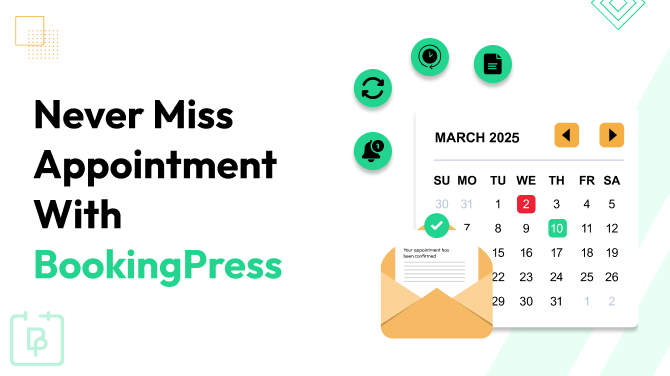
Missed appointments aren’t just frustrating. They disrupt your team, turn your schedule upside down, and can even hurt your business reputation. Your staff may try to keep everything on track, but without the right appointment management system, mistakes and oversights happen.
Keeping your business on time isn’t just about sending reminders or manually tracking bookings. It’s about having a strategy that ensures your team knows what’s coming, can act on it, and stays organized without extra workload and stress.
BookingPress can help you in this. So, curious to see how? What actually works best? And what makes your staff and schedule stay on track so, both your clients and your business are happy? Let’s find out!
Give Staff Member Their Own Tracking Panel
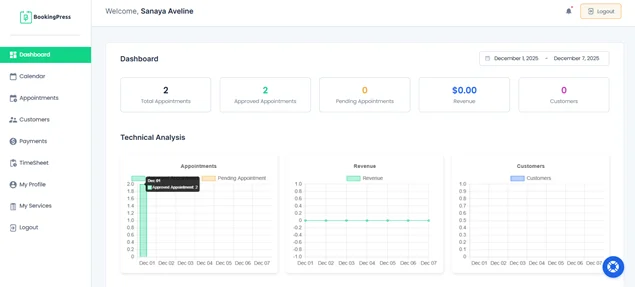
Is your staff having trouble keeping track of their own schedules? Of course, they won’t be able to unless you give them a dedicated panel. Give your staff a dedicated dashboard with BookingPress.
If you are already using BookingPress for automated client bookings and scheduling, do the same for your staff members.
- It’s super easy to use.
- Managing appointments and services becomes child’s play.
- Instantly know which appointments are to fill in today.
- What their day will look like.
- What tasks need more attention.
No guessing! And no more “Who was supposed to take this booking?” moments. Giving a dedicated dashboard to each member is actually the best strategy to help the right staff member see the right data at the right time.
With individual staff accounts and dashboards, your staff can:
- Check their upcoming appointments right away.
- Manage their own schedules without stepping on anyone else’s.
- Get real time updates when clients book, cancel, or reschedule.
- Stay accountable because everything is clearly assigned.
With their own dashboard, your staff can manage availability, update schedules, check client details, and prepare for appointments without relying on anyone else.
One Dashboard to Manage Them All
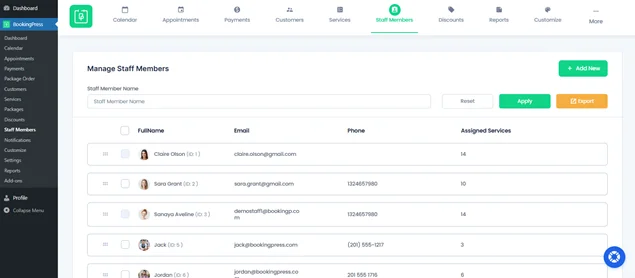
While every staff member has their own login and panel now, as a business owner or manager, you don’t want to check multiple dashboards just to see what’s happening.
That’s where the BookingPress Staff Members Panel comes in for Admin. With one master admin dashboard, you can view all staff schedules, appointments, and changes in real time.
No more clicking between accounts or asking each and every staff member for updates anymore. With BookingPress Staff Members Panel, you can:
- View all staff members at a glance by name, assigned services, and schedules.
- Filter and search any staff member by name, so finding the right person is easy.
- Manage assignments. See how many services each staff member is handling.
- Add or remove staff with no hassle.
- Activate and deactivate staff with ease.
- Edit staff info, update details, or tweak roles without leaving the dashboard.
- Customize working hours and days for each staff member beyond the default working hours with shift management.
- Export staff data for reports or backups.
With this, you never miss an appointment and get the full picture of your workflow.
Calendar Sync So Staff See Real Time Changes
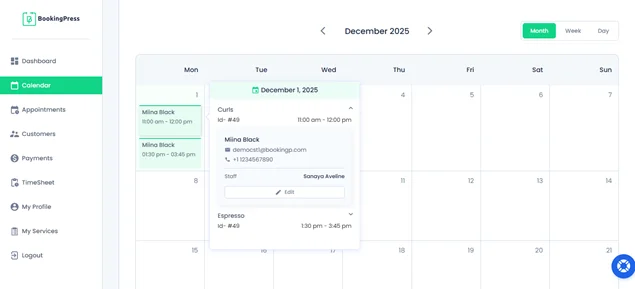
Now your team can’t stay on time if everyone is looking at a different version of the schedule, right? Missed updates, outdated calendars, and “I didn’t see that booking getting updated or rescheduled” moments are exactly how appointments get missed.
BookingPress Staff Member Dashboard itself comes with a Calendar panel to get a clear view of upcoming appointments with exact date, time, client’s details, service and more, all at once.
With smooth calendar sync in BookingPress, every staff member sees real time changes the moment they happen. Your staff can get an Instant update on the new booking or last-minute cancellation, or client reschedules.
This just not end here. BookingPress allows you to sync with popular calendars that are used on your smartphone, such as:
- Apple Calendar
- Google Calendar
- Outlook Calendar
So, if your staff don’t log in to their panel, they can still see an update in their smartphone calendar.
Set Up Automatic Team Notifications
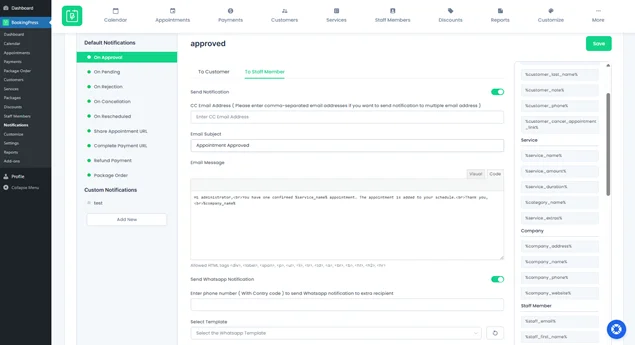
When your staff can’t remember an appointment, BookingPress will. Even your best staff member can miss a detail when their day’s schedule is fully loaded. That’s exactly why automated appointment reminders matter.
BookingPress doesn’t just remind clients. It keeps your team sharp, aligned and always one step ahead. Whenever something important happens with an appointment, BookingPress gives your staff a quick heads up. For example:
- A new booking comes in.
- A client reschedules.
- Someone cancels.
- A payment goes through.
- A refund is issued.
Sending automated appointment reminders for staff is simple, but it keeps your entire team on time so they never miss an appointment.
Set Real Working Hours Per Staff Member
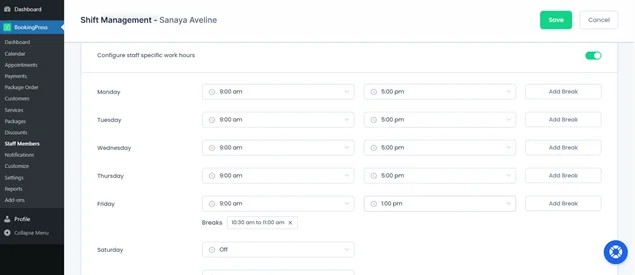
You can’t expect your team or staff to stay perfectly organized if everyone is working different hours but sharing the same common schedule. That’s how double bookings happen, shifts get mixed up, and your client ends up taking a 9 AM appointment when they don’t even start until 10.
With Shift Management in Booking, you set real specific working hours for each staff member, so the system only books appointments when that person is actually available.
No assumptions, no overlaps. This BookingPress feature becomes especially powerful when your team has:
- Different shift patterns (openers, closers, weekend staff).
- Part timers with flexible hours.
- Specialists who work fewer days but handle high value services.
- Seasonal or rotating schedules.
BookingPress ensures your calendar reflects how your business actually operates, not how you hope it operates. With this, a booking flow respects everyone’s time, keeps expectations clear, and eliminates those scheduling headaches that slow your team down.
Appointment Reports To Fix Problems
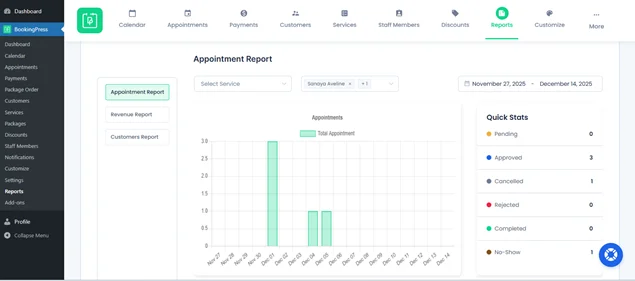
Booking issues don’t occur out of thin air. They build up quietly until one day you’re left thinking why your team is stressed, why slots are going unused or why certain services keep getting rescheduled.
By having a report on every staff and service in BookingPress, you get clear data that shows you exactly where the system is breaking before those issues turn into missing appointments.
With detailed reports, you can spot things like:
- Staff members who get more cancellations than others.
- Time slots that stay consistently empty.
- Services that frequently cause delays.
- Overbooked days vs. slow days.
- Trends that signal client habits or operational gaps.
This isn’t just about looking at numbers for the sake of it. It’s about catching small problems early:
- Too many no shows for a single staff member.
- A spike in cancellations for one service.
- A sudden drop in bookings during a specific week.
- Maybe a service takes longer than the default time.
- Maybe certain days need more staff on shift.
- Maybe one team member is overloaded while another has no work.
You also get a full Appointment Summary with details like Booking ID, Customer name, Staff member, Service, Status and more.
Nothing slips by with BookingPress in action. And because of the data, you get an unaltered picture of how your business is performing, so you can act fast.
Conclusion: Never Miss an Appointment Again
Not taking the missed appointments seriously, you are losing revenue and your business’s face at the same time. With BookingPress as your ultimate appointment booking system, you will never miss an appointment ever.
So here’s a quick recap of how BookingPress keeps your business and your staff exactly on time:
- Staff get their own dedicated dashboards for viewing and managing appointments.
- You can manage and view your staff from the BookingPress Staff Members Panel.
- Automated staff notifications and reminders.
- Real time calendar sync so everyone stays on the same page.
- Smart shift management so no double booking and off hour chaos.
- Detailed appointment reports to identify common patterns of the problem.
Related articles:



Brian is a WordPress expert with a decade of developing experience & technical-writing. He enjoys blogging, movies & hiking.

Get BookingPress Premium
60+ Premium Addons
20+ Payment Gateways
Plan starts at just $89
Get Premium NowLike our insights? Click the badge to add BookingPress as your preferred source on Google.

Add as a Preferred
Source on Google