

I’ve personally tested over 20 WordPress booking plugins in the past 4 years of managing appointment-based businesses, and here’s something I’ve learned: choosing a WordPress plugin isn’t as simple as picking the one with the longest feature list or the lowest price.
Some WordPress booking plugins like Bookly and Appointment Hour Booking plugin look affordable until you realize that the features you need are locked behind a higher plan (Or worst – needs paid add-ons). Meanwhile, other appointment scheduling plugins like Amelia offer plenty of features, but you might never use half of them.
That’s exactly why I’ve tested and shortlisted 5 best WordPress booking plugins for 2026. Before recommending these plugins, I’ve compared their real world performance, user feedback, features and overall pricing.
I installed each plugin on my WordPress staging site, set up 5 services, two staff members, and one schedule, and completed the booking process from the customer’s side. Further, I also checked what each plugin actually includes at its advertised starting price.
Whether you’re running a salon, consulting firm, medical clinic, rental store, or any other service-based business, this guide will help you pick the right booking plugin.
TL;DR: After testing all the best WordPress booking plugins, BookingPress is the most complete and reliable solution for scheduling appointments only. It comes with 60+ premium addons and 22+ payment gateways, making it the most feature-rich plus user friendly option.
Quick Comparison: WordPress Booking Plugins At a Glance
No time to read till the end? No worries! Below are the top WordPress booking plugins compared at a glance.
| Comparison | BookingPress | WP Booking Calendar | MotoPress | LatePoint | Bookly |
| Best for | All-in-one appointment management | Rentals and date-based reservations | Flexible appointment scheduling | Modern appointment booking | Extensible appointment management |
| Free version | Yes | Yes | Yes (Lite) | Yes | Yes |
| Starting paid price | $89/year | $41.87 one-time | $49/year | $69 first year | $39/year |
| Plan for common booking needs | Standard: $89/year | Business Small: $78.97 one-time (discounted) | 7-add-on bundle: $99/year | Starter: $69 first year | Business: $69 first year |
| Essential features | Services, staff, payments, reminders, calendar sync | Booking calendars, availability, reservation requests | Services, employees, schedules, payments | Staff, locations, payments, notifications | Appointment management, customer records, booking forms |
| Paid add-ons required? | Some advanced features require a higher plan | Depends on the edition | Yes, for certain advanced features unless bundled | Not for features included in the selected paid plan | Yes, for certain advanced features |
| Renewal / lifetime options | Annual or lifetime from $229 | One-time license; optional ongoing updates and support | Annual or lifetime from $149; bundle lifetime $199 | Annual or lifetime from $179 | Annual or lifetime from $99 |
| Best value for | Businesses wanting extensive features in one plan | Property rentals and date-based reservations | Businesses wanting flexible add-on bundles | Businesses wanting a modern booking workflow | Businesses that want to expand functionality as needed |
How I Tested And Picked Booking Plugins For WordPress
I’ve tested over 20 WordPress booking plugins over the past four years, and so I know that a plugin can look great on its feature page but feel very different when you actually use it.
Thus, for this comparison, I didn’t just compare feature lists or starting prices. I looked at:
- How each plugin handles the booking process
- What you can actually do with it
- How much you need to pay to get the features your business needs
For the context, every booking plugin for WordPress I’ve recommended was tested using this scorecard:
1. The Customer Experience (UX) Test
Over 60% of appointments are booked on smart phones. So, I went through the booking process, pretending to be a real client on my smart phone. Plus, just to be sure the plugin I say as responsive, is truly responsive, I’ve made other members of my team book services using their different-different mobiles, tablets and laptops.
Next, I checked how many steps it takes to complete a booking. Most of all booking forms provided were multi-step to avoid endless scrolling, yet it also means forcing clients to go though 10 steps booking form.
The maximum of 5-6 booking steps sounds less tiring, encouraging clients to complete the booking.
Lastly, I verified how well it handled timezones. Because if you serve clients in different regions, your plugin must automatically adjust the available time slots.
2. The Admin & Staff Experience Test
Let’s say you have urgent work due to which you must reschedule or cancel an appointment. So I tested how easy it is to manually move an appointment on the backend dashboard.
Backend dashboard experience matters, too. Because here’s where you’ll spend most of your time, managing upcoming appointments, services, staff members, client data. Thus, my priority is to always go with a plugin that offers flexibility, user friendliness, and simplicity.
And, if you have a handful of staff members, their dashboard and management experience is also taken into consideration.
3. The Performance and Speed Test
I ran every WordPress page having the booking form for speed test (using tools like Google PageSpeed Insights) on my staging site before and after installing the plugin.
Remember, heavy booking plugins can slow down your site, causing potential clients to leave.
4. The Edge-Case Test
Lastly, I put each of these finalist plugins under the stress by testing common appointment-based business headache scenarios:
- The Buffer Time Test: I set up an appointment that needed a 15-minute cleanup or travel window afterward. Plus, verified that the plugin automatically blocks out that buffer time for the next client.
- The Overlap Test: Tried booking two conflicting appointments at the exact same time for the same staff member to make sure the system blocks it.
In a nutshell, here’s my evaluation criteria:
| Evaluation criteria | What I checked |
| Booking process | How easily customers can select a service, choose an available time, enter their details, and complete a booking |
| Ease of use | How easy it is for site owners and staff to set up services, manage schedules, and handle appointments from the WordPress dashboard |
| Features | Support for multiple services, staff members, locations, availability rules, and other useful booking options |
| Payments and integrations | Available payment gateways, calendar syncing, and integrations with other tools |
| Automation | Email and SMS notifications, reminders, and other features that reduce manual booking work |
| Pricing and value | What the free version or starting paid plan includes, which features require an upgrade, and whether paid add-ons increase the overall cost |
| User feedback and support | Public ratings, user reviews, documentation, and available customer support |
One thing I paid most attention to was the gap between advertised features and what you actually get at the starting price. I’ve seen a lot of WordPress booking plugins list dozens of features, but if the ones you need require a higher plan or separate add-ons, the starting price doesn’t tell the whole story.
What To Look For In a WordPress Booking Plugin
A salon looks for features like staff scheduling and deposits. Meanwhile, a solo consultant cares more about custom booking forms, online payments and calendar synchronization.
Still, there are some features worth checking before picking a WordPress booking plugin. I’ve covered the essentials below, along with a few extras that are real gold if a plugin offers them.
You don’t need every feature I said here, but knowing what’s available can help you avoid paying extra for something you expected to be included:
- Booking Types and Scheduling Flexibility: Just check whether the plugin supports the type of bookings your business offers. Some businesses need one-on-one appointments, while others need group bookings, recurring appointments, custom service hours or bookings that last several days.
- The bonus: Flexible availability rules that let you set different schedules for individual services, staff members, or locations.
- Staff, Services, Resources, and Availability Management: All these features, if flexible, are the best things you can ask for. Besides, automatic staff assignment, resource-based availability, and staff commission calculations lowers manual work as your business grows.
- Online Payments, Deposits, and Refunds: Want to accept online payments? Then make sure the plugin you pick offers the payment gateways used in your local area or country. Some plugins support online payments in their free versions but others reserve certain gateways or payment features for paid plans (Beware of them).
- Calendar Synchronization: It keeps appointments organized across your booking system and the calendars you already use. Thus, look for integrations with tools such as Google Calendar and Outlook, and check whether the plugin supports one way or two way synchronization.
- Automatic Reminders: Manually reminding every customer about an upcoming appointment takes time, thus, automated reminders helps a lot here. Check which notification channels are available such as email, SMS or WhatsApp and whether they need a separate integration.
- Custom Booking Forms and Customer Experience: Your booking form should collect the details with ease. At a minimum, check whether you can customize customer fields and make specific fields required.
- Integrations, Reporting, and Automation: A booking plugin becomes more useful when it works with the other tools you already use. And, reporting is equally important too. Even basic reports showing appointment totals, cancellations, revenue, and staff performance can help you understand how your business is doing.
- Security, Support, and Ongoing Maintenance: A booking plugin stores your customer contact details, payment related information and other personal data. Thus, always go with a plugin with good reputation; the one offering a clear update history, reliable technical support and detailed documentation.
Top 5 WordPress Booking Plugins (Expert Review)
1. BookingPress
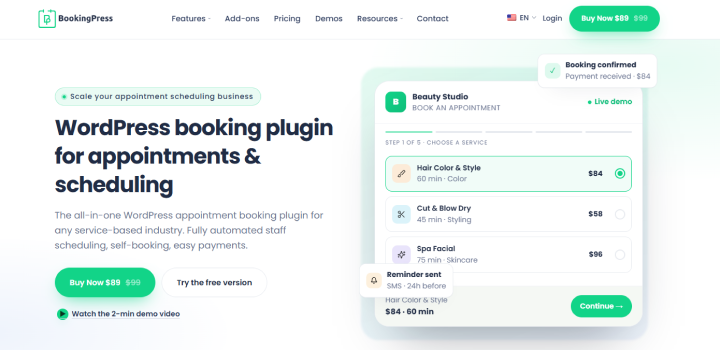
I’ve seen what dozens of WordPress booking plugins have to offer, and BookingPress brings something different to the table. It had the feel of modern, dedicated appointment booking software, without affecting my website’s speed – not even a little. It’s definitely built for real service businesses that need to accept online bookings professionally while automating appointments, payments and reminders to stop booking errors.
When I installed BookingPress on my WordPress staging site, the setup wizard took me and set up almost every basic core setting, from services, staff members to customizing booking form. Even the centralized dashboard looked promising, and the side menu clean because most of its best features aren’t enabled by default.
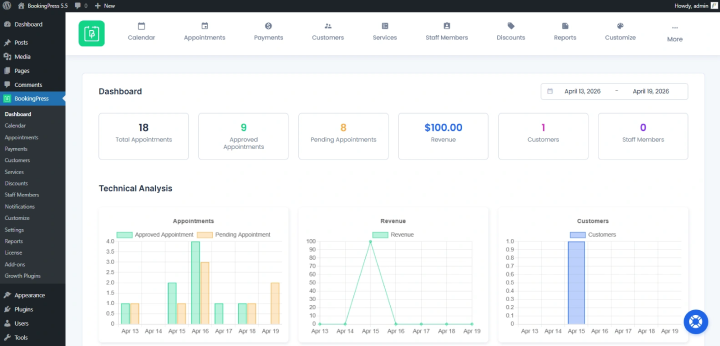
It comes with a set of 60+ premium addons, but surely, you won’t be needing them all at once so you can decide later which feature you want to activate. Among all the plugins we tested, BookingPress is the most feature rich, offering things like WhatsApp & Telegram notifications, POS system, two-way sync with popular calendars, POS system, and a lot more.
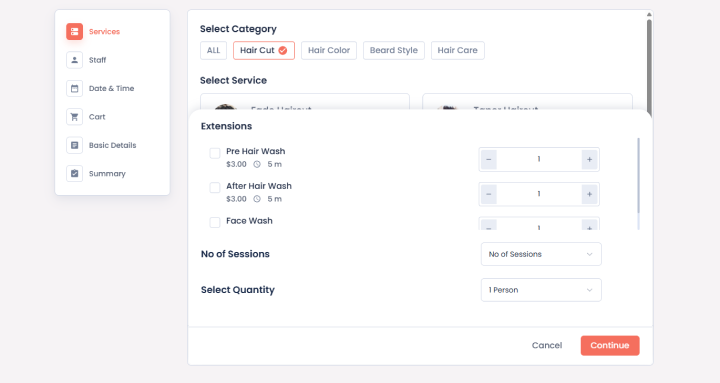
Even the client booking experience was smooth because it was totally designed by me. Yes, you can completely customize your booking form and customer panel using extensive styling options. The system gives you total control over each step of booking. Best of all, you can also bundle multiple services into packages, sell gift cards, set happy hours, dynamic prices, let clients tip at checkout, and even manage resources, locations and staff commissions.
Since one thing is clear that BookingPress is the most feature-rich plugin here, offering only the features which are useful and for the best. Now let’s look at the cost part. It offers a lite free version with all core booking features including custom booking form, unlimited appointments, services, and 1 PayPal online payment option. As for its premium version, it starts at $89/year, including 45+ premium addons, 21+ payment gateways and advanced staff management.
I think this starting plan is more than enough for growing service businesses like a salon, law firm, clinic, rental store, house cleaning, spa, fitness studio, etc.
Standout Features (Things that makes it unique):
- All-inclusive addon model; offering all 60+ premium addons directly in one plans
- Flexible booking rules, like recurring & group appointments, custom service hours, multi-service, cart addon, etc.
- Wide range of 22+ payment gateways including industry-rare Stripe POS Add-on, too
- Generous free lite version with free PayPal integration
- Automatic reminders via email, SMS, WhatsApp and Telegram
- Staff-Specific Dashboards and customer panel for easy reschedule and cancellations
- Two-way sync with Google, Outlook and Apple calendars
- Highly customizable booking form with extensive styling options – zero coding
Things to keep on your radar:
- The standard plan offers 45+ premium addons and 22 payment gateways; to unlock 60+ premium addons, you need to opt for its Professional plan
- Stripe POS add-ons is available in high-tier plans (which also makes sense)
Pricing:
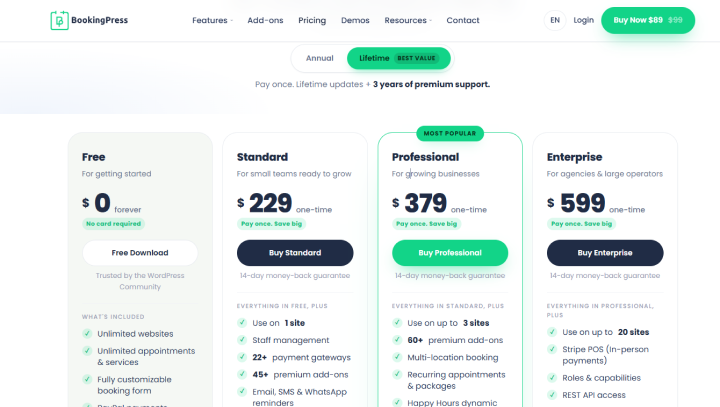
- Free version available
- Standard – $89/year
- Professional – $139/year
- Enterprise – $249/year
Lifetime plan starts at $229 with lifetime updates and 3 years support.
Pricing verified on https://www.bookingpressplugin.com/pricing/#plans on October 23, 2026
2. WP Booking Calendar
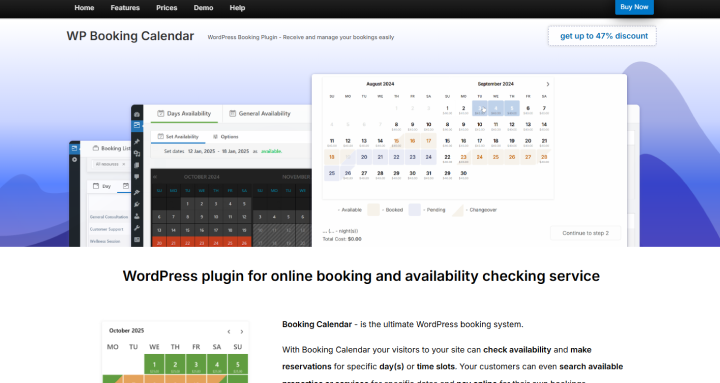
When I tested WP Booking Calendar, one thing became clear: this plugin is useful for businesses where customers need to reserve dates or time slots, rather than simply book an appointment with a particular staff member.
It even supports full-day bookings, time-slot appointments and event reservations which makes it worth considering for vacation rentals, properties and other businesses that manage availability through a calendar.
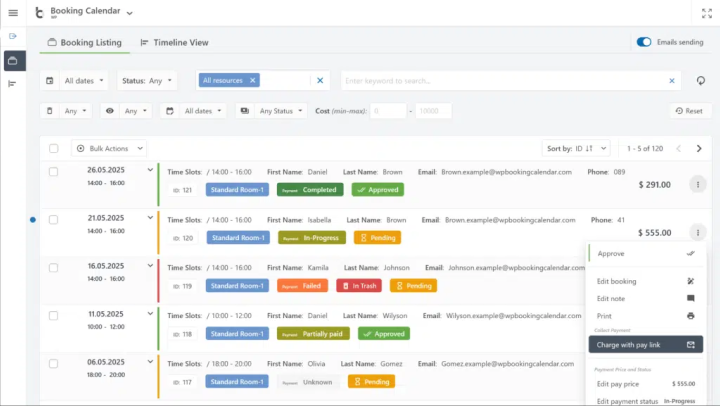
The booking calendar gives you a direct way to show availability on your website, accept booking requests and manage reservations from your WordPress dashboard. Furthermore, you can also customize booking forms, manage booking resources, and configure how availability is shown.
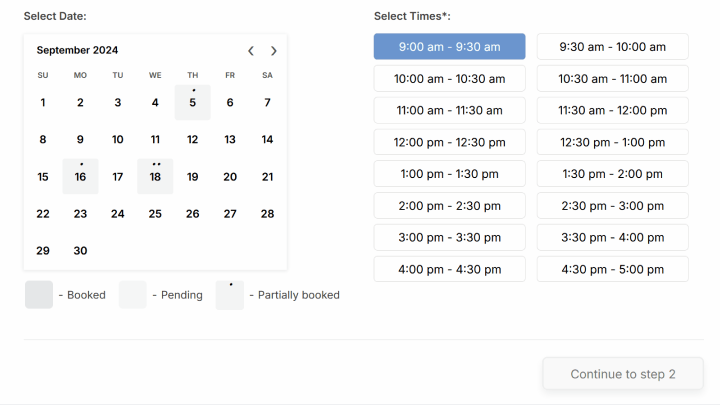
However, don’t confuse it with a modern, all-inclusive appointment management system. WP Booking Calendar has several editions and some important features depend on which one you buy. Thus, if you need online payments, advanced pricing rules, or more complex resource management, you must check the plan carefully before investing.
Key Features (Things that make it useful):
- Booking calendars for full-day reservations and time-slot appointments
- Unlimited booking resources in the paid editions that support multiple calendars
- Availability settings, including unavailable periods and booking restrictions
- Customizable booking forms and email templates
- Booking management with approval, editing, note and CSV export
- Online payment support through 6 listed gateway options: Stripe, PayPal, Authorize.Net, iDEAL Buckaroo, Redsys and iPay88
- Two additional payment methods: cash and direct or wire bank transfer. The bank-transfer option displays payment instructions; it does not directly connect to the bank.
- Advanced reservation options, including check-in/check-out days, seasonal pricing, deposits and booking-cost rules
Things to keep on your radar:
- The free version is useful for basic booking-calendar functionality but online payments are available from the Business Small edition and higher only
- The cheapest paid edition isn’t the right choice for a business that needs online payment or more advanced booking rules.
- Its licensing model is different from most annual WordPress plugins. The license is a one-time purchase, but it includes only 6 months of free updates. Continued updates and support can require an optional subscription.
- It’s a better fit for calendar driven reservations than for businesses that need advanced staff workflows, customer dashboards, and extensive automation in one system.
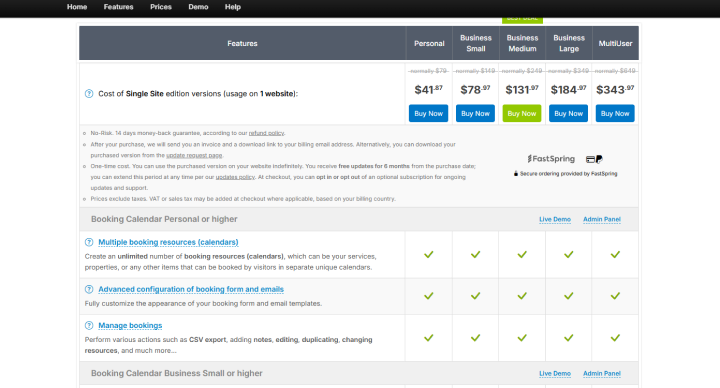
Pricing: WP Booking Calendar offers a free version, and paid licenses are currently shown with promotional discounts. For a single website, the official pricing page lists:
- Free – $0
- Personal – $41.87 (regular price $79)
- Business Small – $78.97 (regular price $149)
- Business Medium – $131.97 (regular price $249)
- Business Large – $184.97 (regular price $349)
- MultiUser – $343.97 (regular price $649)
3. MotoPress Appointment Booking
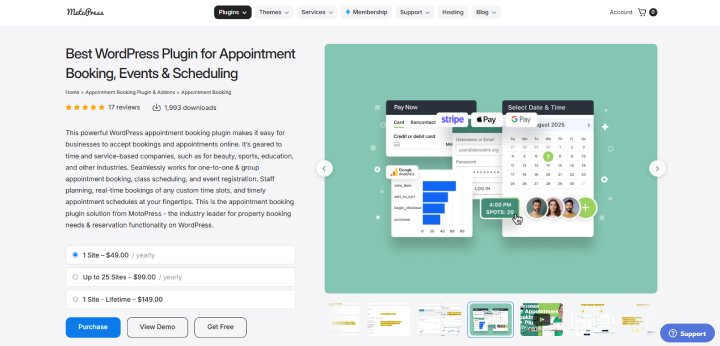
I’ve tested dozens of WordPress booking plugins, and MotoPress caught my attention immediately. Not because it’s unique, but it does everything it says. It gave all the advertised features at the right price. This deserved a spot.
When I tested MotoPress Appointment Booking, I found it to be a practical option for businesses that want to manage services, staff schedules, and appointments. The setup was simple; no complications if you’ve used WordPress for a time being.
The best part? It lets you set one-on-one appointments, group bookings, classes and event registration. Thus, it can work for salons, tutors, fitness instructors, clinics, and other appointment-based businesses.
MotoPress gives you a step-by-step booking form where customers can select a service, pick an available time slot, and submit their booking. When tested on the admin side, you can easily manage employees, assign services, set working schedules and set different service durations and prices depending on the employee. Moreover, it even lets you manage multiple locations, which is useful if your business operates from different branches.
One thing I like about its pricing structure is that the core plugin is available separately, thus you’re not forced to buy a large bundle immediately. But, if you need advanced features such as SMS notifications, custom checkout fields, video conferencing, or additional WooCommerce payment gateways, the price can increase with paid add-ons or bundled plans that start at $99/year for 1 site.
Key Features (Things that make it useful):
- One-on-one appointments, group bookings, classes and event registration
- Unlimited services and employees, with individual schedules and service assignments
- Multiple locations, custom service durations, and appointment buffer times.
- A responsive, step by step booking form with customizable fields
- Online and on-site payment options, including PayPal, Stripe, Square, direct bank transfer, and on-site payments
- Calendar integrations with Google Calendar, Apple Calendar, Outlook Calendar, and Yahoo Calendar
- Appointment and revenue analytics, with reports filtered by service, location, or employee
- Optional paid extensions for SMS notifications, custom checkout fields, PDF invoices, video conferencing, and extra WooCommerce payment gateways
Things to keep on your radar:
- The core plugin supports the main appointment booking workflow, but several features businesses commonly expect are paid add-ons
- The dedicated Twilio SMS extension is listed separately at $59, while the WooCommerce Payments extension is listed at $79.
- If you need custom checkout fields and video meeting links as well, compare the add-on bundle against buying individual extensions. The bundle will work out better when you need several extras.
Pricing:
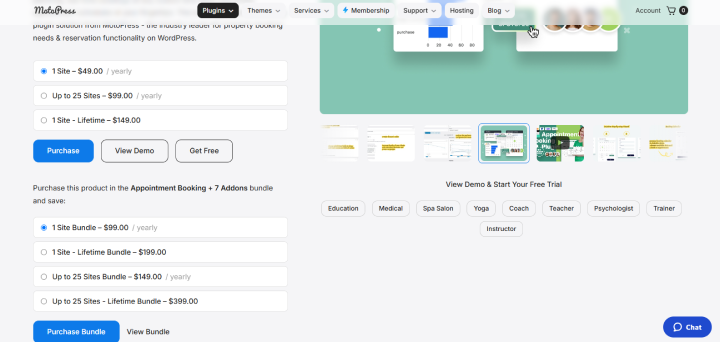
- Free Lite – $0
- Single site license – $49/year
- Up to 25 sites – $99/year
- Single site lifetime license – $149 one-time
- Appointment Booking + 7 Add-ons bundle – $99/year for one site
- Appointment Booking + 7 Add-ons lifetime bundle – $199 one-time for one site
To be honest, if you want a complete working online booking system for your small or growing service business, the Pro bundle plan sounds the best deal.
4. LatePoint
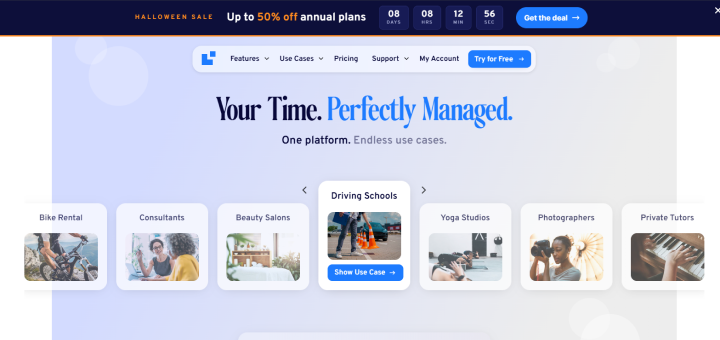
LatePoint stood out to me because it focuses on making appointment scheduling feel like a modern booking application – not another complicated WordPress settings page.
It is specially designed for service businesses that want customers to book, reschedule and pay for appointments online without endless email exchanges. Thus, the booking system supports individual appointments, group bookings, recurring appointments, and events.
Apart from that, you can also create custom booking forms, manage multiple staff members and locations, and give agents their own dashboards. This makes it useful for consultants, salons, clinics, tutors, and businesses where several employees handle different appointments.
One major advantage is its paid-plan structure. Unlike plugins where you need to keep buying individual extensions to unlock more functionality, LatePoint states that all available features are included in its paid annual and lifetime plans. The main difference between these plans is how many websites you can activate them on.
Key Features (Things that make it useful):
- One-on-one, group, recurring and event bookings
- Custom booking forms with additional customer fields
- Multiple staff members, individual schedules, staff dashboards
- Multiple locations and customer booking management
- Payment support for Stripe, PayPal, Square, Mollie, Razorpay, MercadoPago, Flutterwave, Braintree, and PayStack, along with WooCommerce payment integration
- Automated email, SMS, and WhatsApp notifications
- Two-way calendar synchronization with Google, Outlook and Apple Calendar
- Zoom and Google Meet integrations for online appointments
- Payment links, invoices, coupons, packages, workflows, and automation tools
Things to keep on your radar:
- LatePoint has a free version, but the complete feature set is offered through its paid plans.
- The annual discount shown on the official website is introductory pricing. The pricing page states that renewals are charged at the full price displayed during checkout.
- If you’re buying for multiple client websites, check the site limit before purchasing. The Starter plan covers only one site, Scale covers up to five, and Agency covers up to 100 sites.
Pricing: At the time of checking on October 23, 2026, the official LatePoint pricing page shown the Halloween promotion:
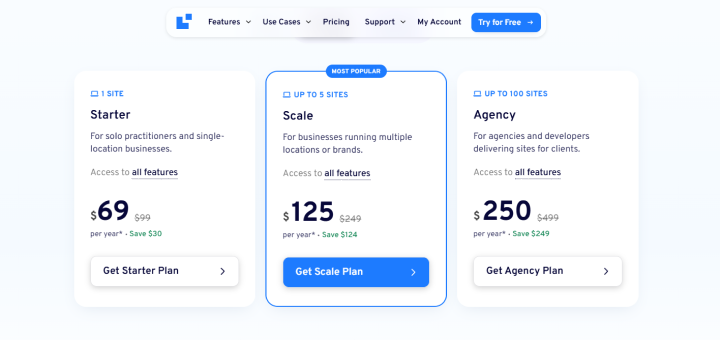
- Free version – $0.
- Starter – $69 for the first year, regular price $99/year.
- Scale – $125 for the first year, regular price $249/year.
- Agency – $250 for the first year, regular price $499/year.
- Starter lifetime – $179 one time, regular price $249.
- Scale lifetime – $369 one time, regular price $599.
5. Bookly
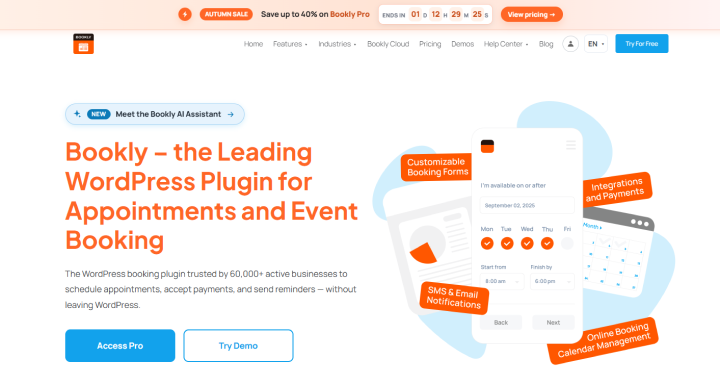
Bookly is a long-established WordPress appointment booking plugin with a free version and a paid version that adds more booking features as you pay.
When I tested it, the booking form was customizable and the admin dashboard organized appointments in a proper format, so it made managing customer details easy. Plus, Bookly offers a large add-on catalog.
Yet, the client experience wasn’t as smooth as other plugins I ranked above. Its booking form felt like it came from 2012 – not clunky, but not modern either.
On top of that, pricing is where you need to pay close attention. The free version is limited to 5 services and 1 staff member. If your business needs more services or employees, you need a paid plan. And although Bookly offers many extra capabilities, not every payment gateway, scheduling tool or advanced feature is included in the same license.
In simple words, while booking plugins like BookingPress offer all 60+ premium add-on bundles in one plan, Bookly charges for each separately, making it way more expensive than any WordPress plugin.
Key Features (Things that make it useful):
- Customizable booking forms and appointment calendars
- Service categories, employee selection, and available time slots
- Appointment management with searchable booking lists and customer records
- Email notifications and reminders, with SMS and WhatsApp capabilities (available according to the selected plan or integration)
- Google Calendar integration, with advanced synchronization options (paid)
- Zoom and Google Meet integrations
- Payment options including Stripe, PayPal options, WooCommerce, Square, Authorize.Net, Mollie, PayU Latam, 2Checkout, and PayUbiz
- Optional add-ons for deposits, group bookings, recurring appointments, custom fields, service extras, waiting lists, coupons, invoices, and more
Things to keep on your radar:
- The free version is fine for testing a basic booking workflow, but the limit of 5 services and 1 staff member can quickly become restrictive.
- Bookly has both tiered plans and separately listed add-ons. Some extensions are available from $9.95/year, while others cost $12.95/year or $15.95/year
- For example, the add-on catalog lists two-way Google Calendar synchronization at $15.95/year or $49 lifetime, and deposit payments at $12.95/year or $39 lifetime. Check whether each feature is included in your chosen plan before buying an add-on separately.
- Payment gateway names can be misleading if you count every variation as a separate processor. Some options are delivered through add-ons, and support differs by gateway.
Pricing: The Bookly pricing page shows the following discounted prices when checked on October 23, 2026. The standard prices are shown alongside them:
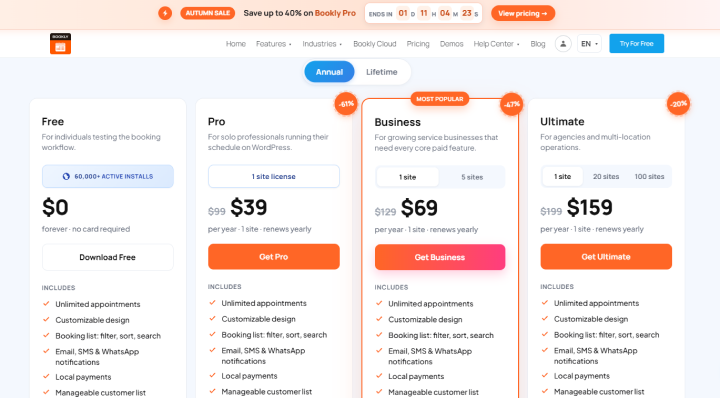
- Free – $0, with limits of 5 services and 1 staff member
- Pro – $39/year (regular $99/year), or $99 lifetime (regular $129)
- Business – $69/year (regular $129/year), or $129 lifetime (regular $149)
- Ultimate – $159/year (regular $199/year), or $199 lifetime (regular $299)
Lifetime plan starts at $99 for now.
The plans have different features and support levels. Yet, the thing that I find the most inconvenient is the fact that Stripe and PayPal Standard payment gateways are available in Business and Ultimate plans only. Means for creating a basic online WordPress booking system, you must start from the Business plan or buy what you need separately (which gets even more expensive).
The Real Price Of a Booking Plugin: First-Year vs. Long-Term Costs
| Plugin | Annual plan | Lifetime plan | Total cost over 3 years | Best investment for |
| BookingPress | $89/year (Standard) | $229+ | $267 annual vs. $229+ lifetime | Businesses wanting a wide range of booking features and add-ons in one plan. |
| WP Booking Calendar | One-time license; no annual renewal required | $78.97 (Business Small, discounted) | $78.97 one-time license* | Rental properties and businesses managing date-based reservations. |
| MotoPress Appointment Booking | $99/year (7-add-on bundle) | $199 (7-add-on bundle) | $297 annual vs. $199 lifetime | Businesses wanting appointment scheduling with several extra features. |
| LatePoint | $69 first year; $99/year renewal (Starter) | $179 (Starter Lifetime) | $267 annual vs. $179 lifetime | Businesses wanting a modern booking system with features included in the paid plan. |
| Bookly | $69 first year; $129/year renewal (Business) | $99+ | $327 annual vs. $99+ lifetime | Businesses that want to expand their booking system as their needs grow. |
Which WordPress Booking Plugin Gives You The Best Value?
| Feature / Capability | BookingPress | WP Booking Calendar | MotoPress Appointment Booking | LatePoint | Bookly |
| Best for | All-in-one appointment management | Rentals and date-based reservations | Flexible appointment scheduling | Modern appointment booking | Extensible appointment management |
| Free version | Yes | Yes | Yes (Lite) | Yes | Yes |
| Multiple services and staff | Yes | Booking resources, rather than staff-focused workflows | Yes | Yes | Yes |
| Group and recurring bookings | Yes | Depends on the edition and booking setup | Yes | Yes | Available through plans/add-ons |
| Online payments | PayPal in free version; 22+ gateways in paid plans | Available from Business Small; gateway support varies by edition | PayPal, Stripe, Square and other options | Multiple gateways, including Stripe and PayPal | Gateway availability depends on the plan and add-ons |
| Calendar synchronization | Google, Outlook and Apple; two-way sync available | Calendar and availability features vary by edition | Google, Apple, Outlook and Yahoo calendars | Two-way sync with Google, Outlook and Apple | Google Calendar integration; advanced sync may cost extra |
| Automated reminders | Email, SMS, WhatsApp and Telegram options | Email notifications | Email; SMS requires an add-on | Email, SMS and WhatsApp | Email; SMS and WhatsApp capabilities depend on the plan/integration |
| Custom booking forms | Extensive customization | Yes | Yes | Yes | Yes |
| Multiple locations | Yes | Multiple booking resources | Yes | Yes | Depends on available functionality and add-ons |
| Advanced features and add-ons | 45+ add-ons in Standard; 60+ in Professional | Advanced features depend on the edition | Optional add-ons and bundles | Features included in paid plans | Many separately priced add-ons |
| Starting paid price | $89/year | $41.87 one-time (Personal) | $49/year | $69 first year (Starter) | $39/year (Pro) |
| Lifetime option | From $229 | One-time license | $149 core plugin; $199 bundle | From $179 | From $99 |
| Best value when… | You need many features in one plan | You mainly manage date-based reservations | You want to choose between the core plugin and an add-on bundle | You want a modern booking workflow without separately buying individual extensions | You want to add selected features as your business grows |
Concluding Thoughts
Finding a WordPress booking plugin is easy because the WordPress ecosystem got hundreds of them. Yet choosing the best booking plugin for WordPress is about finding a tool that fits your unique business workflow.
Although every booking plugin on this list has its own unique features, after extensive testing, BookingPress consistently stood out as my favorite, and for good reasons.
It strikes the perfect balance between enterprise-level features, cost and a beautiful design that makes both your business and your clients’ happy.
Related articles:
 14-day money-back guarantee