

Customized commission models are key for many appointment-based businesses – from beauty and wellness salons to cleaning agencies with subcontractors.
Do you also want staff earnings to update automatically after each completed appointment? Are you looking for a simpler way to track employee performance and payouts?
The BookingPress booking system lets you add that model to your staff commissions calculations and make it fully automatic. All you need to do is add the Staff Commission extension to BookingPress and configure your commission rates for appointments.
Want to do just that? Then read further.
TL;DR: The BookingPress Staff Commission add-on helps appointment based businesses automate staff commission calculations right inside their booking system. You can set global or staff specific commission rates, and get detailed commission reports as well as automatic payout calculations based only on completed appointments.
Automated Commission Calculations Solve Real Operational Problems
If you rely on commissions as part of your payroll management (hair salons, barbershops, clinics, etc.), why not handle some of the calculations automatically through the booking system?
1. Commission for payroll automation
Without this, you manually calculate commissions in spreadsheets every period (week/month, etc.)
2. Staff motivation
Commission structures directly influence upsells and performance. Also, if you provide software-generated calculations, it looks more trustworthy.
3. Transparency
Staff can see what they earned and why.
4. Multi-staff businesses
If you have 3-10+ staff members, manual tracking becomes harder, if not painful. Automatic calculation fully solves that.
5. Service-level payouts
Different services may have different margins and payout rates.
What the BookingPress Booking System Can Do
The basic commission percentage itself doesn’t offer much opportunity – but the advanced workflows around it does! BookingPress tries to solve various staff commission scenarios by providing you with customizable types of incentives. BookingPress lets you automate payroll calculations if your staff is paid:
- fixed salary + commission
- commission only
- commission per service sold.
To go even deeper, the booking system offered by BookingPress and powered up by the Staff Commission add-on, it’s capable of handling these automatic calculations:
- Default commission percentage.
- Individual team/staff commissions.
- Service sales commissions.
- Calculations per date.
So, BookingPress already solves about 70-80% of what many small-to-mid businesses actually need. For example, this is enough for:
- salons paying stylists %
- trainers paid per session
- massage therapists
- beauty technicians
- simple contractor models.
But there are even more nuanced features that natively integrate with specifically how BookingPress operates, for example:
1. Commission reports
With the built-in Commission Report section in BookingPress, you can easily track staff earnings and monitor completed appointments, which altogether should help you simplify payroll management. You may also filter all this – quickly view commission details by booking, staff member, service, or date range.
2. Staff visibility into their earnings
The staff dashboard visibility is also useful psychologically and operationally, because it helps you reduce any payroll disputes thanks to great technology-based transparency. Even more so, this can greatly motivate upsells and performance when staff members are sure all their efforts will be fairly calculated.
3. Calculation only after appointment completion
The “calculate only when completed” logic is also correct for transparent payroll calculator, because commissions should not accrue on:
- cancelled bookings
- no-shows
- pending appointments.
That’s an important business detail BookingPress helps you handle properly.
How to Automatically Calculate Staff Commission in BookingPress
To start using staff commission tracking in BookingPress, you first need to activate the add-on:
- Go to BookingPress → Add-ons
- Find ‘Staff Commission’.
- Click the Activate button.
You might need to firstly download the add-on from your BookingPress account if you don’t see it on your WordPress site.
Once activated, the add-on works together with the Staff Member feature to help you calculate and monitor staff earnings based on completed appointments.
It’s important: commission is generated only when an appointment status is updated to Completed.
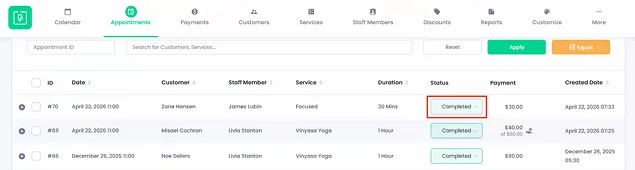
To make the calculations fully accurate, pending or cancelled bookings are not included in commission calculations.
Before enabling commissions, make sure your staff members are already assigned to services properly. Incorrect staff-service mapping can lead to inaccurate commission reports.
Setting Up Staff Commission
After activation, you can configure how commissions should be calculated for your business.
Enable global commission settings:
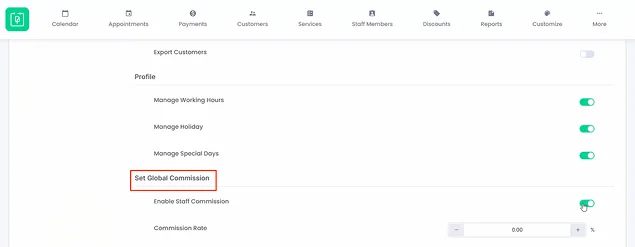
- Go to BookingPress → Settings
- Open the Staff Members tab
- Enable the Staff Member Commission option.
Then you can define a default commission percentage that applies to all staff members.
If your business offers services with different profit margins, avoid using one flat commission rate for everyone. Staff-specific commissions provide more flexibility and accuracy – more below.
Assign Different Commission Rates to Individual Staff Members
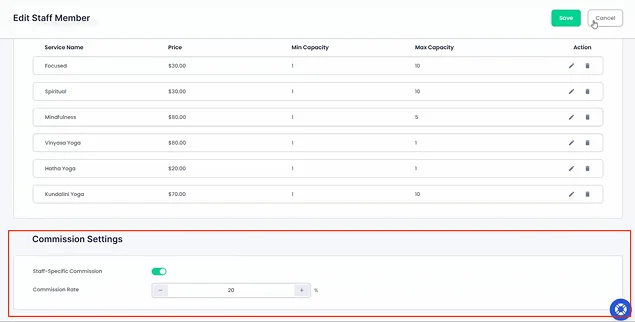
BookingPress also allows you to create custom commission percentages for specific team members. Here is how you can do this:
- Go to BookingPress → Staff Members.
- Click Add New or edit an existing staff member.
- Scroll to the Commission Settings section.
- Enable Staff-Specific Commission.
- Enter the desired commission percentage.
As you might have guessed, this overrides the default global commission setting for that particular staff member.
You can use staff-specific commissions to reward senior employees, specialists, or top-performing staff members without changing commissions for the entire team.
How to Check Staff Commission Reports
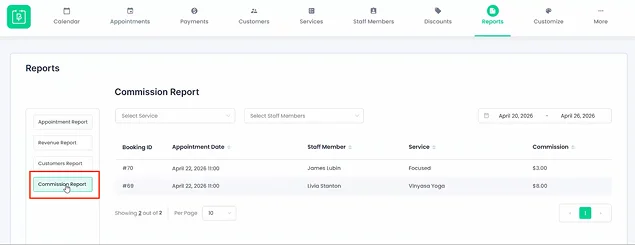
BookingPress allows you to access a dedicated reporting section where you can review commission details via BookingPress → Reports → Open the Commission Report section.
Here you can view important details:
- Booking ID
- Appointment date
- Staff member name
- Assigned service
- Earned commission amount
In this menu, it’s also easy to sort commission data from highest to lowest. You can also filter reports by staff member, service, and date range. You can use date filters at the end of each payroll cycle to quickly calculate payouts for weekly or monthly staff payments.
Allow Staff Members to View Their Own Commission
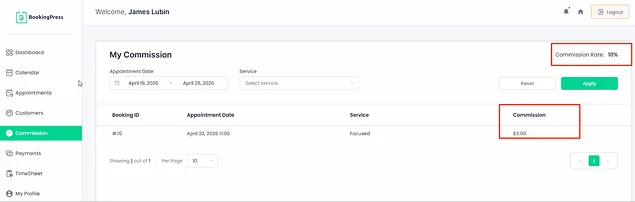
Another great thing is that you can also give staff members access to their individual commission records through the Staff Panel.
Give this access if you want to reduce admin inquiries and improve transparency within your business.
If you are looking to enable this visibility for them, customize it this way:
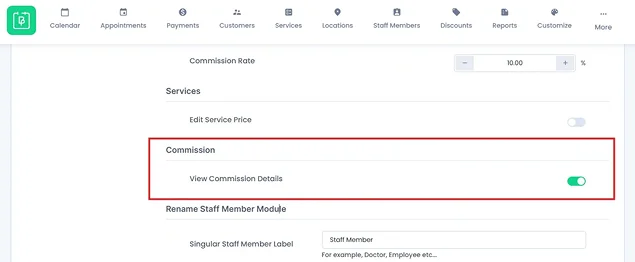
- Go to BookingPress → Settings
- Open Staff Member Settings
- Scroll to the Commission section
- Enable View Commission Details.
What does it change? Staff members will be able to log in and check their earnings directly from the Commission page inside their personal staff accounts.
Concluding: Reduce Manual Commission & Payroll Calculation With BookingPress
BookingPress covers basic staff compensation management with the dedicated Staff Commission add-on. But it’s not that plain if you look closer. The feature helps you deal with several important tasks for daily operations that can be solved with automatic calculations:
- Individual % for team/staff commissions.
- Overall business commissions (if you want to apply the same model for everyone).
- Detailed reports with IDs, staff, appointments and earned commissions.
- Commission reports for selected periods.
- Full commission disclosure to staff members (optional).
No need to do the manual staff commission calculations when you can hand that off to your BookingPress booking system.
Related articles:

 14-day money-back guarantee