If you are facing spam booking submissions, first up, you are not alone – they are very common on WordPress appointment systems as well as other forms and site builders. Attackers may flood the schedule with fake appointments, reducing availability, wasting admin time, and fully disrupting your workflow.
When the booking form is publicly accessible and can be submitted without much friction, it makes it an easy target for malicious actors. What you’re seeing is usually a mix of:
- automated bots,
- scripted spam campaigns,
- fake lead generation attempts,
- card-testing attacks.
But fear now – with the right protection, you can sleep safely.
In this article, we want to elaborate on how these spam bookings typically happen, how to distinguish them from legitimate bookings, and how to harden your BookingPress and WordPress site overall for better protection.
TL;DR: Fake bookings are caused by automated bots targeting public booking forms. The best way to stop them is to combine BookingPress spam protection features with CAPTCHA, verification steps, rate limitations and Cloudflare security.
Why Do Spammers Target Booking Forms?
Booking forms you use for collecting appointments are attractive because they often send emails, create database entries, trigger notifications, and sometimes allow payment attempts. Moreover, they usually have fewer protections than login forms.
Very often, bots scan the web for WordPress sites and automatically test forms. It might be related to SEO spam (when bots submit fake names, promotional URLs, spammy comments in order to inject links into admin emails or customer records to try to manipulate search engines), fake lead generations, or card testing attacks with stolen cards (very serious because payment gateways may flag your account).
How Fake Submissions Are Usually Generated
It’s important to understand that the vast majority of spam bookings are not typed manually.
Bots use automated scripts, headless browsers, form-submission APIs, AI-generated fake identities, or browser automation tools like Puppeteer or Selenium.
They can:
- bypass simple JavaScript,
- fill forms faster than humans,
- rotate IPs,
- mimic browsers.
Some advanced bots even solve weak captchas automatically (that’s why you can see captchas getting improved constantly).
Signs Of Spam VS Real Bookings
It might be that easy to identify spam bookings for sure; moreover, the sad reality is, spam is getting smarter and more realistic when AI is used, for example.
Still, you may learn and recognize some patterns of spam submissions.
Suspicious email addresses, for example:
- random strings,
- disposable domains,
- gibberish usernames (e.g. js83jd83[at]gmail.com)
Unrealistic names
See keyboard-smash names or duplicated first/last names? AI-generated generic names? These can be spam indicators.
Very fast submission time
If the booking is submitted within 1–3 seconds of page load, it’s probably automated. Humans need time to choose services, read dates, and enter information.
Multiple bookings from same IP
Watch for repeated submissions for the same IP and same time intervals.
Weird time patterns
Bots often submit 24/7, in bursts and target random dates/times.
Invalid phone numbers
Today many booking forms have validation systems in place to protect from invalid 123456789, repeated digits, or missing country logic, but smart AI bots can still use realistic phone numbers.
No interaction history
Real users, especially repeated ones, may create accounts to return later and reschedule, but spam submissions are quite often a one-time play.
BookingPress Spam Protection You Should Enable
BookingPress, as a popular WordPress appointment scheduling plugin, cares about your protection. With the variety of add-ons available with premium plans, you can integrate the level of protection that you feel comfortable with.
1. Cloudflare Turnstile (Recommended)
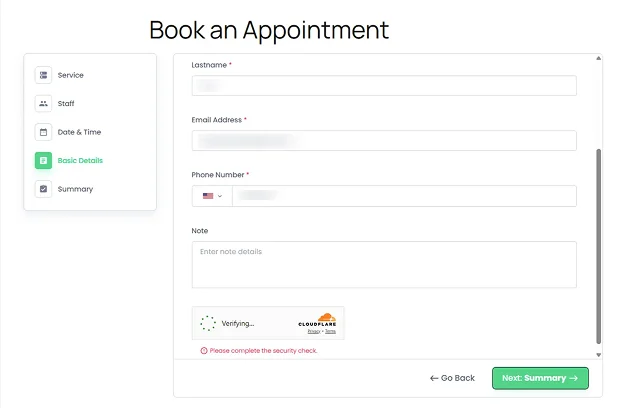
The best first defense is the BookingPress Turnstile CAPTCHA add-on. What’s important, it’s free to use with any BookingPress plan!
Why Turnstile is worth using as the first choice:
- less annoying than reCAPTCHA,
- privacy-friendly,
- strong bot detection,
- invisible to most humans,
- blocks many automated submissions.
In many cases, Turnstile is usually better than Google reCAPTCHA. Google reCAPTCHA v2/v3 is widely targeted by bot-solving services and can annoy users, which sometimes hurts conversion rates.
Cloudflare Turnstile, on the contrary, uses behavioral analysis, has fewer user challenges, and performs very well against modern spam.
So, our recommendation is:
- Prefer Turnstile first.
- Use reCAPTCHA only if Turnstile alone isn’t enough.
Cloudflare Turnstile integration instruction
2. Google reCAPTCHA
The BookingPress Google reCAPTCHA add-on is nice to add as an additional hurdle to reduce simpler bot attacks. This is a very traditional and common way to protect your forms on the most basic level.
Best practice of using it with BookingPress:
- Use invisible or checkbox versions.
- Avoid overly aggressive scoring that blocks real customers.
3. Two-Factor Authentication / OTP Verification
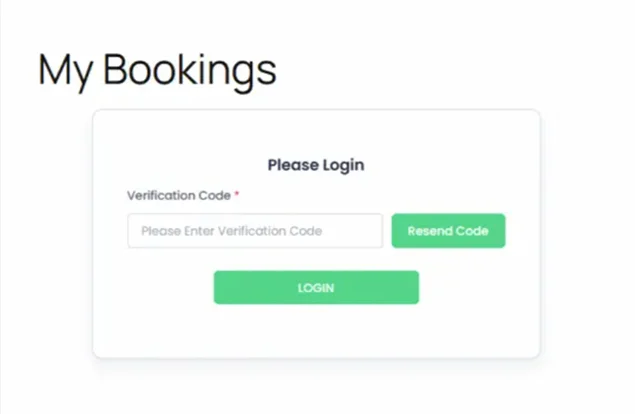
BookingPress Two-Factor Authentication Integration is another effective way to fight spam booking submissions when spam becomes serious.
It has a smart built-in system to verify email, phone number, or OTP (automatically generated one-time passwords) before confirmation.
Since bots don’t control real inboxes and don’t control real phone numbers, this can reduces fake bookings .
Enable OTP verification for:
- high-value appointments,
- long-duration bookings,
- payment-required services,
- businesses heavily targeted by spam.
4. Require Customer Accounts
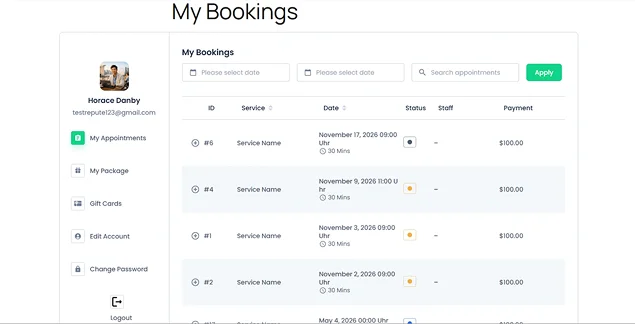
The BookingPress Customer Panel allows your site to have a customer account system for people who make a booking – and this is one of the strongest anti-spam methods.
How can it help you to stop fake submissions?
- repeat customers become identifiable,
- suspicious users can be blocked,
- booking history becomes trackable,
- fake one-off submissions decrease.
For higher-risk businesses, require account registration before booking and verify email before first appointment to eliminate massive amounts of spam.
5. Add Custom Fields
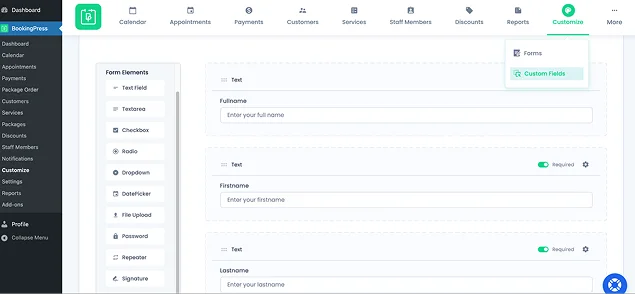
BookingPress’ checkout forms are pretty flexible – you can add custom fields that can help distinguish humans from bots. Which ones can you use?
File Upload
A file upload field can be effective because many automated bots are designed to fill text fields but not upload files. However, this works but only when a file makes sense for the service.
You may also ask for verification documents in some cases:
- Upload a referral document
- Upload a project brief
- Upload an insurance card
- Upload a photo
- Upload a proof-of-purchase document
Major bots aren’t programmed for complex uploads. They will fail when uploads are required.
Signature Field
While less appropriate for quick consumer bookings, a signature field creates additional friction that many bots cannot easily complete. For example: “I confirm this booking request is genuine.”
The user signs before submitting, which may:
- Stop simple automated scripts.
- Create a stronger commitment from the customer.
- Help reduce casual fake submissions.
Password Field
Well, bots can enter passwords just as easily as humans. But it may help as part of extra verification you’ve handled in advance. Then you’re not relying on the password field itself; you’re relying on the account system.
Use the BookingPress customer account functionality and require:
- Account registration
- Login before booking
That creates a much stronger barrier.
BookingPress Custom Fields Documentation
6. Enable Email Confirmation Before Approval
Auto-approving your bookings saves time and makes the process very convenient for customers. But if you face fake submissions, it makes sense to reset the plugin settings to manual approval for first-time users (via Settings > Default Appointment Status > Pending).
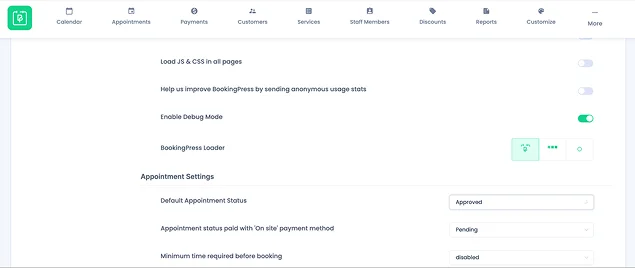
Expensive appointments and limited-capacity schedules will win from this procedure.
7. Enable Payment Deposit
Payment deposits in BookingPress (Settings >Payments>Deposit) help combat spam because they add a financial cost to making a booking.
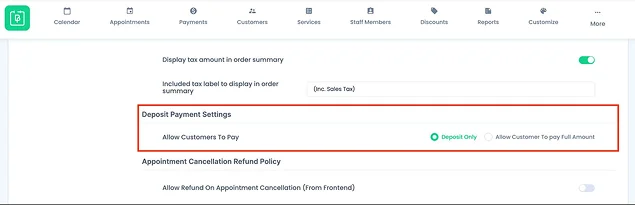
With a deposit, each booking requires a real payment method. Most automated spam bots won’t complete the payment step.
For example, a small fixed fee (e.g. $5-$20) can eliminate a large percentage of fake bookings while remaining acceptable for legitimate customers. Moreover, customers who pay even a small amount are more likely to attend or cancel properly.
But please note that it’s not a complete anti-spam solution – card-testing bots and determined attackers can still attempt bookings, but when combined with CAPTCHA, email/OTP verification, and account registration, deposits become a very effective deterrent.
Website-Level Protections
Even though BookingPress tries to provide you with all possible ways to protect your site, plugin-level protection alone is usually not enough. Here are a few more tips to protect your forms from spam bookings on the website and hosting level.
1. Put The Site Behind Cloudflare
Cloudflare is one of the top-used platforms in the world to block malicious bots, rate-limit requests, challenge suspicious traffic, filter abusive countries/IPs, and detect automated browsers. This is one of the biggest improvements you can make for a site where you have a booking submission form.
Some of the recommended Cloudflare features to enable for a booking site:
- Bot Fight Mode,
- WAF (Web Application Firewall),
- rate limiting,
- managed challenge pages.
2. Add Rate Limiting
Limit bookings per IP, submissions per minute, and repeated failed attempts on a site level (can be done via Cloudflare or via the hosting server). You may also try security plugins with rate limiting, such as All In One WP Security & Firewall.
3. Use a WordPress Security Plugin
There are too many WordPress security plugins and you should do your research as for the pricing and features. Good options include:
- Wordfence
- Sucuri
- Kadence Security
These help with blocking bad IPs, detecting brute-force attacks, and monitoring suspicious traffic.
4. Block Disposable Email Domains
Many spam bookings use temporary emails. So, if you use services/plugins that can block that, e.g. Guerrilla Mail, Mailinator, TempMail, they can reduce fake submissions.
Concluding: How To Stop Fake Booking Requests And Spam Submissions
There are many things you can do to reduce or fully stop fake bookings on your site. However, you don’t need to stack too many captchas or methods – choose one that suits your current situation. Using Turnstile, reCAPTCHA, login captcha, OTP verification – all together can frustrate your real customers. Usually a Turnstile with smart filtering may be enough.
So, here is a recommended “balanced” layer for websites using BookingPress:
Basic protection
- Cloudflare Turnstile Captcha
- Cloudflare Bot Protection
- rate limiting
- manual booking confirmations via the plugin settings.
Medium-security setup
- Turnstile
- required customer account
- OTP/email verification
- custom anti-spam fields
- Cloudflare WAF
High-security setup
For clinics, consultants, legal services, high-ticket bookings:
- mandatory account creation,
- OTP verification,
- payment deposit,
- manual approval for first appointment,
- Turnstile,
- Cloudflare WAF/rate limiting,
- disposable email blocking.
The strongest anti-spam approach is layered bot detection, identity verification, deposit payment commitment, rate limiting, account reputation, and behavioral analysis. All these will help you drastically reduce spam bookings and fake submissions.
Related articles:
 14-day money-back guarantee