

What’s your take on last-minute appointment bookings? For many of your fellow service providers, it’s a double-edged sword: on one hand, they help fill empty calendar slots and increase revenue, but on the other, there are disrupted schedules, overwhelmed staff, and increased risk of no-shows or rushed service.
We’ve created this guide to help you handle late bookings efficiently, whether you run a salon, wellness center, or coaching business.
Particularly, in this guide, we’ll cover:
- Common reasons customers make last-minute bookings
- Traditional ways businesses manage them
- Smart scheduling strategies to reduce disruption
- How BookingPress add-ons can help automate and optimize the process.
TL;DR: To handle last-minute bookings, you can use smart scheduling strategies and BookingPress features like waitlists, deposits, reminders, recurring appointments and flexible service durations.
Why Customers Make Last-Minute Bookings
You can’t find a good solution to the problem if you don’t know the reason for the latter.
So, let’s start understanding how to handle urgent appointments smoothly by identifying typical clients who make such bookings.
1. Emergencies and urgent needs
For some businesses, such appointments are pretty normal – dental clinics, for example. Or, customers may suddenly need a repair service, urgent consultation, or grooming appointment before an event.
Normally, a business response and preparation to such bookings includes:
- Reserving emergency time slots
- Charging rush fees
- Prioritizing loyal customers
- Using waitlists to fill cancellations quickly.
2. Customers forget to book earlier
Many people delay scheduling until the last minute due to busy lifestyles or simple procrastination.
Many businesses do the following in this case:
- Send reminder emails and SMS
- Encourage advance rebooking
- Offer recurring appointment plans
- Reward early bookings with discounts.
3. Sudden availability in the customer’s schedule
Remote work, canceled meetings, or unexpected free time often lead customers to book appointments on short notice. In this case, a traditional way of keeping calendars updated in real time helps, supported by automated confirmations and reminders.
4. Fear of commitment
This is one of the most common reasons – some customers hesitate to commit to a full booking in advance. This can be uncertainty about schedules, pricing, or cancellation policies.
What can you do in this case? Offer flexible rescheduling, minimize payment obligation at this stage (e.g. with deposits), and state simple cancellation policies.
5. Businesses trying to fill empty slots
Last-minute bookings are also valuable for businesses. Empty appointment slots are lost revenue opportunities. To fill them up, you can maintain cancellation waitlists, run last-minute promotions, offer dynamic pricing, and extend availability during peak demand.
Challenges You May Face With Last-Minute Bookings

Some offices are craving for bookings, even last-minute ones. However, late appointments can not just boost revenue, but also create operational challenges like…
- Schedule disruptions (unexpected bookings can create back-to-back appointments without enough preparation time).
- Increased no-shows (customers who book impulsively may cancel more often).
- Staff burnout (pressure on employees increases and they may reduce service quality).
- Uneven workloads (some days become overloaded while others remain under booked).
Many of those can be fixed and improved with the help of automation and flexible booking systems with real-time availability and inventory updates.
How to Use BookingPress to Handle Last-Minute Bookings
As we’ve mentioned, in many cases you just need a smart scheduling tool that can turn any last-minute booking into an opportunity, also increasing occupancy and revenue without overwhelming your team.
Both integrated functionalities and add-ons from BookingPress allow you to manage urgent appointments and keep a smooth schedule. Let’s take a look at some of them.
More Slot Flexibility With The Custom Service Duration Add-on
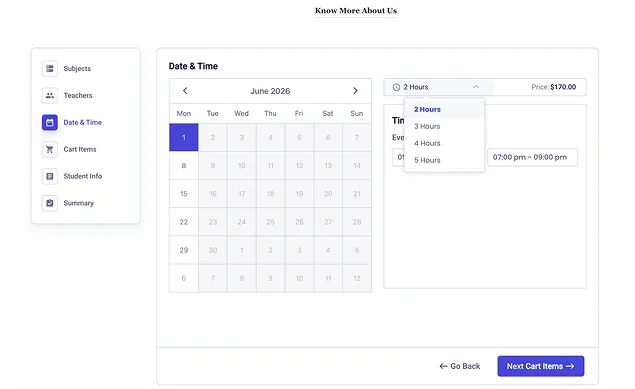
Last-minute customers often need flexibility – not only fixed appointment slots. The Custom Service Duration add-on allows customers to choose how much time they need for a service directly during booking. For example, massage sessions can vary by duration or a coaching session can be extended based on customer needs. Customers can choose shorter or longer sessions depending on availability.
For example, if only a 30-minute opening is available before another appointment, customers can still book a shorter service instead of leaving the slot empty.
The plugin automatically adjusts pricing based on the selected duration in the booking form.
Using this approach, you’ll fill small gaps between appointments, avoid wasted calendar space, accommodate urgent requests without fully disrupting the day, and can even increase revenue through dynamic pricing.
Deposit Payment Add-on To Reduce Upfront Payment Rrequirements
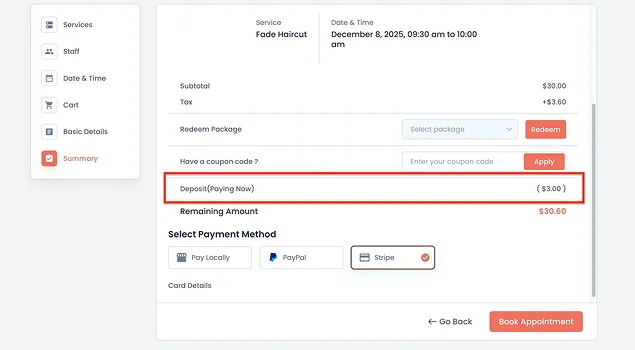
With one small feature, you’ll reach a balance between flexibility for customers and protection for the business. How? The Deposit Payment add-on for BookingPress allows customers to pay only a partial amount during checkout instead of the full service price upfront.
We’ve already mentioned the reasons that customers making urgent or impulsive bookings are often more hesitant to commit to a large upfront payment. Deposits reduce this! The checkout then feels easier and faster.
This small feature can significantly improve conversion rates for last-minute appointments because:
- Customers feel less financial pressure
- Booking decisions happen faster
- The checkout process becomes less intimidating
- You still receive commitment from the customer.
At the same time, deposits help reduce no-shows because customers have already invested financially in the appointment.
Waiting List Add-on To Fill Empty Slots In Advance
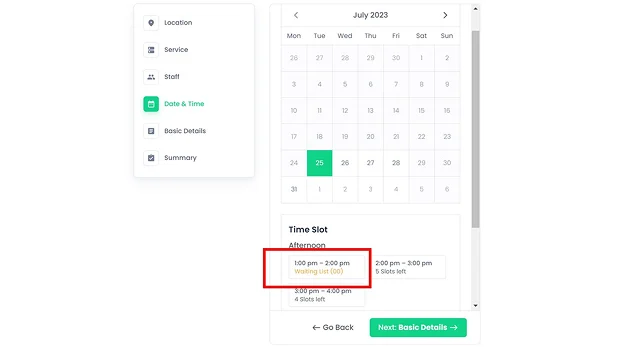
The Waiting list add-on allows customers to join a waiting list when appointment slots are unavailable. If a cancellation occurs, the plugin can notify waiting customers automatically.
Cancellations are one of the biggest challenges in appointment-based businesses. Without a waitlist, empty slots often remain unfilled. Such a list usually helps to:
- Fill canceled appointments quickly
- Recover lost revenue
- Keep staff schedules productive
- Maximize appointment occupancy
It also improves the customer experience by giving clients another chance to book an appointment, even when things are busy. And for those with urgent needs, being able to join a waitlist feels much better than just seeing a “fully booked” message.
Send Reminder Emails And SMS
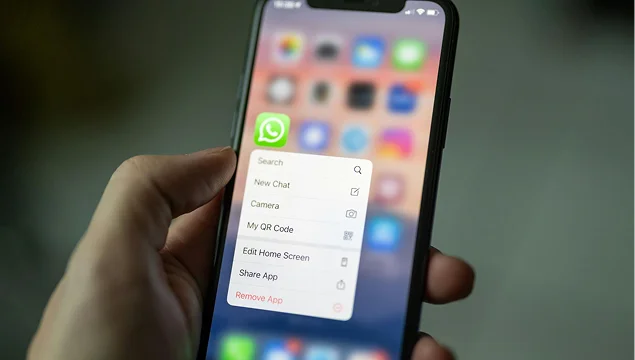
Automated confirmations and reminders are one of the ways to handle such schedules.
Automated reminder emails and SMS messages create a real-time communication loop that keeps your calendar accurate and predictable. They may also contain (if you add them) automated warnings and explicitly state your cancellation and rescheduling deadlines. If a client cancels via a text link, the slot opens instantly for another last-minute booker.
Here are a few more benefits:
- Staff can start the appointment on time without administrative lag.
- Staff get immediate alerts if a last-minute client needs to change plans.
- Automated texts keep phone lines clear for actual emergencies.
With BookingPress, you can easily connect any way to send automated reminders – through SMS, Telegram, WhatsApp, or email.
Offer Recurring Appointments To Proactively Fill Schedule Gaps
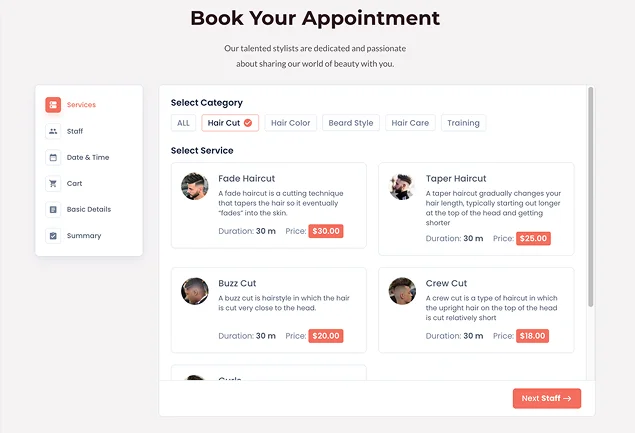
The BookingPress Recurring Appointments add-on helps handle last-minute appointments by proactively filling schedule gaps in advance, automating conflict resolution, and preventing chaotic schedule overlaps.
One of its greatest advantages is instant alternatives: if a last-minute client attempts to book a series of recurring appointments and hits a slot that is already taken, the plugin will offer the nearest open time slot on that same day.
Additional Strategies to Reduce Scheduling Disruptions
Booking software with its powerful automation can significantly help you take the most out of last-minute appointment bookings without headaches. But trying to combine them with operational best practices can create even better results.
- Keep buffer times between appointments
Small breaks between bookings are easy to add with software like BookingPress – it will reduce stress and provide flexibility for overruns or urgent appointments.
- Use automated notifications
Reminders help reduce forgotten appointments and last-minute cancellations.
- Encourage advance booking
Offer loyalty perks or discounts for customers who schedule ahead of time. Sell packages and gift cards to diversify purchase options.
- Part-time workforce
With last-minute bookings, it’s often hard to know how many staff members you need. Part-time workforce can help you cover some needs.
- Fast response times
Some people compare options right before booking (beauty services, hotels), so when you can react fast, you can handle last-minute bookings easier.
Concluding: How to Handle Last-Minute Bookings Without Disrupting Your Schedule?
If last-minute bookings are part of how your customers behave, you may turn those operational inconveniences into real revenue without much struggle.
First and foremost, a flexible scheduling system is what you need, including automated tools, smart booking policies, reminders, and marketing tricks to turn late appointments into an advantage instead of a disruption.
With BookingPress and its scheduling add-ons, you may forget about disruption and smooth your operations thanks to:
- Manage urgent bookings more efficiently
- Reduce empty calendar slots
- Improve customer flexibility
- Lower no-show risks
- Maintain smoother daily operations.
Related articles:
 14-day money-back guarantee