Seeking a practical guide on writing a meeting rescheduling email?
It’s crucial to know how to deal with such emails without sounding unprofessional, annoyed, or vague.
Or you might be managing appointments for a business – then it’s even more important! Such emails can help you reduce those sinister no‑shows and eliminate the need to spend all your time on a single client.
We’re sure you’ll find all you need in this tutorial, especially if you…
- Frequently schedule meetings or calls.
- A business owner handling client appointments.
- A team member responsible for customer communication.
- Want to use booking or scheduling software.
So, time to elaborate on when reschedule emails are used, why they matter, how to write them well, and even get them automated!
When Are Meeting Reschedule Emails Used?
Meeting reschedule emails are used whenever a previously confirmed meeting or appointment needs to move to a new date or time.
The key thing is to accept it mentally – it’s a natural part of the process and not something to be ashamed of.
Is it your scenario? Let’s see. Common situations you may relate to:
- Unexpected conflicts (overlapping meetings, staff shortages).
- Illness or emergencies.
- Delays and external reasons.
- Client‑requested changes.
- Technical issues (internet outages, platform failures).
- Operational changes (shift updates, instructor replacement).
As you know, they apply to both one‑on‑one appointments and group meetings, across industries, from salons and clinics to SaaS companies and educational institutions. So it’s great to have a few meeting reschedule email templates at hand.
The 3 Core Functions of a Rescheduling Email

A good meeting reschedule email always does three things:
1. Communicates change clearly
You don’t want to waste the time of your clients or confuse them.
Your email must confirm that the original meeting will not happen as planned and should remove ambiguity. Without this clarity, people may still show up or assume the meeting is canceled entirely.
2. Preserves the relationship
How you reschedule matters more than why you reschedule. Don’t let the process feel inconvenient or even disrespectful. The best meeting reschedule email lets the other person know you understand this change affects them, and that you don’t take their time for granted.
3. Guides the next step
The next action or incentive must be obvious! Whether you’re proposing a new time, offering options, giving bonuses, or sharing a reschedule link, the email should contain this next step. This helps to speed up the entire scheduling process.
Best Practices for Writing a Meeting Reschedule Email

Let’s now decode the sense and structure of a meeting reschedule email with a few strategic tips! And to understand the details, let’s break it down into an understandable formula.
Visual Best Practices
Chunking works best on human brains, so we recommend this:
- Use short paragraphs (1–2 lines) – modern people don’t read every word.
- Highlight new dates or times using preferred formatting – like bold or italics.
- Avoid long storytelling.
- Include links or buttons when possible.
Structural Best Practices
A functional meeting reschedule email usually follows this flow:
- Clear subject line (mentions reschedule).
- Brief acknowledgment or apology (if appropriate).
- Explanation – short and optional, through.
- New proposed time(s) or next step.
- Confirmation or call to action.
Language Best Practices
And final brushes – your tone and choice of language:
- Your tone and voice should be relevant to your previous communication and relationship.
- Sound polite, calm, and confident.
- Avoid over‑apologizing.
- Don’t overshare details.
- Use active language (“Please choose a new time”).
Common Mistakes of Writing a Professional Meeting Reschedule Email
Mistakes happen even in such a simple thing as writing a meeting reschedule email. Try avoiding them:
1. Being vague (“We’ll need to move our meeting”)
Without dates, options, or next steps, this creates confusion and follow‑ups.
2. Over‑explaining (“I wanted to explain in detail that my internet was unstable this morning, then my earlier call ran over, and after that I received an urgent internal request…”)
Long justifications? May sound defensive or unprofessional.
3. No clear call to action (“I need to reschedule our call originally planned for Tuesday. Thanks!”)
If the recipient doesn’t know whether to reply, wait, or click something, the process just stalls.
4. Forgetting time zones or formats (“Let’s meet tomorrow at 10:00.”)
Think about remote teams and international clients.
The Modern Approach to Automated Meeting Rescheduling
In our times, many businesses now automate scheduling and rescheduling through online booking systems embedded into their websites.
In WordPress, these are known as booking plugins, with BookingPress among the most chosen solutions.
So, which businesses automate scheduling with software like this?
- Salon, wellness, and beauty professionals
- Coaches and consultants
- Fitness trainers and studios
- Schools and tutors
- Medical and wellness practices
- SaaS and tech companies (demos, onboarding calls).
So, how does it work and do you need this for rescheduling tasks? It works for both sides and might look slightly different:
Clients can initiate rescheduling. The process with a booking plugin like BookingPress is pretty much like so:
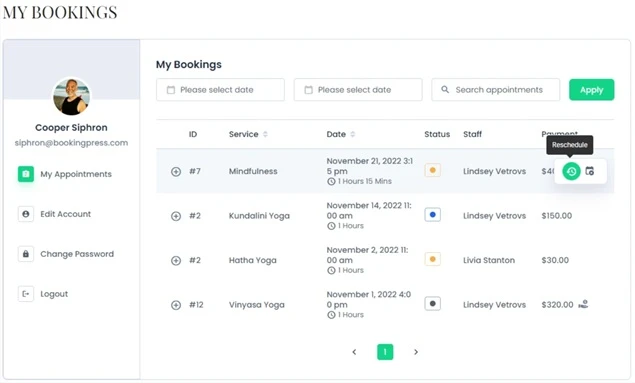
- Client receives a booking confirmation email.
- Email can include reschedule and cancel links / or they can access it in their accounts.
- Client selects a new available time.
- System updates the calendar automatically.
- Confirmation and reminder emails are triggered.
Businesses can also do that for their own reasons or at their client’s request:
- Business changes availability or cancels a time slot.
- Affected appointments are updated in the system.
- Clients receive automatic reschedule notifications.
- Clients choose a new time (if required).
Cancellations and email automation for rescheduling through BookingPress frees the canceled time slot, updates staff calendars, sends cancellation confirmations, and the cool stuff – triggers follow‑up or rebooking emails!
BookingPress also allows you to create custom email templates, fully editing their content and sending options:
- Customize reschedule and cancellation emails.
- Adjust tone and branding.
- Add dynamic variables (date, time, staff name).
You don’t need to manually rewrite emails every time; the plugin handles it all, including changes to already‑booked meetings.
15 Meeting Rescheduling Email Examples
Here are various meeting reschedule email examples that will rescue you in many situations! Just copy and adjust.
1. Salon (Short & Friendly)
Subject: Appointment Update
Hi [Client],
We need to reschedule your hair appointment originally set for June 12 at 3:00 PM.
Please use the link below to pick a new time that works for you.
Thanks!
2. Salon (Medium & Warm)
Subject: Let’s Reschedule Your Appointment
Hi [Client],
Due to a staff scheduling change, we’ll need to move your appointment on June 12 at 3:00 PM.
You can easily choose a new time using the link below. We apologize for the inconvenience and look forward to seeing you soon.
3. Tech Industry (Direct & Professional)
Subject: Meeting Rescheduled – Product Demo
Hello [Name],
Our product demo scheduled for May 18 at 10:00 AM PST needs to be rescheduled due to an internal conflict.
Please select a new time via the scheduling link below.
Best regards,
4. School / Coaching
Subject: Coaching Session Update
Hi [Name],
Unfortunately, I need to reschedule our coaching session planned for Thursday at 4 PM.
Please let me know which of the alternative times works best for you.
Thank you for your flexibility.
5. School (Formal)
Subject: Change to Scheduled Class Meeting
Dear Students,
Due to unforeseen circumstances, our class meeting scheduled for March 22 at 9:00 AM will be rescheduled.
Updated details and available alternatives are provided below. Please confirm your availability at your earliest convenience.
6. Meeting Reschedule Email Because of Technical Issues
Subject: Meeting Reschedule Due to Technical Issues
Hi [Name],
Due to a temporary technical issue, we need to reschedule today’s meeting.
Please use the link below to select a new time.
7. Client‑First Flexibility
Subject: Choose a New Time That Works for You
Hi [Name],
Something came up on our end, so we’d like to offer you the flexibility to choose a new meeting time that suits you best.
8. Apology‑Forward Approach
Subject: Apologies – Meeting Needs to Be Rescheduled
Hi [Name],
I sincerely apologize, but I need to reschedule our meeting originally planned for today.
Thank you for your understanding.
9. Ultra-Brief Automated Reschedule Email Notice
Subject: Appointment Rescheduled
Your meeting scheduled for July 8 at 11:00 AM has been rescheduled.
View updated details or choose a new time using the link below.
10. Friendly Reminder-Style Meeting Reschedule Email Example
Subject: Quick Update on Our Meeting
Hi [Name],
Just a quick note to let you know we need to move our meeting originally planned for Friday at 2 PM.
You can pick a new time here whenever it’s convenient for you.
11. High-Stakes Executive Reschedule Meeting Email
Subject: Rescheduling Today’s Meeting
Hi [Name],
Due to an unavoidable conflict, I’ll need to reschedule our meeting set for today at 1:00 PM.
My apologies for the short notice. My assistant will follow up with alternative times shortly.
12. Casual Internal Team Update
Subject: Moving Today’s Sync
Hey team,
We’ll need to move today’s sync to a later time.
I’ve sent a new calendar invite for 3:30 PM, please accept when you get a chance.
13. Client-Facing Branded Notification
Subject: Update to Your Scheduled Appointment
Hello [Name],
This is a quick update from [Business Name] regarding your upcoming appointment.
Your session has been rescheduled. You can review the new details or select a different time using the button below.
14. Emergency Same-Day Reschedule
Subject: Urgent: Today’s Appointment Needs to Be Rescheduled
Hi [Name],
Due to an unexpected situation, we need to reschedule today’s appointment.
We sincerely apologize for the inconvenience and appreciate your understanding. Please choose a new time using the link below.
15. Group Meeting Change Announcement
Subject: Update: Team Meeting Rescheduled
Hi everyone,
Our team meeting scheduled for Wednesday at 10:00 AM has been moved to Thursday at 11:00 AM.
An updated calendar invite has been sent. Please reach out if you have any conflicts.
In Summary: How to Reschedule Meetings Professionally
Rescheduling a meeting or appointment should be a demonstration of your professionalism and willingness to help.
Make your subject and message clear, give it a thoughtful structure, and use the right tools to automate the sending of such emails. Using plugins like BookingPress, you can allow clients to self-reschedule meetings (and get automated emails) or send more personalized emails manually. Don’t miss a chance to automate your professional meeting emails!
Related blogs:


 14-day money-back guarantee