

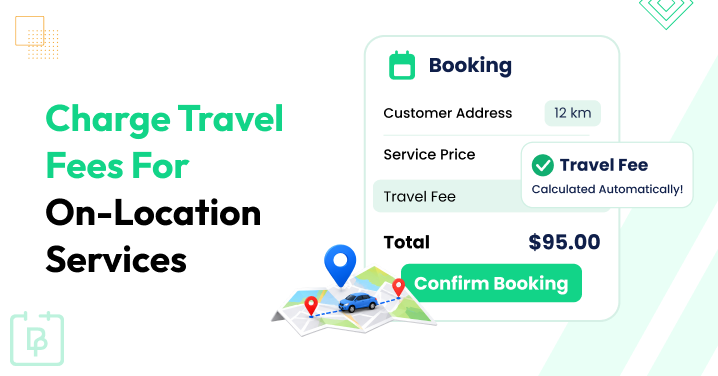
Traveling to customers’ locations is one of those extra responsibilities that comes with running an on-location service business.
Customers pay for the service, but what about the fuel, transportation and time you spend reaching their location? As your appointment calendar fills up, these travel expenses can quickly add up which makes every on-location appointment a little more expensive to manage.
Not charging customers for these expenses means you’re indirectly lowering your own business profits. And calculating different travel charges manually for every appointment just makes the whole booking process more complicated.
Automating travel fee calculations is one of those methods that makes managing these expenses much easier. It’s basically about letting your booking system calculate the travel charges based on distance, travel time or customer location, and automatically add them to the final booking amount.
Luckily, the BookingPress Distance Cost Calculator Addon automates this complete process – from calculating driving distances to applying travel fees and showing accurate totals during checkout.
Want to set it up? Then read further.
TL;DR: When offering on-location or home services, you can charge customers for travel expenses using a flat fee, mileage, travel time, or location-based pricing. With BookingPress Distance Cost Calculator Add-on, you can automate these charges based on driving distance, travel time, or customer postcode and add them directly to the booking total.
Why Should You Charge Customers For Travel Expenses?
Many service business owners hesitate before charging for travel time and expenses. Why? because they’re afraid of losing customers to competitors who may not charge any travel fee.
Surely, there are many different ways to decide whether to bill for the time you spend travelling to your client’s location, but as a business owner, here’s one thing you must always keep in mind:
Time and Effort Have Their Price!
You’re travelling, driving to a customer’s location by using your own vehicle and burning up your own gas, and this all cuts from your profit if you don’t charge any extra travel fee. Maintenance of your vehicle, cost of gas, your time – none of these is cheap.
In simple words, here are the reasons why you should charge customers for travel expenses:
- Gas and car upkeep add up: Driving burns fuel, wears down your tires and puts miles on your car. Thus, if you don’t recover those costs, your profits are going to shrink.
- Time is your product: Sitting in traffic or driving out to a location at the end of town means you can’t work on other services or see other clients during those hours.
- No surprises on the bill: When you set a clear rule such as flat trip fee or per mile rate discussed and calculated beforehand, everyone stays on the page.
- Fairness for local vs distant jobs: If you don’t charge for travel, your local clients end up subsidizing the gas and time you spend driving out to far-away clients.
Now let us show you how to charge clients for mileage in different ways.
Different Ways To Charge Customers For Travel Expenses
Not every service business has the same travel requirements. Some businesses visit customers within a limited geographical area and others travel several miles to offer their services.
Thus, based on your business type, travel distance and transportation costs, you can pick different ways to charge customers for these extra travel expenses.
1. Charge a Flat Travel Fee

If your service business serves customers within a limited area only, charging a fixed travel fee for every appointment is one of the easiest methods.
And, with this approach, you just have to set a fixed amount that customers need to pay whenever they book an on-location service (regardless of the actual distance).
For instance, you can set your travel charges like this:
- Withing 2 miles: $0
- Within 5 miles: $10
- Withing 10 miles: $20
- Withing 20 miles: $35
Best for: Cleaning services, beauty professionals, mobile therapists and businesses serving in a limited area only.
2. Charge Customers Based On Mileage
If your business covers different travel distances (like even out of town, sometimes), then calculating charges based on mileage is another practical option.
Here you simply decide how much you want to charge per mile and calculate the final travel fee based on the distance between your business location and the customer’s address.
For instance, you charge $2 per mile and your customer’s location is 15 miles away.
15 × $2 = $30 travel fee
Apart from that, you can decide whether to charge for one-way or round-trip mileage.
Best for: Contractors, mechanics, photographers, mobile repair professionals and other businesses covering different travel distances .
3. Charge Based On Travel Time

Sometimes distance alone doesn’t tell you how much it actually costs to reach a customer’s location. Traffic, road conditions, busy city routes and many other factors can make even a simple short journey take longer.
For example, in Los Angeles, travelling just 26 miles from Woodland Hills to Downtown LA can take around 1.5 hours during peak traffic. Despite the short distance, the driver spends a LOT more time on the road.
Thus charging based on travel time rather than distance alone makes sense. This even accounts for traffic congestion, delays and the actual time spent reaching the customer’s location.
For instance, your service business charges $1.50 per minute and reaching the customer’s location takes around 20 minutes.
20 × $1.50 = $30 travel fee
Best for: Mobile professionals working in busy cities, contractors and service providers covering large areas.
4. Charge Different Fees Based On Location or Postcode

If your business serves customers across different cities, suburbs or neighbourhoods, simply divide your service areas into different zones and assign a fixed travel fee to each one – making calculation a lot easier for everyone included – you, your staff and your customer.
For instance:
| Service area | Travel fee |
| City centre | $10 |
| Nearby suburbs | $20 |
| Outer suburbs | $35 |
| Outside service area | Not available |
Furthermore, you can also decide which areas your business serves and prevent customers from booking appointments outside your available service locations.
Best for: Cleaning companies, home service providers and businesses serving multiple neighbourhoods.
How To Calculate And Invoice Travel Expenses Correctly?
Because no customer likes unexpected charges, it’s always better to have a proper travel-pricing structure before accepting on-location appointments.
Thus here are a few things to keep in mind:
- Calculate Your Actual Travel Costs. Start by taking the following into your calculations – your fuel expenses, vehicle maintenance, parking fees and other transportation costs to decide how much you need to charge to recover your expenses.
- Choose Your Travel Pricing Method. Decide whether you want to charge customers a flat fee, mileage charges for business, travel time fees or different amounts as per their location.
- Consider One Way or Round Trip Travel. If you also have to return to your business location after completing an appointment, decide whether your travel charges should include the return journey
- Set a Minimum Travel Fee. Even shorter journeys burn gas. Setting a minimum fee makes sure you’re not spending more on travel than you’re actually recovering.
- Set Your Maximum Service Distance. Decide how far your staff members are willing to travel for an appointment. This avoids you from accepting bookings that may not be profitable.
- Consider Taxes, Discounts and Refunds. Decide how travel fees should be handled when customers apply coupons, pay taxes or cancel their appointments.
For instance, let’s say you’re a contractor offering repair services at customers’ homes. You charge $2 per mile and a customer is located 20 miles away from your business.
Your invoice can add the travel expenses separately like this:
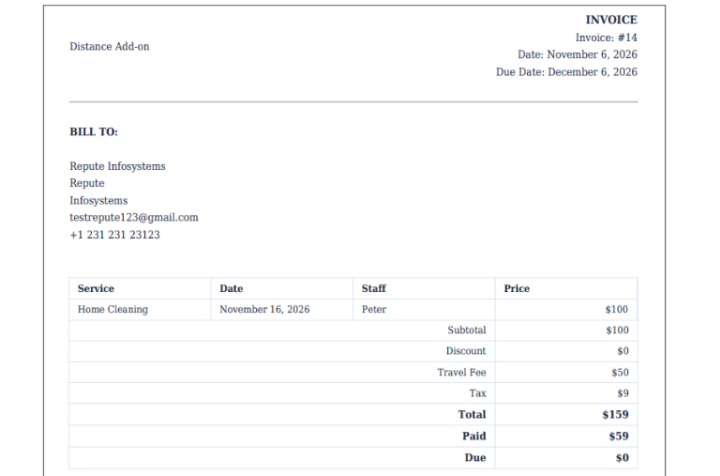
Thus customers can clearly understand how much they’re paying for the actual service and how much goes towards your travel expenses.
However, calculating these charges and updating invoices manually for every appointment can become quite repetitive.
In our age and day, when charging for travel expenses, I used to ensure all calculations and invoices were correct by hand (easily wasting hours every week). However, nowadays, all that is automatically calculated with full accuracy with booking systems like BookingPress. No extra paid addon. No third-party tool.
Want to automate the complete process? Let’s see how BookingPress makes it easier.
How To Automatically Charge Customers For Travel Expenses Using BookingPress?
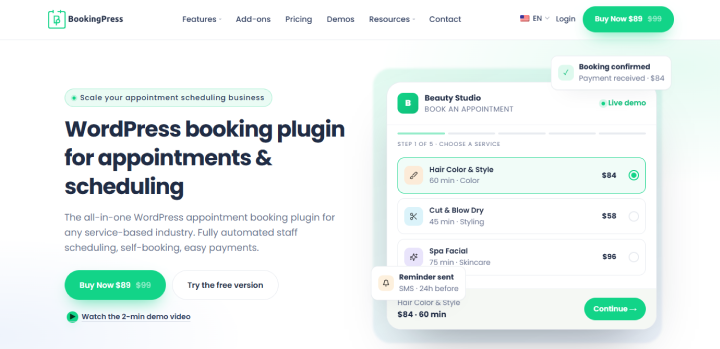
Calculating travel expenses for every new booking can get tiring when you have plenty of appointments already on your plate. The BookingPress Distance Cost Calculator Addon makes this much easier by calculating the fees automatically. No more checking distances or postcodes and adding travel costs manually.
The best part? You don’t need any third party tools to manage these calculations. BookingPress lets you set everything directly from your WordPress dashboard.
How To Activate The Distance Cost Calculator Addon
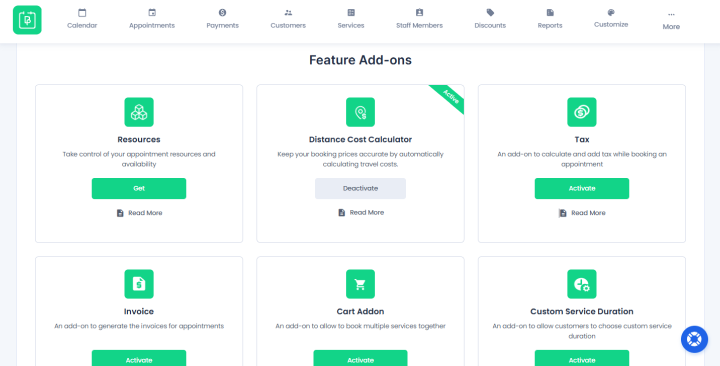
First off, you gotta activate the Distance Cost Calculator Addon.
- Go to the BookingPress → Add-ons
- Find the “Distance Cost Calculator” addon under the Feature Add-ons
- Click the “Activate” button
The addon is available with BookingPress Pro 6.4.1 or later.
Configure General Settings
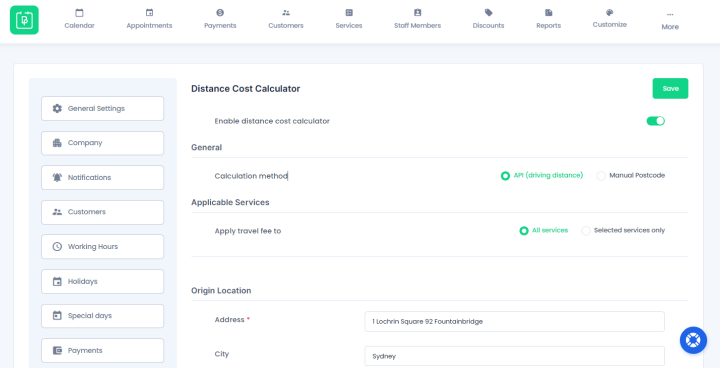
After activation, open BookingPress → Settings → Distance Cost Calculator.
Here you can enable the calculator and choose how you want BookingPress to calculate travel expenses.
You get two different calculation methods:
- API (Driving Distance) calculates travel fees based on the actual driving distance or estimated travel time between your business location and the customer’s address.
- Manual Postcode lets you simply set fixed travel fees for different postcodes or postcode zones if you don’t want to connect a maps provider.
For instance, if you select API-based calculations, you can connect Google, Mapbox, HERE, Geoapify or OpenRouteService. Keep in mind that API usage limits and additional charges depend on your selected provider.
Set Up Your Travel Fee Pricing Rules
Now’s time to decide and set how much your customers should pay for their travel expenses.
If you’re using the API method, you can choose:
- Distance Unit – Kilometres or Miles
- Trip – One-way or Round trip
- Charge By – Distance or Travel Time
- From and To – Set different distance or travel-time ranges
- Base – Add a fixed amount for each pricing range
- Per km/mile/min – Set an extra charge for every unit covered
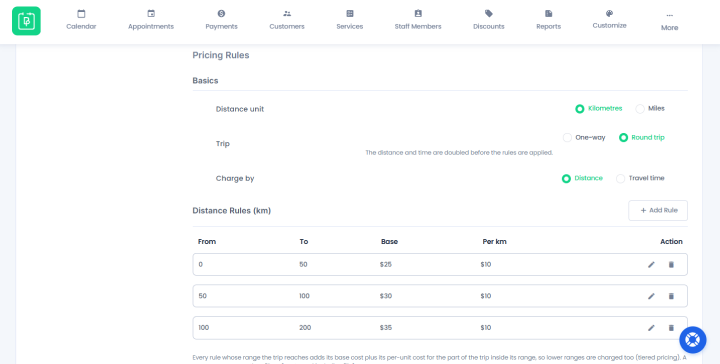
For instance, you can set different charges for the first 10 miles, the next 20 miles and any additional distance.
BookingPress automatically adds charges from the lower pricing ranges when a customer reaches a higher range. Thus you don’t have to calculate every additional amount manually.
If you’re using Manual Postcode mode, you can instead assign fixed travel fees to specific postcodes, postcode prefixes or numeric postcode ranges.
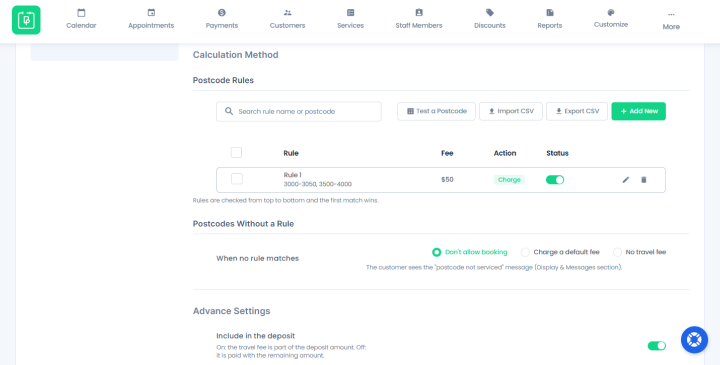
Furthermore, you can even block bookings from areas where your business doesn’t provide services.
Set Additional Travel Fee Settings
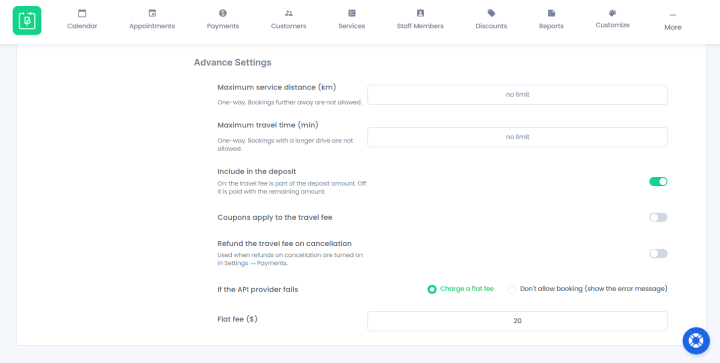
Best of all, BookingPress lets you control conditions such as maximum service distance, maximum travel time, taxable travel fees, deposits, coupons and travel fee refunds on cancellations.
This gives you better control over how travel expenses are charged and managed with every appointment.
Lastly, don’t forget to save your settings and test the travel fee calculation.
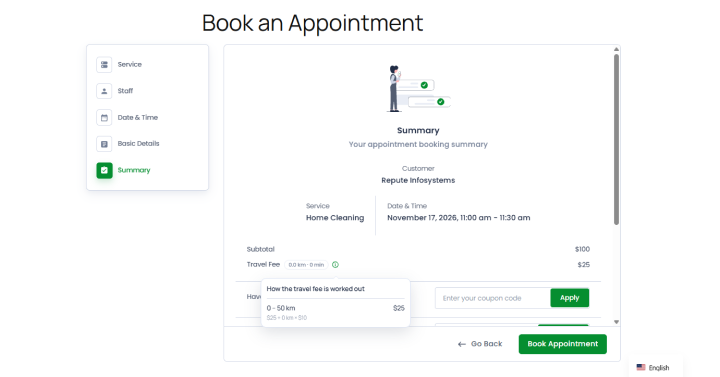
And….. that’s it! BookingPress can now calculate the applicable travel fee, add it to the booking summary and in the customer’s final payable amount on auto-pilot.
In Conclusion: Make Charging Travel Expenses Easier With BookingPress
The BookingPress Distance Cost Calculator Addon automates one of the most repetitive parts of managing an on-location service business.
Simply set your travel-fee rules once and every service of your choice automatically follows them. No manual calculations. No updating invoices separately. No extra admin work. This BookingPress feature add-on lets you:
- Calculate travel fees based on distance or estimated travel time
- Connect multiple map providers to calculate routes
- Charge travel fees for one-way or round-trip mileage
- Block bookings for postcodes or areas you don’t serve
- Allow customers to see clear payable price with travel fees included during the time of booking
Best of all, BookingPress automatically calculates the travel fee whenever a customer fills in their address during the booking time so, you can easily collect travel charges along with your service payments.
Related articles:
- 5 Best Cleaning Service Booking Plugins for WordPress (2026)
- How To Automate Tax Calculations In Your Appointment Booking System With BookingPress Tax Addon
- How To Let Customers Book Multiple Appointments In One Checkout With BookingPress Cart Add-on
FAQs
If you’re wondering how to charge for mileage in BookingPress, use its Distance Cost Calculator add-ons which is already included in its Professional and Enterprise plan, so you don’t have to spend a single extra penny. Simply activate the addon, and configure the distance and travel settings. That’s all. BookingPress now automatically charges for mileage when a client selects an on-location service and enters their address on the booking form.
There is no single fixed rate to charge for travel expenses. The right amount depends on whether you are billing for local driving, long distance flights or your time spent. Most businesses recover both their out-of-pocket costs (fuel, tickets, lodging) and the opportunity cost of lost working hours. You can either charge a fixed rate per distance unit to cover fuel, insurance and vehicle wear, set a fixed call-out fee, or bill for the time spent using the BookingPress booking system.
Yes, indeed. You should charge customers for travel time to cover your overhead cost of fuel, vehicle maintenance and if you are a specialist or consultant whose available hours are limited.
Yes, of course. You can automate travel charges when customers book appointments using modern online scheduling systems such as BookingPress WordPress booking plugin. Its Distance Cost Calculator calculates all the travel costs automatically, so your customers know what and how much they’ll pay.
Using systems like BookingPress, you don’t have to manually invoice every single booking. Just decide and set your travel expense billing structure once, and the system automatically invoices the travel fee into the total booking price. Later, you and your customers can also download the auto-generated invoice which already mentions the travel fees clearly.
A travel fee is a set flat price for a trip. Meanwhile, a mileage charge is calculated strictly by the exact distance (per km or per mile) you or your staff drives for the on-location or home service.
 14-day money-back guarantee