8 Proven Ways to Reduce Patient No Shows with BookingPress


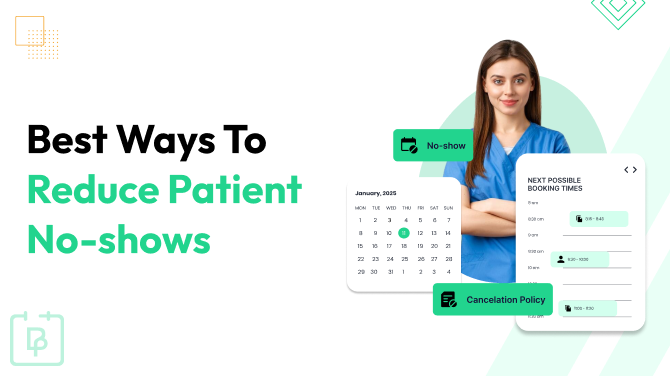
Ever blocked out an hour for a patient…only to watch the clock tick while your room stays empty?
Yes, that’s exactly what we call patient no shows. And patient no shows are one of the most frustrating (and costly) problems in healthcare.
But once you understand why patients skip appointments, you can fix a huge chunk of the problem with the right tools and strategies. And that’s exactly where BookingPress steps in.
In this guide, we’ll break down the 8 best ways to reduce patient no shows, improve patient engagement, and keep your appointment calendar managed. Whether you’re in primary care, a clinic, or a private practice, these steps work beautifully.
Why do patients not show up for appointments?

Patients don’t usually skip on purpose – life happens! Forgetfulness, scheduling conflicts, or long wait times all add up. After all, we can’t ignore the fact that no-show rates in primary care are usually higher than in any other sector.
Thus, we must understand the common reasons why patients miss medical appointments.
- Forgetfulness: They simply forgot. Because today, everyone’s life gets busy.
- Fear or anxiety: Medical appointments make many people nervous, so avoidance kicks in.
- Long wait times: If patients expect delays or overcrowded clinics, they postpone or skip.
- Transportation issues: No reliable ride, traffic, which is…Well, pretty common in big cities, so nothing new.
- Complex scheduling systems: If booking or rescheduling is confusing, patients simply give up.
- Poor Communication or Confusion: If confirmation messages are unclear, patients think the appointment isn’t firm.
- Feeling better (or worse): When symptoms improve, they deprioritize the visit. Or if they feel too sick to visit, then they simply can’t just show up. It’s as simple as that.
- Work or family constraints: Jobs, childcare, and emergencies often conflict with appointment times.
- Hard to reschedule: Not all patients are the same. Some try to reschedule or inform in advance, yet maybe your booking system is just too confusing for reschedules.
Now we may not be able to solve all common reasons, like work constraints or transportation issues for patients. But we can surely spare a glance at the other 80% of problems from our end.
How No Shows Impact Your Clinic
The answer is simple and straightforward. No show rates in healthcare mean lost revenue + disrupted care. That’s why we just focus on reducing no show rates in primary care and hospitals.
Wondering how to improve no show rates in your clinic? Here are the 7 proven strategies to decrease no shows of patients with BookingPress.
8 Best Ways to Reduce Patient No Shows With BookingPress
BookingPress is the best booking and scheduling WordPress plugin that helps not only in the creation of a feature rich booking system, but also in reducing no show rates in healthcare.
In here, we’ll show you how to reduce patient no shows with BookingPress, solving each common reason of no show one by one. So take a breath, and let’s jump right in.
1. Send Automated Appointment Reminders
Most no shows happen simply because patients forget. Sometimes they aren’t sure about the timing or don’t feel the visit is urgent. And that’s exactly where BookingPress’s automated reminders come to the rescue.
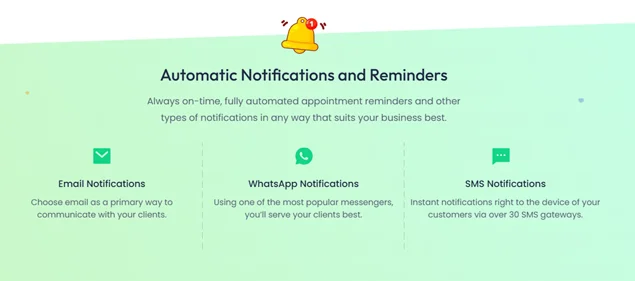
BookingPress allows you to send automated appointment reminders to reach your patients on their preferred platform, so your reminder actually gets noticed. You can send these automated medical appointment reminders via:
- SMS
- And Telegram
Apart from this, you can customize reminder timings to send a heads up a week, a day, or even an hour before the appointment, whatever works for your clinic’s flow. Also, it improves the problem of poor communication, leaving no room for confusion.
Also, BookingPress smoothly syncs with popular calendars such as Google Calendar, Outlook Calendar, and Apple Calendar. This ensures patients never miss an appointment.
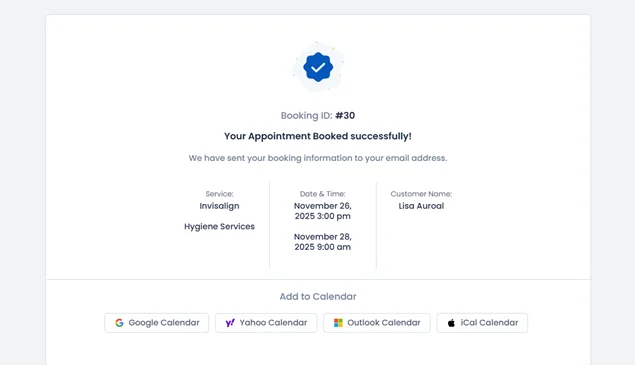
With these features, forgetfulness will be long forgotten, and your schedule will start running smoother with just smart reminders.
2. Allow Easy Self Rescheduling
As discussed earlier, sometimes patients don’t skip on purpose; their schedule just changes. Work, childcare, or unexpected errands can clash with their appointment.
Don’t make your patients go back and forth with missed calls or emails. With BookingPress, your patients can manage and reschedule their appointments in a few clicks right from your business website.
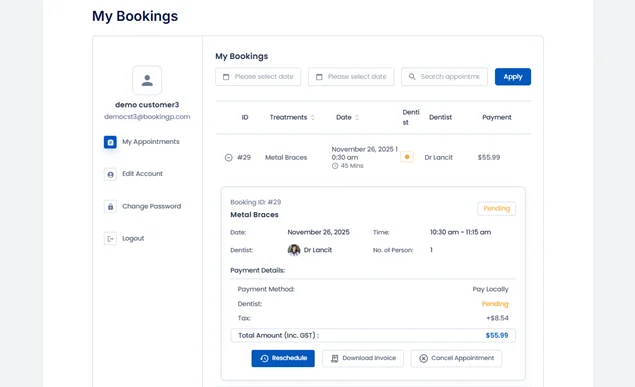
BookingPress allows your patients to adjust date and time slots right away in real time and also sends automated notifications to both your patients and staff for the updated schedule.
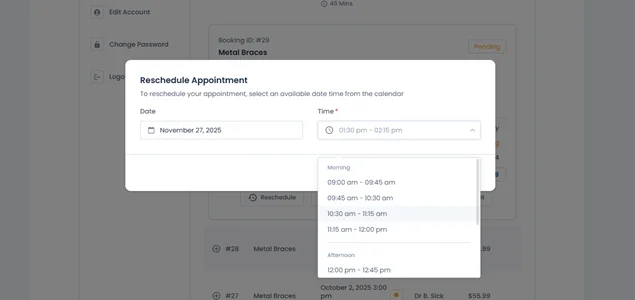
By making rescheduling painless, you reduce no show charges, improve the show rate, and keep your patients happy.
3. Add Deposits or Pre-Payments for High Value Appointments
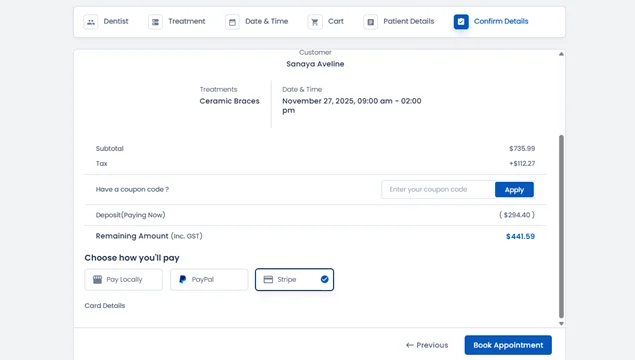
When patients have zero financial commitment, skipping an appointment feels cost and risk free!
That’s why adding a small deposit or full pre-payment options in the booking process helps reduce no shows for high value sessions like diagnostics, specialist visits, or long consultations.
How BookingPress helps:
- Deposit Payments: Let patients pay a partial amount upfront to secure their slot.
- Full Online Payments: Accept complete payment before the visit with over 20+ payment gateways like PayPal, Stripe, and more.
- Custom Pricing per Service: Set different deposit rules for specific services.
- PDF Invoices: Give your patients the proof of their full or deposit payment with automatically generated invoices.
- Tax Fees: Add tax charges for appointment payments by simply setting the percentage, and leave the calculation to BookingPress.
At last, even a small deposit fee can turn “I’ll come if I can” patients into committed, confirmed bookings, so your revenue stays protected.
4. Create a Clear No Show Appointment Policy
A lot of patients don’t even realize the impact of missing an appointment or that your clinic actually has rules around it.
Yes, creating a clear no show appointment policy is the best way to set clear expectations and reduce “I didn’t know” excuses.
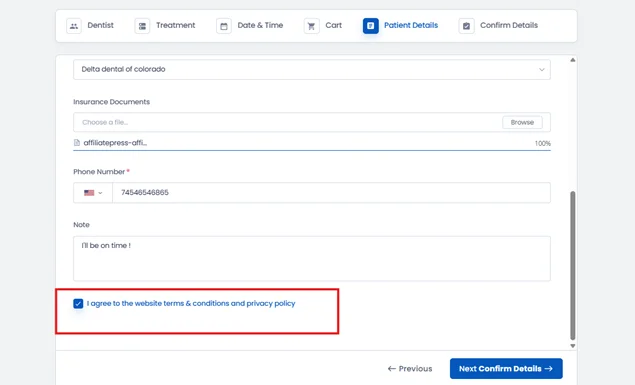
Display your no show or cancellation rules right on the checkout page so patients see them before confirming. Or you can add a mandatory policy acceptance checkbox so patients must tick the box to continue by agreeing to your policy.
5. Use Waitlists to Fill Cancelled Appointments
Last minute cancellations don’t have to leave empty gaps in your schedule. With BookingPress, you can get a smart waitlist to turn those open slots into confirmed appointments without your team lifting a finger.

So here’s how BookingPress works:
- Waiting List: When a timeslot is fully booked, patients can still join the waitlist instead of giving up.
- Automatic Slot Release: If an approved patient cancels or reschedules, the waitlisted patients immediately see the slot become available in real time.
- Instant Email Alerts: All waitlisted patients get notified right away the moment a slot opens.
- Keeps Your Schedule Full: Every cancellation can be replaced right away, so no cancellation will ruin your healthcare business.
With a waiting list running in the background, those inevitable cancellations actually help you keep your appointment flow steady.
6. Reduce Clinic Friction With Better Scheduling Options

A surprising number of patient no shows happen because sometimes booking an appointment feels confusing, inconvenient, or just time consuming.
When patients struggle to find the right slot or don’t understand availability, they either book the wrong time or simply don’t show up. Here, BookingPress makes that effortless by:
- 24/7 Online Booking: Patients can book anytime without calling the clinic or waiting on hold.
- Real Time Slot Availability: Shows only open slots, leaving no room for double bookings or confusion.
- Multiple Staff & Service Calendars: Patients can pick the right doctor, therapist, or service.
- Flexible Time Slot Management: Create custom durations, buffers, and break times so your schedule matches your clinic flow.
- Mobile Friendly Booking: Patients can book or adjust appointments directly from their phone in a few seconds.
- Multiple Quantity: Let your patients book an appointment for their friends and family too in one go.
7. Use Recurring Appointments for Chronic Care Patients

Patients with chronic conditions often need repeated visits, but relying on them to book every single appointment manually every time increases the chances of missed sessions.
Thus, with BookingPress recurring appointments, your patients can book a series of recurring appointments in one session, perfect for regular medical checkups. What’s more, patients can schedule multiple future visits in one go as they want, which can be either weekly, bi-weekly, monthly, or more.
Thus, by allowing recurring appointments with BookingPress, not only are you reducing no shows, but also keeping a predictable routine to avoid gaps in medical care.
Once set, the patient doesn’t have to remember anything. They’ll simply receive automated reminders before each visit. This works beautifully for physiotherapy, diabetes management, mental health, prenatal care, and other long-term treatment programs.
8. Offer Virtual Consultations (If Possible)

Some patients cancel or skip appointments simply because getting to the clinic is difficult. Travel issues, childcare, weather, or tight working schedules. So for them, you can offer them virtual visits to improve no show ups for these patients.
How BookingPress helps:
- Zoom Integration: Create automatic Zoom meeting links for online consultation sessions.
- Google, Apple & Outlook Calendar Sync: Your patients get the meeting link in their calendar automatically to reduce no shows in virtual appointments, too.
- Instant Notifications: Send appointment reminders with the virtual meeting link via SMS, Email, WhatsApp, or Telegram.
Note: This is optional because even though we understand most health care sectors need personal one-on-one treatment and diagnoses.
Let’s Compare, How BookingPress Solves Each Patient No Shows Problem
| Common Problem | How BookingPress Fixes It |
| Patients forget their appointment | Automated reminders via Email, SMS, WhatsApp, Telegram, plus calendar sync keep patients fully aware of upcoming visits. |
| Last minute schedule changes | Easy self-rescheduling, real-time availability updates ensure patients can shift timings without canceling. |
| No financial commitment | Deposits or full pre-payments, 20+ gateways, tax options, PDF invoices, and adding commitment reduce no-shows for high-value appointments. |
| Patients don’t understand your no show policy (or you just don’t have one) | Add clear policies at checkout, mandatory acceptance checkboxes, and visible terms so patients know the rules before booking. |
| Cancelled slots stay empty | BookingPress Waiting List Addon auto fills cancellations. |
| Complicated or slow booking process | Simplified 24/7 booking, mobile-friendly UI, buffer time, breaks, staff calendars, and multi-quantity booking reduce friction. |
| Chronic care patients miss follow ups | Recurring Appointments Addon lets them pre-book multiple sessions (weekly/monthly/custom) + receive reminders for each one. |
| Travel, distance, or accessibility issues | Zoom integration enables virtual consultations with auto-added meeting links + reminder notifications. |
Conclusion
These are the best ways to reduce patient no shows with BookingPress. Now we aren’t saying there are no other ways to do it. Sure, there are ways like:
- No show charges: charging patients for no shows (May upset a few, thinking it is a fine).
- Pre appointment instructions: Send any necessary pre-visit forms or instructions early to ensure patients are prepared (Most patients don’t read).
- Shorter booking windows: Schedule appointments closer to the present day (Will give less flexibility to patients who book to plan ahead).
However, all these ways have their own shortcoming which can turn badly if not implemented properly. That’s why we have listed only the best proven strategies and helpful recommendations to reduce patient no shows.
So once you set up BookingPress, more than half of the usual no show frustrations disappear into thin air. Patients get clearer communication, easier scheduling, more flexibility, and your clinic gets a more predictable calendar.
A win-win for both your team and your patients.
You May Also Like:



Brian is a WordPress expert with a decade of developing experience & technical-writing. He enjoys blogging, movies & hiking.

Get BookingPress Premium
60+ Premium Addons
20+ Payment Gateways
Plan starts at just $89
Get Premium NowLike our insights? Click the badge to add BookingPress as your preferred source on Google.

Add as a Preferred
Source on Google