10 Tips to Make Your Appointment Scheduling More Effective


You know how the day to day process of scheduling an appointment works. Your client calls, you scramble to find an open slot, and by the time you confirm, they’ve already booked with someone else.
Sounds frustrating, right?
Let’s be true: managing appointments isn’t just a calendar problem; it’s a business problem which eats your productivity, revenue, and clients. But what if you could cut that chaos in half, impress your clients, and reclaim your time?
In this appointment scheduling guide, you’ll transform your appointment process from stressful to seamless with BookingPress and these 10 proven appointment scheduling tips, giving your business more efficiency, credibility, and happier clients.
Audit Your Current Booking Process

Before you jump straight to this appointment scheduling practice, you must see the full picture. Thus, take a look at how appointments are currently booked, tracked, and managed.
Are clients confused during book an appointment? Are double bookings a recurring headache?
Plus, a detailed audit helps you uncover the hidden inefficiencies that cost time, money, and even client trust. Look at:
- How clients currently book (calls, emails, forms).
- Response times and follow ups.
- No show and cancellation rates.
- Internal communication between your team members.
The goal is to identify opportunities.
Once you know what’s working and what’s not, you can build a smarter, more effective system with BookingPress. Being honest now saves frustration later and sets the foundation for a truly seamless appointment scheduling process.
Choose a Smart Scheduling Tool
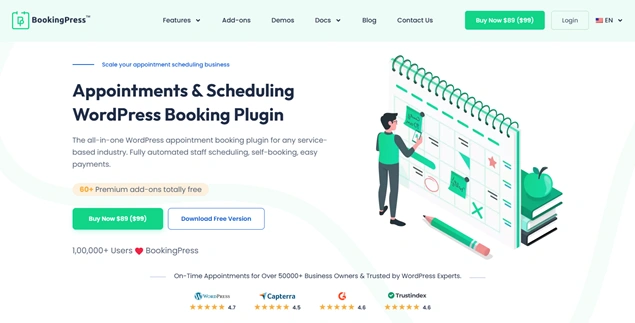
Once you’ve identified the gaps in your current process, the next step is choosing a scheduling tool that actually solves those problems.
A “smart” scheduling tool does more than show available time slots. It automates repetitive tasks, leaves no room for human error, and creates a smooth experience for everyone involved, including you, your staff, and your clients.
If your system still depends on manual checks or confirmations, it’s holding your growth back. When choosing a scheduling tool, make sure it allows:
- Real time availability with automatic conflict prevention.
- Self service booking so clients can schedule, reschedule, or cancel without contacting you.
- Automatic reminders and notifications to reduce no-shows.
- Easy customization to match your services.
- Secured Payment gateway integrations.
The best part? BookingPress, an all-in-one WordPress appointment booking plugin, ticks all these boxes.
You get a centralized dashboard, flexible booking rules, and automation that works in the background so appointments get booked accurately, clients stay informed, and you stay focused on offering great service.
Also, BookingPress allows you to:
- Create a branded booking form.
- Send automatic notifications and reminders via Email, SMS and WhatsApp as well as Telegram.
- Offer effective staff management and scheduling.
- Smooth two-way sync bookings across popular calendars such as Apple, Outlook, and Google Calendar.
- Create a package of multiple services and offer discounts via a coupon code in total.
- Understand your business better with reports.
- Allow group appointments, recurring appointments, and multiple appointments.
Define Realistic Availability, No Overbooking

Overbooking makes you overwhelmed.
One of the biggest scheduling mistakes businesses make is offering availability that looks good on paper but fails in real life.
The effective scheduling starts with honesty about your time, energy, and capacity. If clients sense rushed sessions, delays, or last minute reschedules, trust simply breaks. That’s why you must:
- Account for preparation, follow ups, and breaks.
- Leave buffer time between appointments to avoid delays.
- Set different availability for different services if needed.
- Block personal or administrative time in advance.
With BookingPress, you can set precise working hours, custom service durations, and buffer times automatically so your calendar protects your workload instead of overloading it.
Best of all, you can even set a special price of appointment depending on the hour of the day with Happy Hours Pricing.
Expert Tip: Make sure to have 10 to 15 minutes of buffer time between your services for overruns or preparation. And don’t forget to block off personal or admin time.
Automate Client Communication

Manual follow ups are one of the biggest time drains in appointment scheduling, and they’re also where mistakes happen most often.
Missed confirmations, forgotten reminders, or unclear instructions can quickly turn into no shows and unhappy clients before you even realize what’s happening and why now.
By automating client communication, you lower that risk while creating a more professional experience. Clients expect timely updates, clear instructions, and reassurance that their booking is confirmed.
By using the smart appointment scheduling system, BookingPress, you can:
- Send instant personalised booking confirmation emails.
- Appointment reminders via email, SMS, WhatsApp, and Telegram.
- Cancellation or rescheduling notifications.
- Follow up messages with next steps or resources.
Best of all, these messages are triggered automatically via BookingPress. Thus, once everything is set, BookingPress communicates automatically for you consistently, accurately, and always on time.
Brand Your Booking Experience
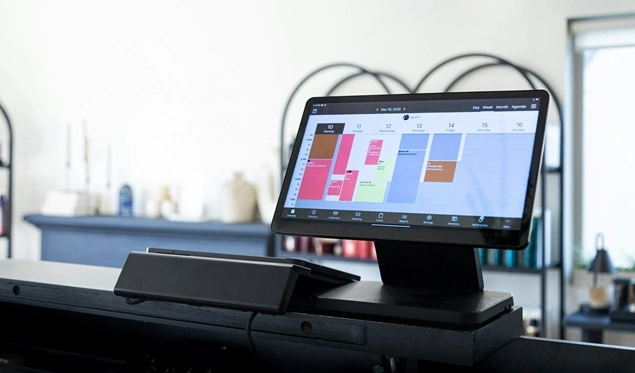
The moment a client books an appointment, they subconsciously judge how professional, trustworthy, and committed you and your services are.
A mismatched booking interface can break confidence, even if your service or pricing looks excellent. On the other side, a fully branded booking experience gives you credibility and makes clients feel they’re in the right place.
Thus, to strengthen your brand through appointment scheduling, the best scheduling practice is to:
- Always use your logo, brand colors, and typography.
- Customize booking forms and confirmation messages to match your tone.
- Remove unnecessary third-party branding distractions.
- Align the booking flow with the rest of your website experience.
BookingPress lets you fully customize the booking form so it feels like a natural extension of your brand, not a separate tool. From the booking form to confirmation emails, everything stays visually professional and consistent.
Why does this matter? Because branded experiences build trust. And trust directly impacts conversions, repeat bookings, and long term client loyalty.
When clients feel confident during booking, they show up on time, follow instructions, and are far more likely to book again. Thus, branding is one of the best ways to make your appointment scheduling effective.
Make Booking Frictionless
Nobody likes a complicated booking process, and your clients are no different. Every extra field, unnecessary step or confusing design increases the chance they’ll abandon the booking altogether.
That’s why, aim for a booking flow that takes no more than 3-4 clicks from start to confirmation. The faster clients can secure a time slot, the higher your conversion rate.
That’s why to sort this out, BookingPress allows you to create a smooth step by step appointment scheduling process which keeps your clients prepared for what’s coming up.
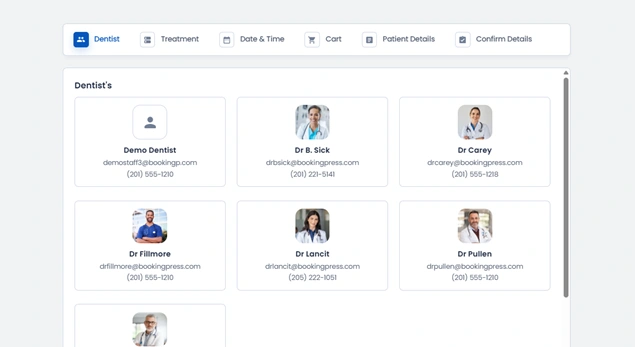
Also, make sure your booking links are easy to find and accessible everywhere your clients interact with you:
- On your website (homepage, service pages, contact page).
- Inside emails and email signatures.
- Across social media profiles and posts.
- Via QR codes at your physical location or events.

A frictionless booking process removes hesitation, speeds up decisions, and turns interest into confirmed appointments – exactly what effective scheduling is meant to do.
Pro Tip: Mobile optimization is non-negotiable. Most clients book appointments on their phones, often in a hurry. BookingPress is fully mobile responsive to ensure a smooth experience across all devices without extra setup.
Collect Only Essential Info
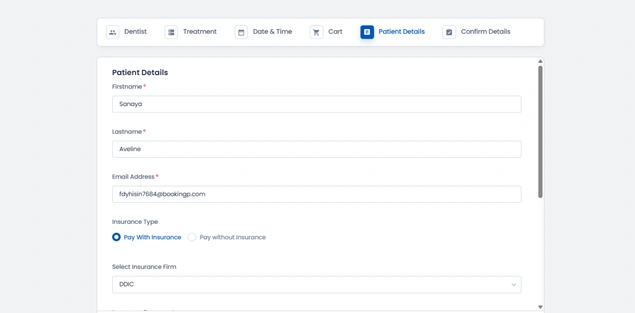
When it comes to appointment booking, less really is more. Asking for too much information upfront slows clients down and creates unnecessary friction, especially on mobile devices.
Your goal at the booking stage is simple: secure the appointment, not conduct a full onboarding interview. Thus, collect only what’s necessary, such as:
- Name.
- Contact details.
- Preferred date and time.
- Service specific essentials (only if truly required).
Everything else can wait until after the appointment is booked because the longer the forms, the higher the abandonment rates.
With BookingPress, you can fully customize booking forms and show fields only when they’re relevant to a specific service. This keeps the experience smooth, fast, and focused only on what matters.
Once the appointment is secured, you can always collect additional details through follow up emails, pre appointment forms, or in-person.
Efficient scheduling respects your client’s time, and that respect shows in higher conversions and better attendance.
Collect Payments or Deposits During Booking
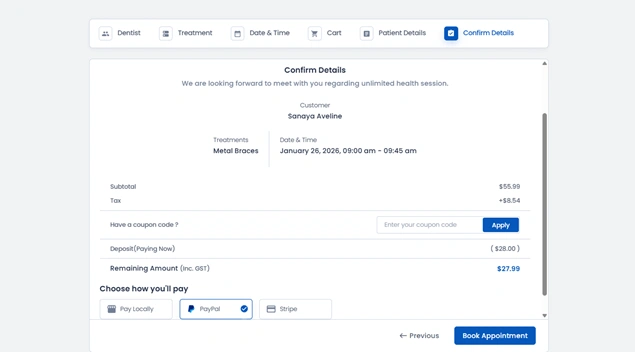
No-shows and last-minute cancellations directly impact your revenue. And one of the most effective ways to protect your schedule is to collect payments or deposits at the time of booking.
When clients commit financially, they’re far more likely to show up and take the appointment seriously. Even a small deposit creates accountability and filters out low intent bookings.
Here’s how taking payments in advance saves your revenue:
- Reduce no-shows and casual cancellations.
- Secure revenue before the appointment takes place.
- Create a more professional, business first experience.
- Help forecast income more accurately.
BookingPress makes this seamless by allowing you to collect full payments or partial deposits during the booking process via 20+ payment gateways, safe and sound.
A protected schedule is a productive schedule. And collecting payments early ensures your time is valued as much as your service.
Monitor, Review, and Adjust
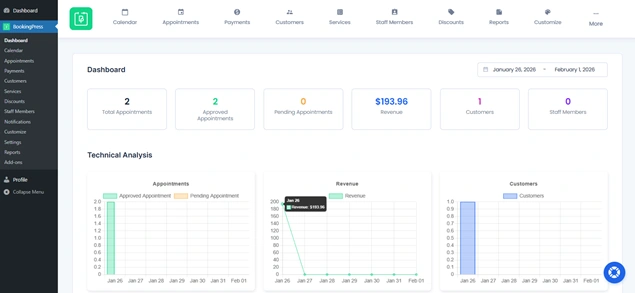
Effective appointment scheduling isn’t a “set it and forget it” process. Client behavior changes, demand fluctuates, and what worked last month may not work next quarter. That’s why regular monitoring and optimization are essential.
Your booking data tells a story. All you have to do is just pay attention to it by reviewing key scheduling metrics such as:
- Booking volume by service and time slot.
- No show and cancellation trends.
- Peak demand hours and underutilized slots.
- Conversion rates from booking forms.
The good news is BookingPress gives you detailed reports and insights into your appointments and performance, making it easier to spot patterns and problems.
Its main dashboards give you a clear overview of your service business, and if something feels off, you can simply go to the “Reports” section and verify:
- Appointment Reports
- Revenue Reports
- Customers Reports
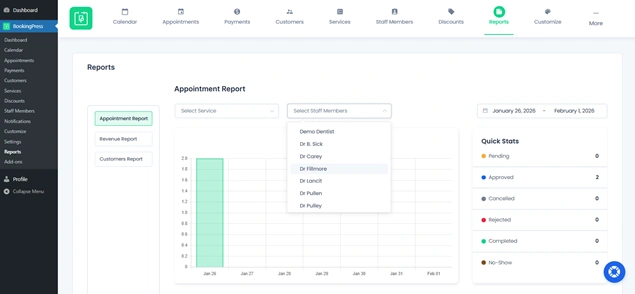
So, use these insights to fine-tune your availability, adjust service durations, refine buffer times, or optimize pricing strategies.
Set Clear Cancellation and Rescheduling Policies

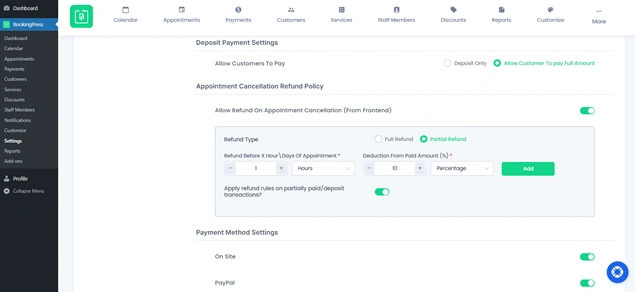
If clients don’t know what’s allowed or what’s not, they’re more likely to cancel at the last minute or reschedule again and again with no real consequences, leading to loss of your revenue.
On the other hand, having clearly defined policies protects your time and sets professional expectations from the very beginning. Thus, your rescheduling and cancellation policy should be mentioned:
- How far in advance cancellations are allowed?
- Whether fees apply for late cancellations or no shows.
- How rescheduling requests are handled.
- Refund or deposit adjustment rules.
BookingPress lets you display these policies directly during the booking process and automate enforcement through payment rules and notifications. You can decide the Appointment Cancellation Refund Policy in just a few clicks from BookingPress > Settings > Payments.
Conclusion
These are the 10 simple and actionable appointment scheduling tips to make your appointment scheduling smarter and stress free.
First things first, start small.
Pick one tip this week and see how it changes your workflow. Then layer in the rest. The best first step towards effective appointment scheduling begins with a smart appointment scheduling tool – BookingPress.
BookingPress is an ultimate appointment booking plugin for WordPress that allows you to turn your simple WordPress site into a smart online booking system.
Remember: efficient scheduling = happier clients + less stress for you.
You May Also Like:
- 8 AI Tools for Appointment Scheduling Websites
- How to Manage Multi-Branch Scheduling With BookingPress
- How BookingPress Availability Actually Works
FAQs
BookingPress is the best appointment scheduling system for WordPress that automates bookings, two-way syncs calendars, sends automatic notifications and collects deposits or full payments via 20+ payment gateways.
– Get the right appointment scheduling system, such as BookingPress.
– Offer real time availability so clients can self-book right away.
– Automate confirmations and reminders to reduce no shows.
– Add buffer time between appointments to avoid delays.
– Collect payments or deposits to secure bookings.
– Clearly communicate cancellation and rescheduling policies.
To set up an appointment schedule, you can start by defining your working hours, services, and availability. Then use an online scheduling system like BookingPress that manages bookings automatically.
– Keeping availability realistic with buffer times.
– Automating confirmations, reminders, and follow-ups.
– Limiting booking forms to essential information only.
– Collecting payments or deposits during booking.
– Monitoring scheduling data and optimizing regularly.



Brian is a WordPress expert with a decade of developing experience & technical-writing. He enjoys blogging, movies & hiking.

Get BookingPress Premium
60+ Premium Addons
20+ Payment Gateways
Plan starts at just $89
Get Premium NowLike our insights? Click the badge to add BookingPress as your preferred source on Google.

Add as a Preferred
Source on Google