

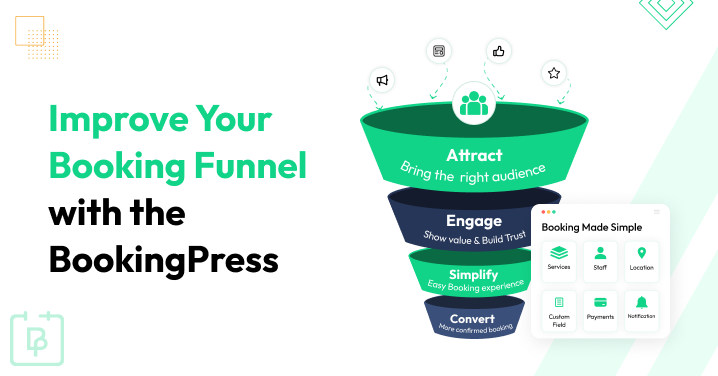
You’re getting website visitors. You’ve added a Book Now button. Your services are clearly listed. So why aren’t more people booking?
The problem could be hiding somewhere between that first click and the final confirmation.
A booking funnel takes customers through that complete journey, and every unnecessary step, confusing page or moment of hesitation can cost you a booking. The good news? You don’t always need more traffic. Sometimes you just need a better appointment booking funnel.
Here’s how to find the weak spots and improve your booking funnel conversion with BookingPress.
TL;DR: A high converting booking funnel makes it easy for customers to go from discovering your business to booking an appointment and coming back again. With BookingPress, you can simplify booking forms, show real time availability, offer flexible payments, automate reminders and make rescheduling and repeat bookings easier.
What Is a Booking Funnel?
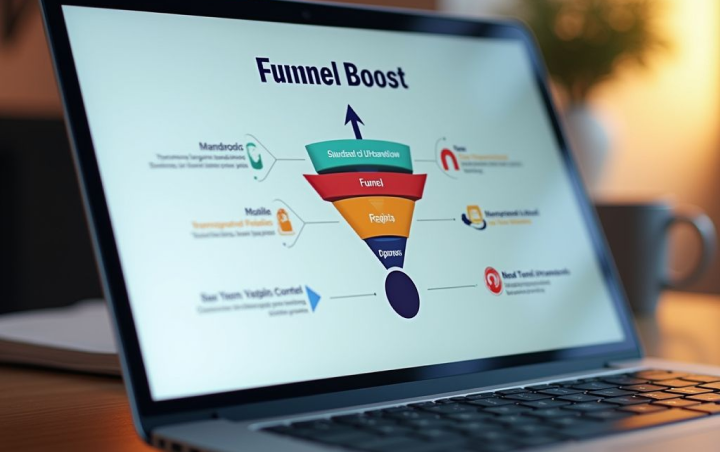
A booking funnel is the journey a customer takes from discovering your business to completing an appointment. It covers every interaction that moves someone from “I’m interested” to “My appointment is confirmed.”
You can think of it as more than just your booking form or calendar. Your landing page, service info, booking process, payment options, confirmation emails, reminders and follow ups can all influence whether someone books or just drops off.
Thus here’s what a typical booking funnel looks like:
Attract visitors → Build interest → Get the booking → Confirm the appointment → Encourage repeat bookings.
Overall, as you can see the goal is to make each step clear, relevant to your potential customer and easy to book.
For intance a person looking for a hair salon might discover your website through Google, check your services and prices, pick a stylist, find a convenient time, pay online, receive a reminder and eventually book their next appointment.
Every one of those interactions is part of the booking funnel.
Booking Funnel vs. Appointment Funnel
You’ll mostly see booking funnel, appointment funnel, and appointment booking funnel used interchangeably. Although there are some differences depending on the business, they all focus on moving a potential customer toward a scheduled appointment.
The main difference is usually the context:
- Booking funnel: Mostly refers to the complete customer journey leading to an online booking
- Appointment funnel: Usually focuses more specifically on generating and converting appointment leads
- Appointment booking funnel: Emphasizes the process of getting a prospect to schedule an appointment
For a service business, these can overlap heavily. Yet what matters most is not the label, but how effectively your funnel turns visitors into booked appointments.
How Does an Appointment Booking Funnel Work?
At BookingPress, we’ve worked with many service business owners of every industry, and one thing most of them have in common is the misunderstanding – how does an appointment booking funnel conversion work.
On paper, it sounds simple. If you’re also thinking a booking funnel starts the moment someone opens your booking calendar, let us give you a reality check.
- Out of 100% of potential prospects who discover your services via social media or search, only about 20% to 30% transition into active website visitors.
- Of those who lands on your site, only 3% to 10% ever reach your booking page or open the calendar widget
Thus an appointment funnel doesn’t begin when someone opens your booking calendar but mostly the moment they discover your business. From there, your job is to answer their questions, remove doubts, make booking easy and keep the relationship going after the appointment.
Here’s how the journey typically works.
1. Attract Visitors

Firstly you need to get the right people to your website. Your visitors might come from:
- Google search.
- Social media.
- Paid advertising.
- Email campaigns.
- Referrals.
- Local search.
- Blog content.
- Direct traffic.
But traffic alone isn’t the goal. Relevant traffic is.
Someone searching for “women’s haircut near me” is much closer to booking than someone who randomly lands on your homepage. That’s why your marketing should target people who are actually looking for the services you offer.
Your landing pages should then make it obvious that they’re in the right place with clear headline, right service info, pricing, reviews and a visible Book Now CTA to book.
2. Turn Visitors Into Interested Prospects
Getting someone to your website is only half the battle. Now you need to give them a reason to stay.
Before booking, customers might have a tons of questions for you to answer like:
- What services do you offer?
- When are you available?
- Can I cancel or reschedule easily?
- How long does the appointment take?
- Who’s gonna provide the service?
- How much does it cost?
If your website makes these answers difficult to find, customers just leave and look elsewhere.
Use your service pages to remove that uncertainty. Add clear descriptions, pricing, testimonials, FAQs, photos, credentials and anything else that helps customers feel confident about booking.
Then give them one obvious next step: Book your appointment.
3. Turn Prospects Into Bookings
This is exactly where your booking experience really matters. After someone decides they want your service, don’t make them work for the appointment.
A complicated booking process can quickly turn a ready-to-buy customer into an abandoned booking.
Mostly, customers should be able to:
- Choose a service.
- Select a staff member, if applicable.
- Pick a location (optional).
- Pick an available date and time.
- Enter their details.
- Pay online (optional).
- Confirm the appointment.
The fewer unnecessary obstacles between “I want this” and “I’m booked,” the better.
Moreover, this is also where a WordPress booking plugin can make a big difference. Rather than just asking customers to call, email or message you to check availability, you can let them complete the complete booking process directly from your website.
4. Confirm And Prepare Customers
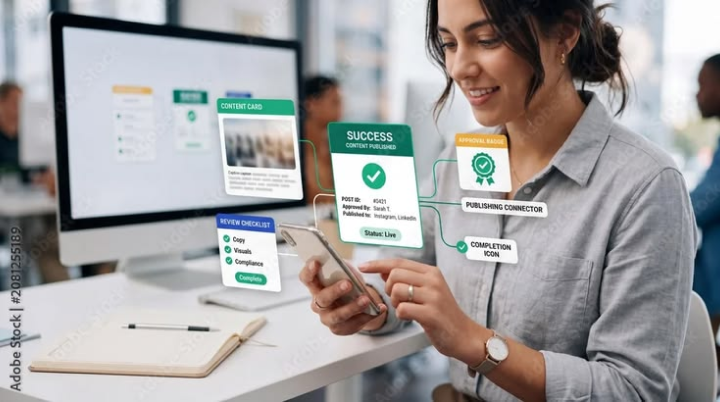
The funnel doesn’t end when someone clicks Confirm.
So now you need to make sure they know that their appointment is booked, and what they need to do next. This stage is easy to overlook but it can have a huge impact on the overall customer experience.
5. Turn Appointments Into Repeat Business

Why stop at one booking?
Thus if someone has already trusted you enough to make an appointment, you’ve already overcome one of the biggest barriers to conversion. Now you have an opportunity to turn that customer into a repeat client.
After the appointment, you can:
- Ask for feedback or a review.
- Send a thank you message.
- Make rebooking quick and easy.
- And more.
That turns your funnel from a simple visitor → booking process into a longer customer journey:
Visitor → Booking → Appointment → Follow-up → Repeat Booking
And that’s where appointment funnel optimization can become much more valuable than simply adding a Book Now button to your website.
10 Ways To Improve Your Booking Funnel With BookingPress
When you understand where customers move through your booking funnel, the next obvious step is to look for places where they might hesitate, abandon the process or fail to return.
You don’t have to rebuild your complete website to do this. In most cases, small changes to the booking experience can make the journey easier for customers.
Thus here are 10 ways to optimize your booking funnel with BookingPress.
1. Create a Dedicated Booking Page For Your Services
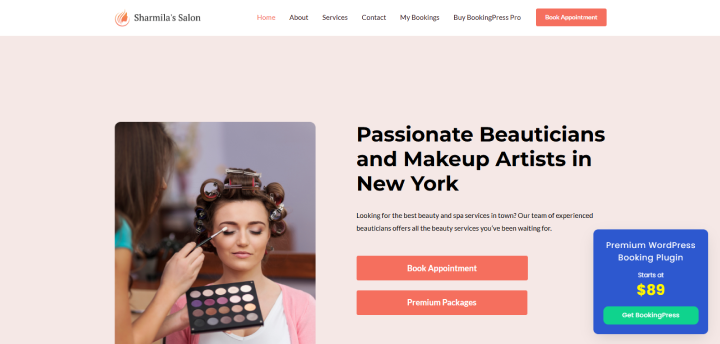
If you’re using BookingPress as your WordPress booking plugin, or even planning to use it, you can just place a booking form right on your WordPress pages or post using a simple shortcode.
Thus this can create service specific pages and let customers start booking without leaving your website. On top of that, BookingPress also lets you customize the booking form’s layout, colors, typography and fields to fit your site.
For example a salon could have:
Hair Coloring → Service details (Duration, description and image)→ Booking form → Select stylist → Select time
This keeps the info customers need and the booking action in the same journey.
2. Simplify Your Booking Form
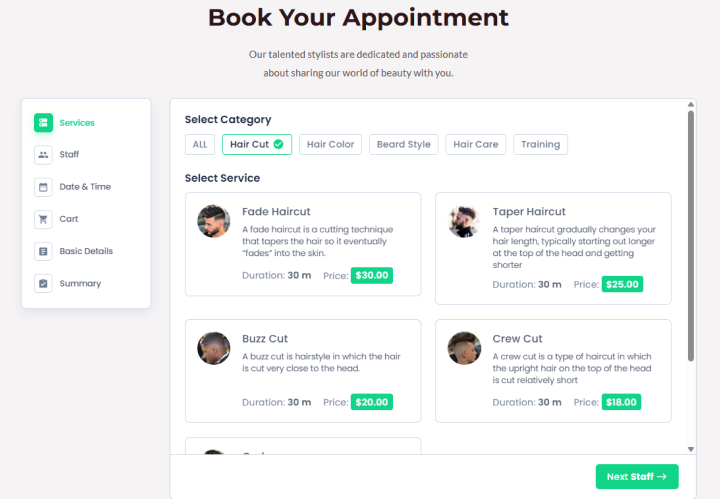
After customers decide to book, don’t make them jump through hoops.
Always keep your booking form and steps simple. A booking form’s main purpose is to collect customers’ basic info regarding appointments. So no need to turn that into a lengthy government application form. Just ask what’s needed.
BookingPress provides a customizable step-by-step booking form where you can adjust the form fields and layout. This way customers can move through the booking process by selecting their service, preferred staff member, date and time before giving the necessary details and completing the booking.
Plus, before you publish your booking form, we’d recommend you go through it as a customer.
Ask yourself:
- Is every field necessary?
- Is it obvious what to do next?
- Can customers understand which service they’re selecting?
- Are the available times easy to find?
- Is the final confirmation clear?
If the answer to any of these is no, simplify the experience before trying to drive more traffic to it.
3. Let Customers Choose The Right Service And Staff
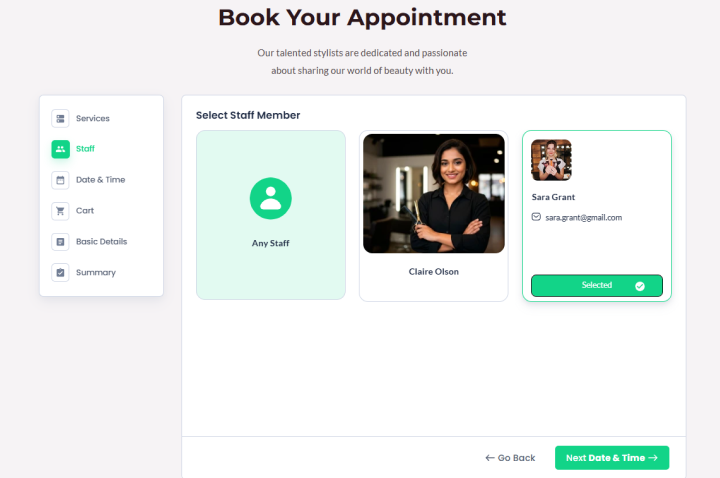
Customers don’t always want the first available appointment. They mostly go for a particular service, specialist or staff member.
Giving them control over these choices can make the booking experience more relevant to their needs.
BookingPress allows customers to pick services and, where applicable, choose a preferred staff member or let the system find an available staff member. Staff members can also have their own working hours, services, days off and availability.
For example a beauty business could let customers pick a:
Service → Stylist → Date → Available time
Meanwhile, a consulting business might use:
Consultation type → Consultant → Date → Time
This way can also lower the need for back and forth communication before an appointment is booked.
4. Show Real Time Availability
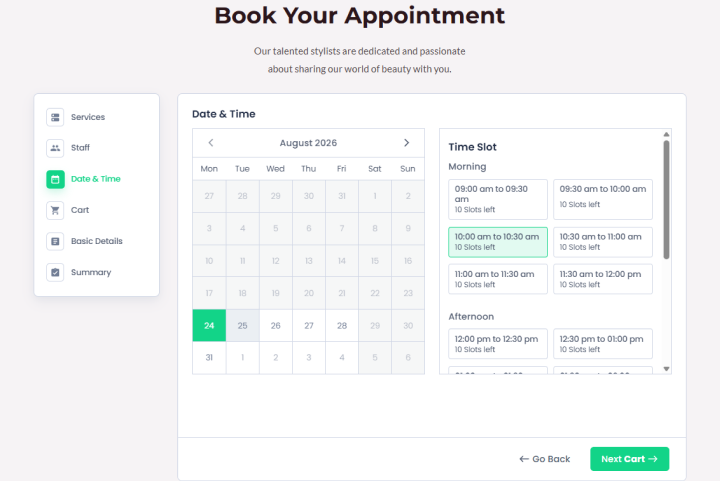
One of the easiest ways to create friction is to make customers ask, “When are you available?”
If customers have to call, email or message your business before they can find an appointment time, you’re adding another step to the funnel.
That’s why using the BookingPress WordPress appointment plugin is the smartest way. It lets your customers view available dates and times in real time, and book appointments online based on your schedules.
Furthermore, staff availability can also be managed through working hours, breaks, holidays and special days. Each of the staff members even get their own dedicated dashboard for managing their upcoming bookings, reviews, tips, and working hours.
What’s more is you get two way sync calendars such as Google Calendar, Outlook and Apple Calendar to make sure everyone’s on the same page. Its two way synchronization can block unavailable times based on events in connected calendars.
That means customers can move from:
“I want an appointment” → “This time works for me” → “Booked”
without waiting for someone on your team to confirm availability.
5. Offer Convenient Online Payments
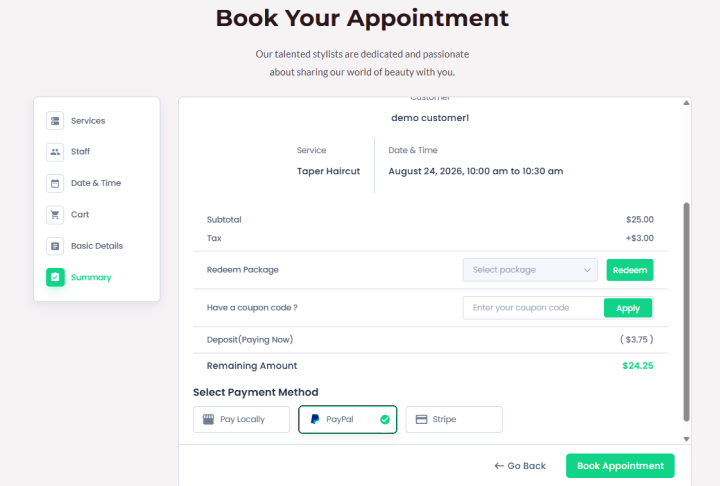
Payment shouldn’t become an unexpected obstacle at the end of your booking process.
You might want customers to pay the full amount when booking, pay a deposit or pay at the business after the appointment. With BookingPress, everything is possible.
This WordPress booking plugin lets you accept on-site and online payment with option for full or deposit payment via 22+ payment gateways + POS system.
6. Optimize Your Booking Funnel For Mobile
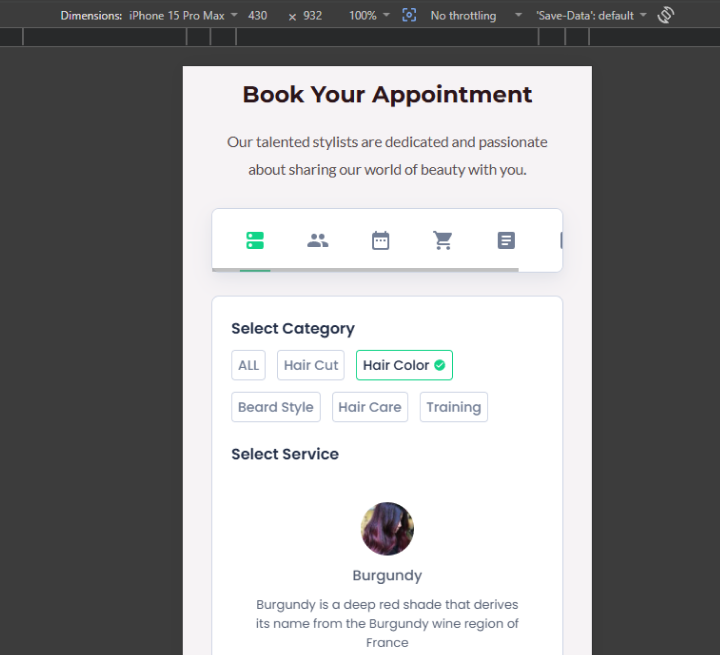
Your appointment booking funnel should never end at the desktop version of your website.
With over 65% to 78% of online appointments and service bookings made using mobile phones, responsiveness is not optional.
Customers may discover your business via a phone search, social media post, Google listing or mobile ad. If the booking process becomes difficult on a smaller screen, that customer simply leaves.
That’s why BookingPress is designed to let customers book right from your WordPress website, and its current product page highlights a mobile friendly booking experience.
But don’t rely only on the plugin or theme to handle this.
Test the complete journey yourself:
Landing page → Service → Booking form → Date/time → Customer details → Payment → Confirmation
Check whether:
- Buttons are easy to tap.
- Text is readable.
- The calendar is easy to navigate.
- Form fields don’t require excessive scrolling.
- Payment works properly on mobile.
- Customers can clearly see that the booking was completed.
BookingPress booking form is fully responsive across all smart phones we’ve tested. But as for your website, you have to ensure it’s responsive as well to sync in properly for high appointment booking funnel conversion.
7. Automate Booking Confirmations And Reminders
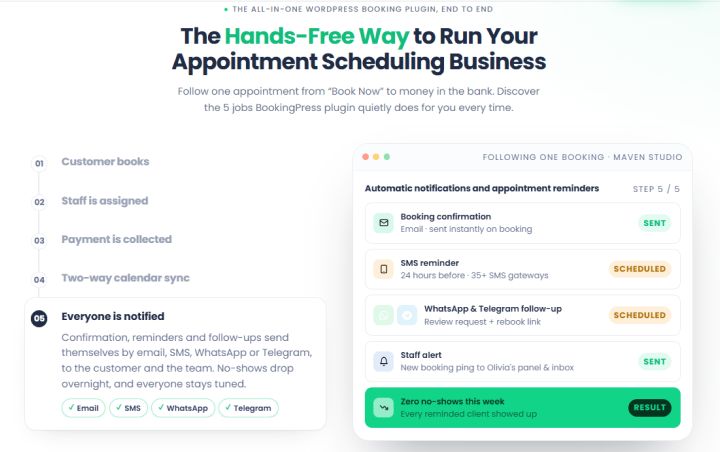
Getting the booking is one thing. Getting the customer to actually show up is another.
A confirmation tells customers that their appointment was successfully scheduled. Reminders keep the appointment visible as the date approaches.
BookingPress allows you to send automatic notifications via
- SMS
- Telegram
You can use these messages to include info such as:
- Appointment date and time
- Service
- Staff member
- Location
- Payment details
- Preparation instructions
- Rescheduling information
The best part is you don’t have to manually type any message. Just use the placeholders and whenever an automatic message is sent, the details will be dynamically updated.
For example:
Booking confirmed → Reminder 24 hours before → Appointment → Follow-up
This also lowers the amount of manual communication your team needs to handle.
8. Make Rescheduling And Cancellation Easy
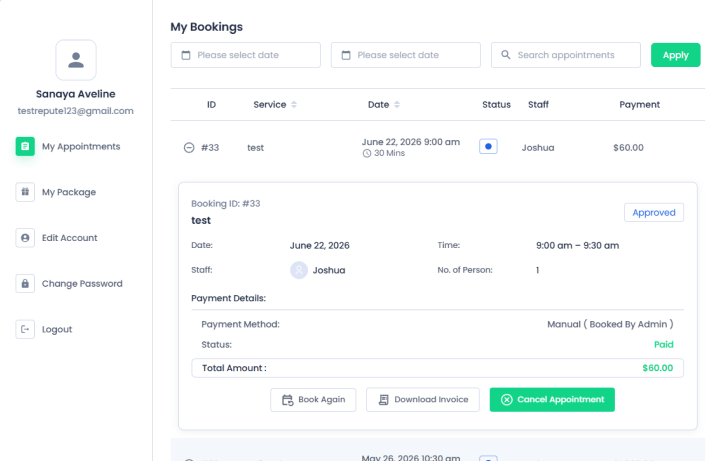
If changing an appointment requires calling your business or sending an email, customers may give up rather than rescheduling.
BookingPress allows customers to reschedule appointments through the My Bookings page or a rescheduling page linked from an email. Also, you can customize the labels and messages shown during the time of rescheduling process.
This creates a useful alternative to:
Can’t make it → Cancel → Customer lost
Instead:
Can’t make it → Reschedule → Customer retained
That small difference can matter when you’re trying to keep existing customers in your funnel.
9. Track Where Customers Drop Off
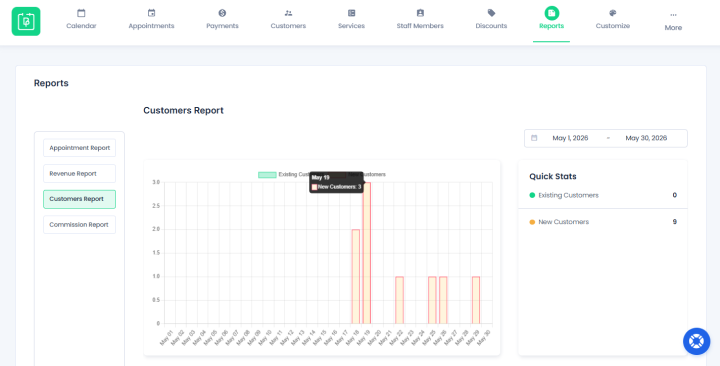
You can’t optimize a funnel if you don’t know where it’s losing customers. Thus instead of looking only at your total number of appointments, break the journey into smaller stages.
For example:
10,000 visitors
↓
1,500 visit your booking page
↓
700 start booking
↓
450 complete booking
Now you have more useful questions to ask.
- Why did 8,500 visitors never reach the booking page?
- Why did 800 people who reached the booking page not complete their booking?
- Are certain services converting better than others?
- Are cancellations or no-shows increasing?
BookingPress offers appointment, revenue, and customer reports with filters for factors such as date, service and staff. Best of all, its reports also come with appointment statuses such as completed, canceled, rejected and no show.
This gives you a way to look at what happens after someone books, too. For example lets say one service has a high number of bookings but also a high cancellation or no show rate. So to increase online bookings, means that one deserves a closer look.
You can then use those observations to decide what part of your funnel needs attention.
10. Turn Completed Appointments Into Repeat Bookings
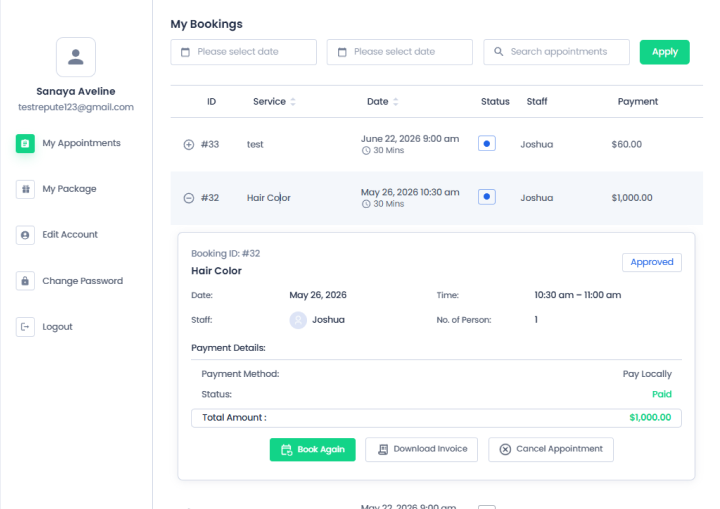
Last but not the least, we all know a completed appointment doesn’t have to be the end of your funnel.
If a customer has already used your service, the next goal can be to make their next booking easier.
Depending on your business, you can encourage customers to:
- Book their next appointment.
- Schedule recurring appointments
- Purchase a service package
- Return for a related service.
- Leave a review.
- Follow up after a set period.
Here’s where BookingPress can help. This WordPress booking plugin comes with flexible booking types such as group or recurring appointments so customers schedule multiple sessions in advance based on their preferred frequency and schedule.
Its recurring appointments feature can also send a follow-up notification after a recurring series is completed which encourages customers to make another booking.
Appointment Booking Funnel Examples For Different Businesses

A booking funnel can look different as per what you’re selling, how customers book, and how much information they need before making an appointment.
Thus here are a few simple examples:
Salon Booking Funnel Conversion
Google/Instagram → Service Page → Choose Service → Choose Stylist → Select Time → Pay → Confirmation → Reminder → Rebooking
Consultant Booking Funnel Conversion
Google/LinkedIn → Landing Page → Service Details → Qualification → Calendar → Confirmation → Consultation → Follow-up
Fitness Business Booking Funnel Conversion
Social Media/Google → Class or Service Page → Choose Class → Select Time → Book → Payment → Reminder → Next Booking
Medical/Wellness Business Booking Funnel Conversion
Google → Service Page → Choose Provider → Select Date & Time → Patient Details → Confirmation → Reminder → Follow-up
Hotel Booking Funnel Conversion
Google/Travel Site → Hotel Page → Check Availability → Choose Room → Guest Details → Payment → Confirmation → Pre-arrival Communication → Repeat Stay
All in all, the common pattern is simple: attract the right visitor, remove uncertainty, make booking easy and keep the relationship going after the booking.
Final Thoughts
In a nutshell, these are all the best, proven ways to improve your appointment booking funnel conversion. If you want to turn your WordPress site into a complete online booking system, BookingPress is an appointment booking plugin you can consider.
Not only it helps customers book easily, but also lets you increase online bookings though:
- Automatic reminders and confirmations
- 22+ global or local payment gateways
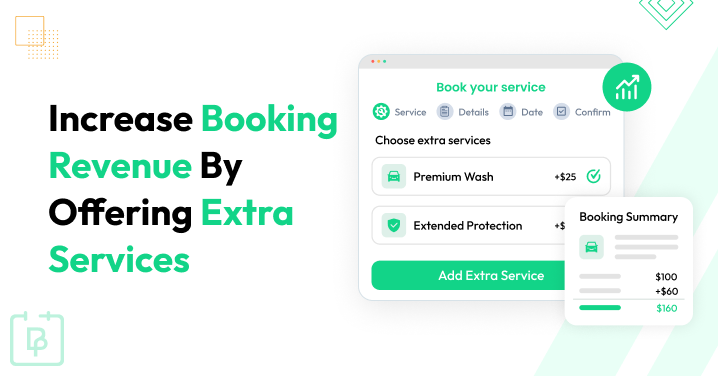
- Service packages and service extras for upsell
- Responsive and full customizable booking form
- Two way sync with all popular calendars
- Advanced staff management and multi-location
- And a lot more…
Turn your website traffic into guaranteed revenue. Switch to BookingPress now to create a flawless booking experience your clients will love!
Related Articles:
- 7 UX Strategies to Create a Booking Website Users Love
- How Can Online Booking Boost Appointments & Revenue
- How to Show Your Availability Online in WordPress: 5 Options
FAQs
Booking funnel is a step by step path a person takes from first learning about a service to officially booking it. In other words, a funnel guides potential customers through a digital journey whose main goal is to turn strangers into paying customers by building trust and removing friction at each stage.
Here’s an example of how a booking funnel works:
– Awareness – People find your business via social media, google or ads.
– Consideration – Visitors reads your content, reviews and prices
– Conversion – They final decide to book your service
– Retention and Follow Up – Automated reminders to lower no-shows encourage repeat bookings
Yes, Booking funnels still indeed work, but nowadays, single path models are failing against modern buyer habits. That’s why you need a high performing booking system now such as BookingPress to make it act as an interactive, multi-step booking form. Plus, with functionalities to send automatic reminders, sync with calendar two ways and show real time availability with easy options for cancellations and reschedule.
An appointment booking funnel works to build trust, filter out bad fits and make customer booking journeys easy and encouraging. Here’s how it works.
– First, attract the visitors via ads or social media
– Next turn those visitors into interested customers with your website
– Once they’re finally interested, show them way to your booking form
– Confirm the booking by sending automatic messages and reminders
– Turn appointments into repeat business with follow ups or recurring appointment options
 14-day money-back guarantee