How to Balance Client Needs with Your Booking Availability


Most businesses think the problem is “not enough clients.” But in reality, the bigger problem is poor availability management.
You may already have demand. But if your schedule doesn’t align with customer needs, you create friction, and friction kills conversions.
Clients want flexibility, but your business needs structure. That’s the conflict.
When you try to please everyone, your schedule becomes chaotic. When you restrict too much, you lose bookings. So, the solution is not working more hours. But learning how to understand client needs and structure your booking availability strategically.
With the right system, you can know your customers’ needs, control your availability and still maximize bookings.
TL;DR. More bookings don’t come from more hours; they come from smarter availability. Structure your schedule around client demand, staff capacity, and peak hours to maximize results without chaos.
Start with Your Base Booking Availability (Your “Global Schedule”)
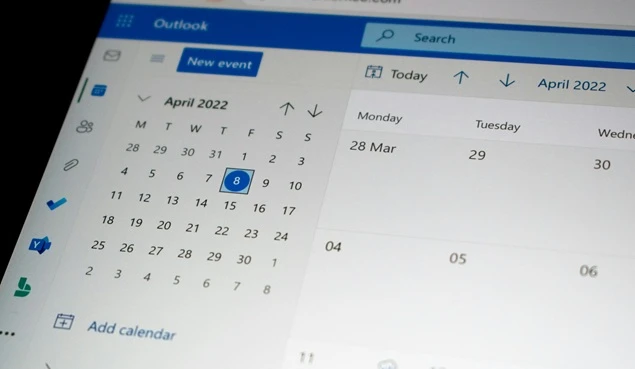
Your base availability is the foundation of how you balance client needs with your working hours. This is your default working schedule – the time slots when your business is generally open for bookings.
Why This Step Matters for Understanding Client Needs
Most businesses jump straight into advanced settings. That’s a mistake. Before you optimize, you need clarity.
Your default schedule helps you:
- Understand client needs patterns. (when people actually book)
- Create predictable availability for more conversions.
- Avoid manual adjustments.
When your booking availability is structured, clients trust the system more, and they book faster.
Where Most Businesses Go Wrong
- Setting different hours every day without logic.
- Opening too many slots “just in case”.
- Ignoring when clients actually prefer to book.
This leads to a mismatch between online booking availability and real demand.
How to Set It Up Strategically
No matter which WordPress appointment booking system you’re using, structure your default working hours around both your business capacity and customer behavior:
- Define your core working hours (e.g., 9 AM – 6 PM).
- Block non-working days in advance.
- Keep high-demand days slightly more flexible.
- Avoid overloading every hour with open slots.
Your first goal should be: create a stable system first, then optimize it. And with BookingPress, you can set your global availability once and use it as a base across all services and staff.
You don’t need to rebuild your schedule every time. Simply go to BookingPress > Settings, to:
- Define default working hours in a few clicks.
- Apply them across services automatically.
- Update your base schedule anytime without breaking your system.
This gives you a clean starting point, so every adjustment you make later is strategic, not reactive.
Use Staff-Specific Availability to Handle Real Workloads

Your business doesn’t run on one schedule. It runs on people.
Each staff member in your business has different working hours, skills and capacity. If you treat everyone the same, you create scheduling gaps, overbooking or missed opportunities.
This is where most businesses fail to truly balance client needs with real booking availability.
Why Staff-Level Availability Matters
Clients don’t just want any slot. They want the right person at the right time. If your system doesn’t reflect that:
- High performing staff get overbooked.
- Others remain underutilized.
- Clients don’t get their preferred experience.
This directly impacts conversions and retention. Thus, to truly understand client needs, you must align availability with who is delivering the service, not just when it’s available.
How to Structure Staff Availability Smartly
All you have to do is customize your business availability based on the real workload of your staff members:
- Set individual working hours for each staff member.
- Adjust availability for part time or shift based staff.
- Keep buffer space for high demand team members.
- Assign specific services based on expertise.
This way, you can ensure everything works as expected:
- Better workload distribution.
- Higher booking efficiency.
- Improved client satisfaction.
- Using one global schedule for all staff.
- Ignoring staff capacity differences.
- Overloading top performers while others stay idle.
This creates friction between customer needs and actual service delivery.
How BookingPress Solves This
BookingPress is an business oriented appointment booking plugin for WordPress sites that lets you assign booking availability at the staff level without complicating your system.
- Set custom schedules for each staff member.
- Link staff to specific services.
- Manage real time availability based on actual workload.
- Keep everything synced with your global schedule.
This gives you full control while keeping your booking flow simple for clients.
Adjust Booking Availability Only Where Needed (Don’t Overcomplicate)

Not all services should be available all the time.
Trying to open every service in every slot might feel like you’re maximizing options. Yet in reality, it creates confusion, lowers efficiency and weakens your ability to truly balance client needs with your business capacity.
Why Selective Availability Works
Different services have different demands:
- Some require more time and focus.
- Some generate higher revenue.
- Some are quick and volume driven.
If you treat them equally, you dilute both profitability and performance. So to understand client needs, you need to match when a service is available with how it’s typically consumed.
Thus, the best way is to control availability at the service level:
- Limit high effort services to specific time blocks.
- Prioritize high revenue services during peak hours.
- Keep quick services available during high traffic times.
Further, it makes sure your availability is optimized for both demand and output.
Real World Example:
Let’s say you run a wellness or consulting business offering.
- 60-minute strategy consultations. (high value and high focus)
- 20-minute quick sessions. (lower value and high volume)
Here’s how smart availability changes your results. Without any optimization:
- Both services are available all day.
- Long consultations get booked randomly.
- Peak hours get filled with low value sessions.
However, on the flip side, with strategic adjustment, you can manage everything effortlessly:
- Strategy consultations: Only available from 9 AM to 12 PM (when focus is highest).
- Quick sessions: Open during evening peak hours (5 PM to 8 PM).
- Midday: Reserved for buffer, admin, or overflow.
This way, high value services get dedicated and distraction-free time. Plus, your schedule feels more structured.
Add Buffer Time to Prevent Burnout and Delays

Most businesses treat buffer time as optional. In reality, it’s what keeps your schedule from falling apart.
Buffer time is the small gap between appointments that protects service quality and prevents delays from spreading across the day. Without it, one late session can disrupt everything that follows.
Buffer time creates breathing spaces between online bookings to:
- Prevents schedule overruns from affecting the next client.
- Gives staff time to reset and maintain service quality.
- Reduces last-minute stress and operational delays.
- Helps you consistently meet client expectations.
This is vital when you want to understand client needs as well as deliver a reliable experience. Thus, here are some smart ways to use buffer time:
- Add pre appointment buffers for preparation.
- Add post appointment buffers for wrap up.
- Use longer buffers for high effort services.
- Keep shorter buffers for quick and repeatable services.
This makes sure your schedule stays efficient and realistic.
Use Peak Hours Strategically (Demand-Based Scheduling)

Peak hours are your most valuable slots. Don’t waste them.
Allocate peak time to high-impact bookings, not just fill it. Here’s what most businesses do wrong: They open peak hours to everyone. And this leads to:
- Low value bookings are taking up premium time.
- Lower revenue per hour.
- Limited availability for your best clients.
The smarter approach is:
- Use off-peak hours for easy or discounted services.
- Keep peak slots limited and intentional.
- Align availability with actual customer needs.
However, for using this approach smartly, first you gotta:
- Find out when demand is highest. (evenings, weekends or specific days)
- Reserve these slots for premium or high revenue services.
- Prioritize loyal or high value clients during these hours.
Limit Booking Availability Without Hurting Conversions
Limited availability doesn’t lower bookings, but increases them. Why? because scarcity drives action. When clients see limited availability,
- They feel a sense of urgency.
- They are less likely to delay decisions.
- They complete bookings faster.
When used correctly, controlled scarcity helps you balance client needs while driving faster decisions and higher conversions.
How to Limit Booking Availability Strategically
Show limited slots
Show only a few available time slots per day; never full schedule. This keeps options clear and avoids overwhelming users.
Hide fully booked slots
Remove unavailable times completely or simply make them unable to click with a different shade color, so clients can know what they can actually book. This creates a cleaner and faster booking experience.
Use a clean booking interface
Simplify your booking layout so users can pick their preferred time slot and confirm the right way with zero distractions.
Handle Multi Service and Complex Bookings Effortlessly
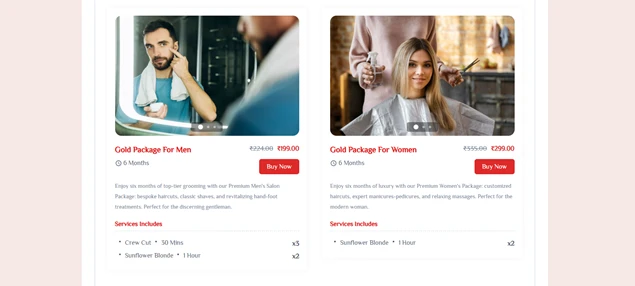
Not every client books just one service. Many clients want to book multiple services, longer sessions or bundled experiences at once. And if your system can’t handle this smoothly, you lose both conversions and revenue.
Choose a booking system that lets your clients:
- Book multiple services in one go.
- Make group appointments or recurring appointments.
- Show a personalised branded booking form with fewer steps and faster checkout.
Below is a real life scenario to make it easier to understand. Let’s say you run a salon or wellness business offering:
- Haircut → 30 minutes.
- Facial → 45 minutes
- Massage → 1 hour.
Without multi service setup:
- Clients must book each service separately; simply inconvenient.
- Time slots are not aligning.
- High drop off rate.
With multi service booking:
- Client selects all services in one go.
- Total duration is calculated automatically.
- One seamless booking, one checkout.
The Outcome? You get…
- Higher booking value per client.
- Better user experience.
- Fewer scheduling errors.
Use Location-Based Availability (If You Operate in Multiple Places)
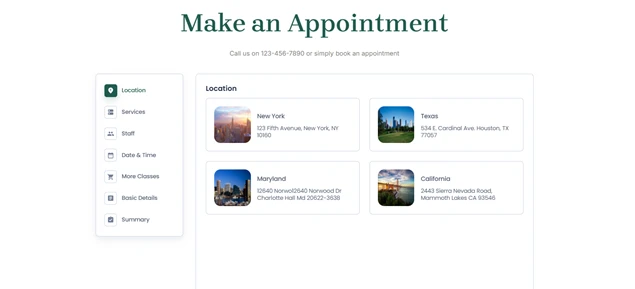
If your business operates in multiple locations, availability becomes more complex. Without proper location-based scheduling, clients may book services that aren’t available where they need them.
This creates confusion, missed appointments, and wasted time for both staff and customers.
Location-based availability solves this by ensuring clients only see services, staff, and time slots that are actually available at their chosen location.
Why Location-Based Scheduling Matters
Each location often has different:
- Working hours
- Available staff
- Services offered
- Capacity limits
Treating all locations the same creates errors. For example, if your downtown branch opens at 9 AM but your suburban branch opens at 10 AM, showing identical schedules leads to incorrect bookings and frustrated clients.
Location-based scheduling prevents this by aligning availability with real operations.
What This Changes for Clients
When location-based availability is set correctly:
- Clients select their preferred location first.
- They only see the staff who work there.
- They only see services available at that location.
- They book faster with fewer errors.
This creates a smoother booking experience and builds trust in your system.
Let’s Conclude
Balancing client needs with your team’s capacity is about being available at the right times.
When your schedule matches how customers search and book services, more people complete their bookings. At the same time, your team is not overworked. A win-win for both!
The best part is, WordPress booking scheduling plugins like BookingPress put everything in one place. You can take endless appointments and manage schedules, staff, services, and multiple locations with zero hassle.
A clear and planned schedule helps your business grow strategically.
You May Also Like:



Brian is a WordPress expert with a decade of developing experience & technical-writing. He enjoys blogging, movies & hiking.

Get BookingPress Premium
60+ Premium Addons
20+ Payment Gateways
Plan starts at just $89
Get Premium NowLike our insights? Click the badge to add BookingPress as your preferred source on Google.

Add as a Preferred
Source on Google