How To Build Customer Loyalty With Booking Rewards


Looking for a way to build customer loyalty with booking rewards? Your search ends here.
Many service businesses are losing revenue to empty calendar slots and one time clients who don’t return. And, as we all know, these days, chasing new clients is simply exhausting and five times more expensive than keeping the ones you have.
Yet countless businesses still spend thousands hunting fresh leads while ignoring the biggest leak in their revenue: repeat bookings.
From a service business owner’s perspective, the solution is simple: An automated booking rewards system. With it, casual appointments become a predictable stream of recurring income, and your customers keep coming back for more.
In this tutorial, we’ll share the separate step-by-step instructions for building customer loyalty with booking rewards, and get it set up on your WordPress site without losing a single moment!
TL;DR: Build customer loyalty by turning repeat bookings into rewarding experiences with automated booking rewards. With BookingPress + myCred, you can easily reward customers, increase retention and drive more recurring revenue.
Why Customer Loyalty Matters In Service Businesses

Customer loyalty matters more when it comes to service businesses because it costs much less to keep an existing client than to find a new one.
It directly impacts your business growth.
Loyal Clients = More Booking = More revenue
In fact, a Salesforce study found that 88% of customers are more likely to make a repeat booking again from the same service business they trust.
Retaining your existing customers’ loyalty means you don’t have to spend thousands of dollars on paid ads to attract new ones. And at some point of business if you manage to get more loyal clients, they can turn into referrers or affiliates to acquire new customers for you.
So to maintain this customer’s ongoing commitment to your business, you have to give them something worth coming back for. It can be a great service, discounts, coupons, or booking rewards. We would say do a mix of all for the best results.
Why Booking Rewards Are Key To Build Customer Loyalty
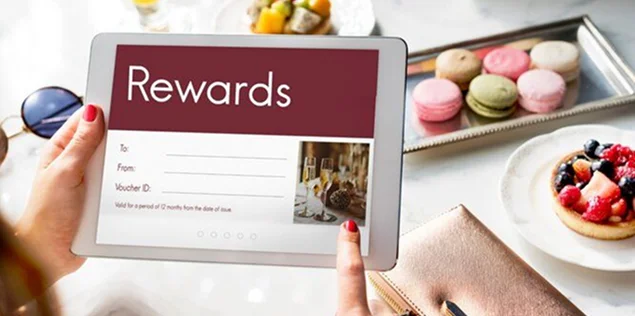
Booking rewards give customers a tangible reason to return. It turns a one time transaction into an ongoing relationship that builds customers trust.
From A Customer’s Perspective, Rewards For Repeat Bookings Means Getting:
More value
Getting more for your money via discounts or upgrades.
VIP Treatment
Since they have already visited once, they feel much valued and special now.
Simpler Choices
Picking the same businesses is easier when you’re rewarded for it.
Long-Term Trust
Making a customer relationship where loyalty = consistent rewards.
Thinking from a customer’s point of view, all these perks mean added value, financial savings and appreciation which makes them far more likely to choose your business over competitors
From A Service Business Owner’s Perspective, Rewards For Repeat Bookings Means Getting:
Lower customer Acquisition Cost
It is much cheaper to retain an existing customer than to spend dollars on marketing to find new ones (And that also – without no-guarantee)
Guaranteed Recurring Revenue
If you run a clinic, salon, or law firm, people will always need your kind of services on a regular basis, so why not be the ONE to offer it on a recurring basis.
Valuable Customer Data
Tracking booking patterns of customers lets you understand what your client wants, when they mostly book and along with what extras. Tracking these booking patterns helps you offer more personalized rewards.
Built-In Brand Advocates
Loyal customers are 55% more likely to leave positive reviews and recommend your services to friends and family. You can make it more professional by creating an affiliate program using AffiliatePress.
Competitive Advantage
Offering better booking rewards (Alongside great service – Of course) makes it harder for clients to switch to rival businesses which secures your market share.
Thinking from a business’s mind set, booking rewards drive customer loyalty by increasing Customer Lifetime Value (CLV), lowering customer acquisition costs (CAC) and creating a competitive moat.
How Booking Rewards Work In BookingPress
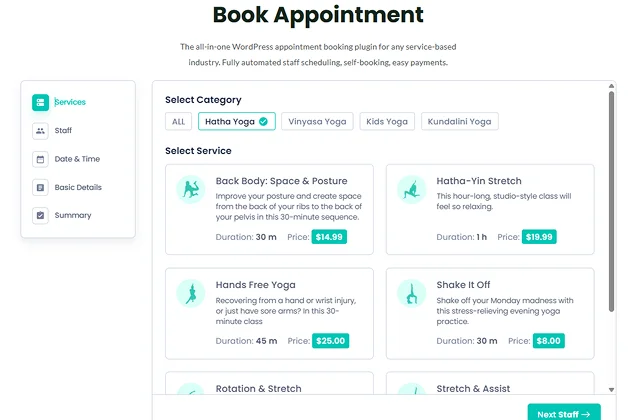
Booking rewards are really easy to create and assign for generic or specific services, directly from your WordPress site alongside accepting online bookings via appointment booking form.
You can use tools like BookingPress to automatically grant redeemable points for every completed booking.
From a customer or visitor’s point of view, the process is super easy:
1. They visit your business website (where you have embedded your booking form)
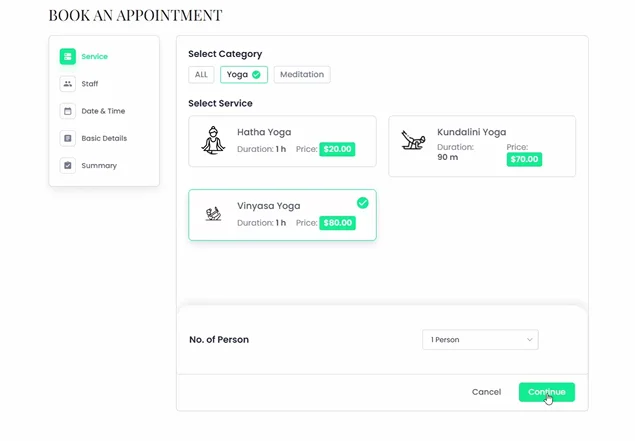
2. From the BookingPress online booking form, they pick a service, select their preferred staff members, date & time and complete all the required summary details.
3. At the checkout (Summary) step of the booking form, there will be a section with a checkbox for “Reward Points”.
4. They tick on the checkbox, they can see their available remaining rewards points from here. It’s up to them to decide how many points they wanna redeem.
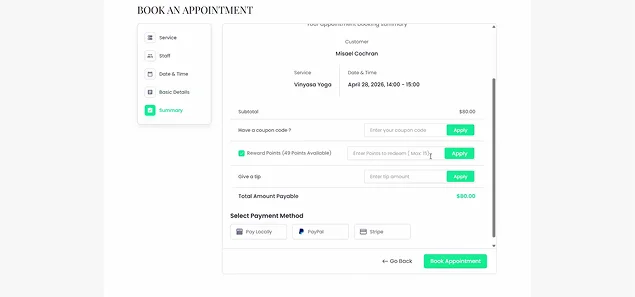
5. Enter the number of points to redeem. (They can see how many points can be redeemed at a time) At last, click the apply button.
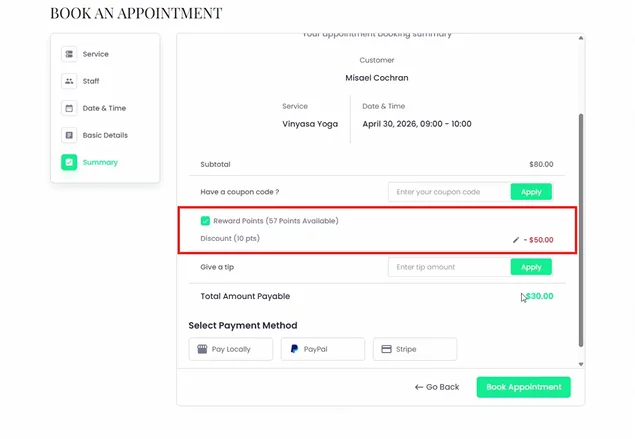
6. As you see the appointment amount is discounted based on the value of redeemed points (You’ll set the value as the business owner)
7. Customers can also edit the amount if you want by clicking on the edit icon. And that’s it.
Now customers can simply pay online and complete their appointment booking. If they wanna manage their booking rewards, they can easily do it from their My Bookings page → Reward Points panel.
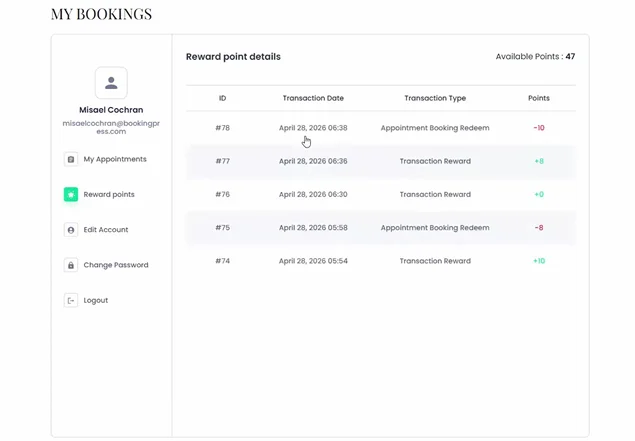
Here customers will be able to see all their reward point details such as:
- Available points
- ID
- Transaction date
- Transaction Type such as:
- Appointment Booking Redeem
- Transaction Reward
- Points (e.g +10, -8, +0, etc. )
How To Build A Customer Loyalty System With Booking Rewards In BookingPress
To build a customer loyalty system with booking rewards, you can integrate BookingPress with myCred Plugin. This popular loyalty plugin for WordPress allows you to reward your customers with points for every successful booking.
Follow these simple steps to build this system:
Step 1: Install BookingPress + myCred Integration Addon
If you don’t have BookingPress, you can easily install, activate and start accepting bookings in just a few minutes by following this beginner friendly quick setup guide.
- After you have BookingPress all configured, simply log in to your BookingPress account.
- Now go to Access Passes → View Downloads.
- From the list of addons, download the “myCred” addon.
- After downloading, upload the zip file of myCred addon to your WordPress and activate it as you do with all WordPress plugins.
Step 2: Set Up The myCred Addon Integrations
After successfully installing and activating myCred Addon. inside the BookingPress, go to the Settings → myCred panel.
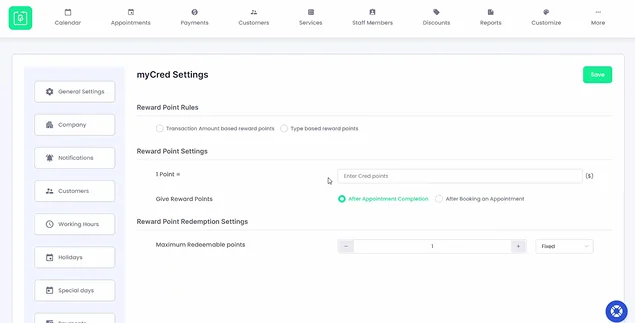
Open the myCred Settings panel to configure:
Reward Point Rules
From this section inside myCred Settings, you can decide how many points are earned by customers. That said, there are basically two types of reward point rules:
- Transaction Amount Based Reward Points
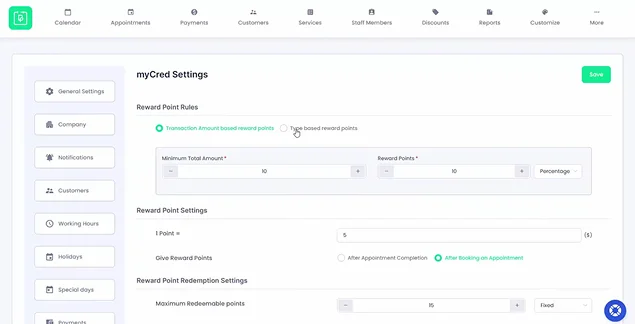
Click on it and you’ll be able to set “Minimum Total Amount” and “Reward points”. Here points are awarded as per the total booking amount. Let’s say if you set the Minimum Total Amount to $10 and Reward points to 1. Now if a customer spends a total of $100, they earn 10 points.
- Type Based Reward Points
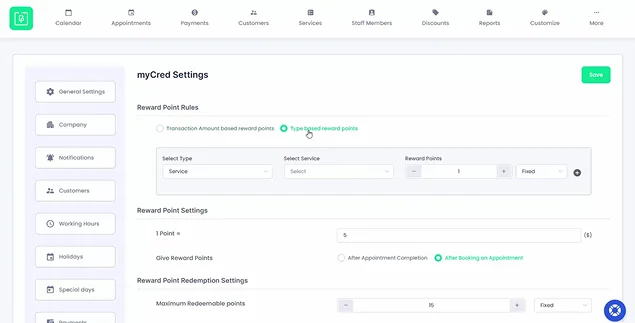
Click on it, and you’ll be able to set booking reward points so the client earns extra bonus or specific points for booking specific premium services or packages.
Now here you can also set reward points as Fixed or Percentage for both rules.
Reward Point Settings
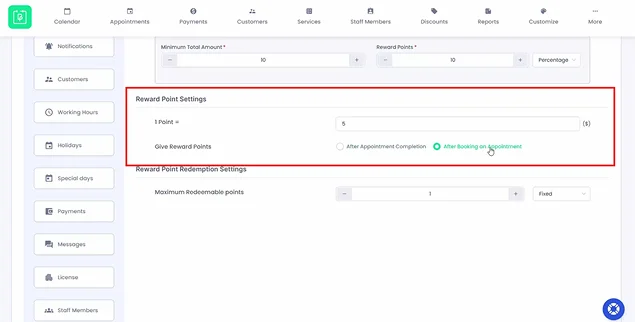
From here you can set how much value one myCred point is worth.
Let’s say a customer has 10 myCred points, and the value of 1 Point = $5. It means the customer can get up to a $50 discount on their next booking.
Next, you can also set “Give Reward Points” conditions. It can be either:
- After appointment completion
- Or, after booking an appointment
You can choose whatever you see fit as per your business. Still if you are wondering, we would recommend giving reward points after appointment completion if you also offer On-site payment method. But if you only offer to pay online or have a deposit system, giving reward points after booking an appointment sounds only fair.
Reward Point Redemption Settings
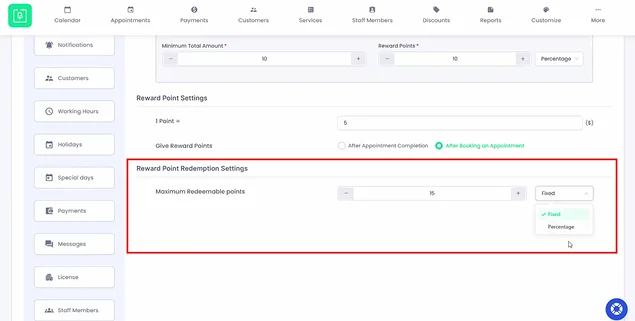
At last, set the Maximum Redeemable Points a customer can redeem per booking. Simply enter the max redeemable points and choose between percentage or fixed value.
Step 3: Save Changes And Start Rewarding Customers
At last, save the changes.
After all is set, your system will automatically track appointments, award points to the customer’s profile and allow them to apply those points straight at checkout from your BookingPress booking form.
Tips To Improve Customer Loyalty With Booking Rewards

Customer loyalty is not won by being first. It is won by being the best and by making the customer feel that you are the most reliable partner in their journey. However, there are a few proven strategies you can use to truly boost your customer loyalty with booking rewards:
- Keep It Simple & Automatic: Never complicate your point system. Always try to keep booking rewards rules as simple as possible so your customers won’t have to sit with a calculator.
- Make the Rewards Useful: Remember: Always offer rewards that actually matter to your customers. Apart from points, you can offer them free cancellations, flexible payment and first pick during busy seasons.
- Personalize the Experience: Allowing your customers to manage their own profile, easily able to reschedule and cancel makes them feel free, yet thankful. You can also create a branded booking form from BookingPress Customize to match your style.
- Offer Surprise & Delight: The point booking rewards are surely great, but sometimes sending unexpected rewards like dynamic discounts or coupon codes can turn a regular customer into a massive fan.
- Follow Up & Thank You: You can send personalized automatic notifications by adding placeholders for customer first name, last name, service, appointment type, and so on. The best part is you can send follow ups and messages via Email, SMS, WhatsApp and Telegram using BookingPress.
- Allow Word-of-mouth growth: Let your most loyal customers recommend your business to family and friends by integrating with plugins like AffiliatePress, so they can also get on this loop of rewards.
Let’s Sum Up: Building Strong Customer Loyalty With Rewards
In a nutshell, building customer loyalty with booking rewards is simply all about giving your clients points which they can convert to discounts on their next booking.
This creates a loop of rewards that turns a one time visitor into a loyal customer. And the best part? It benefits both – customers and service business owners.
Customers save money, and service businesses like salons, clinics, yoga classes or spas, secures a guaranteed future bookings.
Related articles:
- How to Boost Customer Retention & Loyalty with BookingPress
- How to Build an Appointment Funnel That Converts in 2026
- 5 Pricing Strategies You Can Implement Directly Through Your Booking System
FAQs
You can develop customer loyalty by offering great service and booking rewards like points, dynamic discount, and coupon codes. And for this, you can use tools like BookingPress + myCred integrations that automatically award points per booking and calculate discounts at checkout.
The key to customer loyalty is trust which is built through consistent, personalized experience and booking rewards. You can reward clients by automatically awarding points per booking, set happy hours, create service packages and offer coupon codes with ease using BookingPress.
1. Communication
2. Choice
3. Control
4. Connection
….are all the 4 C’s of customer loyalty.
1. Offer exceptional customer service.
2. Personalize the customer experience with upsells and recommendations.
3. Introduce a booking reward system with BookingPress.
4. Follow up notifications via multi-channels.
5. Always ask for feedback.
6. Make surprise and delight moments.
7. Always meet customer’s expectations.



Brian is a WordPress expert with a decade of developing experience & technical-writing. He enjoys blogging, movies & hiking.

Get BookingPress Premium
60+ Premium Addons
21+ Payment Gateways
Plan starts at just $79
Get Premium NowLike our insights? Click the badge to add BookingPress as your preferred source on Google.

Add as a Preferred
Source on Google