Offline vs Online Appointment Booking: Which Is Better?


As businesses grow, so do their scheduling demands. What works for five appointments a day may not work for fifty.
Every missed call is a missed opportunity, and every missed opportunity could mean potential revenue lost. Yet, many businesses still rely on phone calls, walk-ins, or manual registers to manage bookings.
While these traditional methods may have worked in the past, customer expectations have changed. Today, people expect to book appointments right away, without waiting for business hours.
This shift brings us to a debate of offline vs online appointment booking. Should businesses continue with traditional scheduling methods or adopt automated online booking systems?
In this blog, we discuss the key differences, pros, limitations, and what each method means for your business’s bottom line.
TL;DR. If your business handles only a few bookings daily, offline scheduling can work. But for better efficiency, fewer missed opportunities, and 24/7 appointment availability, online booking systems are the smarter long-term solution.
What Is Offline Appointment Booking?
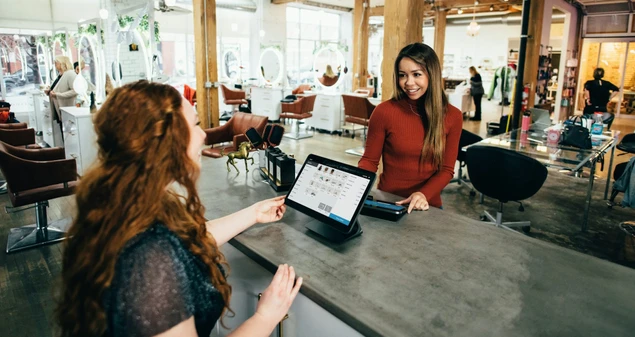
Offline appointment booking is when you schedule a meeting or make a reservation by calling someone, sending an email, or talking to them in person. It’s the old-fashioned way before online booking systems became popular.
For example:
- Calling a dentist’s clinic to book a visit.
- Walking into a salon to book a haircut.
- Visiting a travel agent to book a flight.
In simple words, offline appointment booking refers to scheduling appointments manually through phone calls, in-person visits, paper registers, or basic spreadsheets.
Pros of Offline Booking
Although digital systems are growing, offline booking still offers certain advantages over online appointment scheduling for specific businesses.
- Personal Interaction: Customers can directly communicate with your staff, adding a personal touch.
- No Technology Barrier: Offline bookings are perfect if your customers or clients are not tech-savvy.
- Simple Setup: There is no need for software installation, technical setup or system training.
- No Internet Dependency: Offline systems function without relying on internet connectivity or digital platforms.
- Direct Control: Business owners and staff have complete manual control over scheduling, adjustments and confirmations.
- Cost Effective: Managing appointments offline means no need to buy costly booking software.
Limitations of Offline Booking
Despite its simplicity, offline booking has many challenges, especially as appointment bookings start growing.
- Limited Availability: Customers can only book appointments during working hours. Thus, you miss high intent customers who wish to book during holidays or late at night.
- Time Consuming: The process of offline bookings comes with waiting, making calls or visiting locations, which is just a waste of time for busy clients.
- Higher Risk of Human Error: Even a small mistake of staff member means double bookings, misplaced records and unhappy customers.
- Staff Dependency: Every booking needs staff involvement, even during peak hours for managing calls and walk-ins.
- No Automation or Reminders: Offline systems lack automated confirmations or reminders, which may increase no-shows.
- Confusing with More Appointments: What works for five appointments a day becomes tricky to manage at fifty.
- No Reporting and Insights: Tracking booking trends, peak hours, staff performance or revenue patterns becomes almost impossible.
While this traditional method has been used for decades across industries like salons, clinics, repair centers and fitness studios, it relies fully on human coordination. And wherever there’s more human coordination, there’s more room for trials and errors.
What Is Online Appointment Booking?
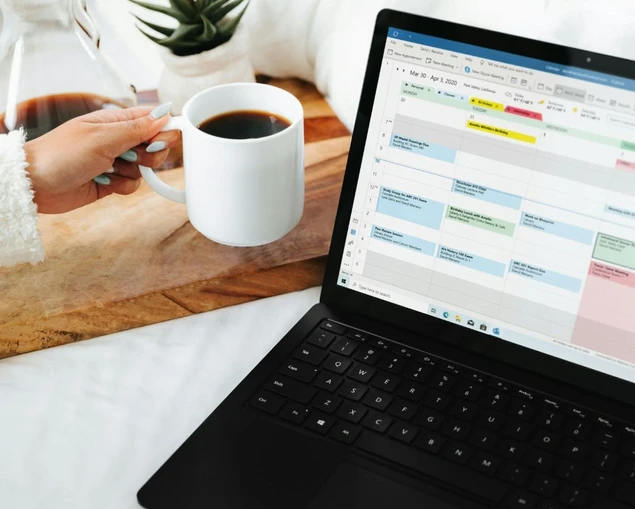
Online appointment booking is a digital software or system that allows customers to schedule, reschedule or cancel appointments via a website or application 24/7.
No more manual phone calls and waiting for business hours.
Customers can view available time slots, select services, choose staff members (if applicable) and confirm appointments online. Best of all, you can even give options to pay online, full or deposit.
Benefits of Online Appointment Booking
As customer expectations shift toward speed and convenience, online bookings offer several operational and financial advantages.
- 24/7 Appointment Scheduling: It lets your customers book appointments from anywhere, anytime.
- Reduced Administrative Work: Since customers schedule their own appointments, staff spend less time answering calls or managing registers.
- Automated Confirmations and Reminders: Online booking systems send automatic email or SMS confirmations and reminders to lower no shows and last minute cancellations.
- Real-Time Availability Updates: Appointments update quickly within the system, so everyone stays on the same page.
- Online Payment Integration: Most of the popular online booking systems come with payment gateways to collect online payments, full or deposit in advance.
- Centralized Booking Management: All appointments, customer details, and reports are stored in one place. Thus, business owners can track it with ease.
- Scalability: Whether handling 5 appointments a day or 50, automated systems can scale with no hassle.
Potential Challenges of Online Booking
While online appointment booking has a lot of benefits, there are some challenges to keep in mind:
- Complicated Setup: Setting up a new booking system means picking the right software, setting up services, availability, and payment options. All of these can simply take time.
- Technical Issues: Problems such as system downtime, bugs or slow updates can mess up your booking process.
- Learning Curve: Some customers, especially those not familiar with technology, may find the interface hard or confusing to use.
- Inflexible Scheduling: Some online booking systems don’t allow complex or special appointments, which could limit your booking options.
- Over Cancellation: As online bookings have made cancellations easy, some clients just cancel or change appointments at the last minute (You can take a deposit to avoid it smartly).
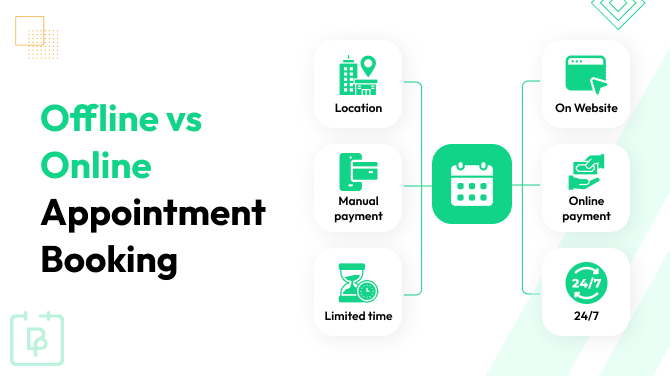
Offline vs Online Appointment Booking: Key Differences
Now let’s compare offline vs online appointment booking side by side.
| Feature | Offline Appointment Booking | Online Appointment Booking |
| Availability | Only during business hours. | 24/7 scheduling. |
| Booking Method | Phone calls, walk-ins, manual entry. | Website or booking platform. |
| Staff Involvement | Required for every booking. | Mostly automated. |
| Error Risk | Higher | Lower |
| Payment Collection | In-person or manual. | Online payments or deposits. |
| Reminders | Usually manual. | Automated email/SMS reminders. |
| Reporting & Insights | Limited or none. | Real-time reports and analytics. |
| Scalability | Difficult as volume grows. | Easily handles higher volume. |
In short, while offline methods work for very small operations, online systems are better for growing businesses that want to compete with their competitors.
Which Appointment Booking Method Is Better for Small Businesses?

The honest answer is: it depends on the size and goals of the business.
For very small businesses that handle only a few appointments a day, offline booking can still work. If most of your customers also prefer calling and you, as an owner, can manage bookings personally, a manual system feels simple and manageable.
However, as soon as appointment numbers start increasing, offline booking can quickly become stressful. More calls mean more interruptions. More bookings mean higher chances of errors. And more customers mean higher expectations.
Small businesses today are not just competing locally; they are competing online too. Because many customers mostly search for services, compare options and expect instant booking confirmation. If they cannot book right away, they simply move to a competitor who offers online appointment booking.
Here’s a simple way to think about it:
- If your business handles very low appointment volume and growth is not a priority, offline booking is enough.
- If you want to grow, reduce workload, improve customer experience and appear more professional, online appointment booking is the better long term choice.
Online systems also help small businesses look more established. Even a one-person operation can offer 24/7 booking, automated reminders and online payments; features that were once available only to large companies.
In short, when comparing offline vs online appointment booking for small businesses, the better option is always the one that supports future growth.
How to Set Up Online Appointment Booking on WordPress
If you have a WordPress site (or plan to build one) for your business site, you’re in luck!
Setting up an online appointment booking system on WordPress is easier than most business owners think. You don’t need coding skills. You just need the right plugin and a clear setup process.
Here’s how to do it in simple steps:
Step 1: Choose a Booking Plugin
Now here comes the most important decision: choosing the right booking plugin. A WordPress booking plugin allows you to turn your simple WordPress site into a complete online booking system.
The best thing is WordPress ecosystem has tons of WordPress booking plugins. Still, if you want the best of all, we’d recommend going with BookingPress.
Why Use BookingPress for Online Appointment Booking?
Because BookingPress is the most feature-rich appointment booking plugin here, you can set up your online booking system with zero coding. Plus, this booking plugin comes with over 60+ premium addons and a robust set of features such as:
- Unlimited appointments, services and staff members.
- Automated staff and location management.
- Recurring appointments and group appointments.
- 20+ payment gateways + POS system.
- Service extras and packages of multiple services.
- Coupon codes for discounts.
- Two-way sync bookings across Google Calendar, Outlook Calendar and Apple Calendar.
- Fully customizable booking form via no code form builder.
Step 2: Install the Booking Plugin
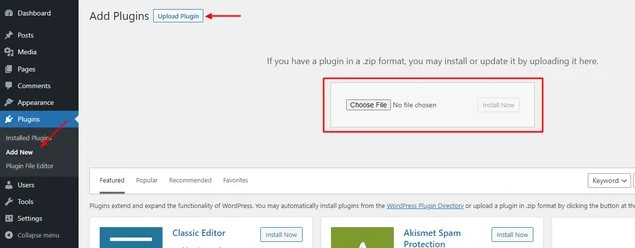
To get started:
- First go to BookingPress official website and get your preferred version. (You can even start with free version and upgrade anytime later)
- Next, go back to your WordPress dashboard > Plugins > Add new and upload the zip file of BookingPress you got earlier.
- Click “Install” and then “Activate” the BookingPress plugin.
Once the plugin is activated, you’ll see a new BookingPress menu in your dashboard.
Step 3: Configure Your Booking System
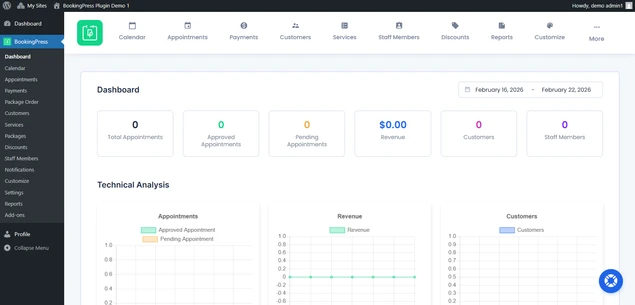
After activation, you can easily:
- Add unlimited services and set pricing.
- Set up working hours.
- Assign staff members (if needed).
- Integrate online payments via its 20+ payment gateways.
- Customize your booking form.
Finally, add the booking form to any page using a shortcode and your system is live. In just a few steps, your business can start accepting appointments 24/7.
Here’s a quick beginner-friendly guide to set up your own online booking system in WordPress.
Do You Want to Automate Your Appointment Scheduling Process?
Look no further than BookingPress.
Automate your availability and bookings to streamline your business management on WordPress with BookingPress. Easily organize your clients, transactions, email notifications, reservations, schedules, and more to keep everything centralized and up-to-date.
Interested?
Experience the power of BookingPress and join our global community of over 60,000+ satisfied users. Give it a try today!
Final Thoughts
When comparing offline vs online appointment booking, the real question is not which system is “better” in general. The real question is: which system supports your business goals today and tomorrow?
Offline booking works for very small businesses with limited daily appointments, adding personal interaction and a simple setup.
However, when your booking appointments increase, offline systems get harder to manage. Missed calls, double bookings and no shows start affecting your revenue.
Online appointment booking, on the other hand, lets your customers book appointments anytime with lower staff workload, sends automatic reminders and offers detailed insights. Most importantly, it allows you to capture opportunities even outside business hours.
So, if your goal is to:
- Save time.
- Reduce errors.
- Improve customer convenience.
- Go from 5 to 50+ bookings a day.
- Compete in today’s digital market.
Then an online appointment booking system is a must. In 2026 and beyond, customers expect speed, flexibility and confirmation with no delays. Businesses that adapt to online appointment booking systems will grow faster and operate smarter.
You May Also Like:
- Top Shift Management Best Practices for Modern Businesses
- The Do’s and Don’ts of Cancelling Appointments Professionally
- 10 Tips to Make Appointment Scheduling More Effective
Frequently Asked Questions
The difference between online booking and offline booking is convenience and speed. Online booking allows customers to book services 24/7 via the website with instant confirmation. Offline booking, on the other hand, involves sending emails or calling a staff member to make an appointment, which is only possible during working hours.
Here are the benefits of online booking:
– Book services 24/7 from anywhere.
– Instant confirmation via Email or SMS.
– No need to wait for business hours to call or stand in long lines.
– Easy to view all available services, prices and time slots.
– Automatic reminders to lower show ups.
– Accept online payment, full or partial deposit.
You can easily switch from offline to online appointment booking by using an online booking system that integrates with your calendar. Online booking systems such as BookingPress allow you to two-way sync with popular calendars such as Google, Outlook and Apple Calendars.
Here are the disadvantages of online booking for service businesses:
– Technological dependence.
– Lack of personalization.
– Cost of having an online booking system for accepting online reservations.
Taking bookings online can be beneficial for both service businesses and customers as it lowers admin workload and gives customers the freedom to book 24/7, from anywhere.



Brian is a WordPress expert with a decade of developing experience & technical-writing. He enjoys blogging, movies & hiking.

Get BookingPress Premium
60+ Premium Addons
20+ Payment Gateways
Plan starts at just $89
Get Premium NowLike our insights? Click the badge to add BookingPress as your preferred source on Google.

Add as a Preferred
Source on Google