Looking for the most reliable and beginner friendly appointment booking solutions on WordPress?
Here’s the catch: most “easy” booking plugins are only easy at the beginning.
As your booking needs grow with more services, more staff and more customization, that simplicity can quickly turn into a limitation. Going with the wrong one can lead to unnecessary complexity or force you to switch later.
That’s where BookingPress and Simply Schedule Appointments plugins come into the picture.
BookingPress is a feature rich WordPress booking plugin for all growing service businesses that need flexibility. Simply Schedule Appointments, on the other hand, focuses on simplicity with a clean interface and an easy setup.
Both plugins target service-based businesses. But they take very different approaches to solving the same problem.
To see which one actually performs better, I tested both across different booking setups—from simple scheduling to more advanced workflows.
In this WordPress booking plugin comparison guide, you’ll learn exactly where each plugin performs well, where it falls short, and which one makes the most sense for your service business in the long run.
TL;DR: After comparing BookingPress vs. Simply Schedule Appointments plugin, I concluded both plugins have their own set of advantages and limitations. But if you want a WordPress booking plugin that’s right-fit for your service business, BookingPress is the better long term choice if you want more than just basic appointment booking.
BookingPress vs Simply Schedule Appointments: Key Differences at a Glance
Don’t have time to read? No worries. Here’s the head-on-head comparison of Simply Schedule Appointment vs. BookingPress plugin.
| Feature | BookingPress | Simply Schedule Appointments |
| Core Purpose | Full appointment + business management system | Simple appointment scheduling tool |
| Target Users | Clinics, salons, agencies, multi-staff businesses | Freelancers, coaches, small service providers |
| Setup Experience | Moderate setup with advanced configuration | Very fast setup, beginner-friendly |
| Appointment Types | One-on-one, group, multi-service, staff-based bookings | Primarily one-on-one appointments |
| Staff Management | Advanced staff accounts + commissions + scheduling | Limited staff handling (depends on plan) |
| Payments Support | 20+ gateways, deposits, coupons, WooCommerce integration | Basic payment support (more limited integrations) |
| Calendar Integration | Google Calendar + admin calendar view | Google Calendar sync |
| Notifications | Email + SMS + automation options | Email notifications (SMS limited/paid add-ons) |
| Customization | Highly flexible booking rules, forms, workflows | Basic customization, limited form logic |
| Add-ons & Extensibility | 45–60+ add-ons (payments, packages, recurring bookings) | Smaller extension ecosystem |
| Scalability | High (built for growing businesses & teams) | Moderate (best for small setups) |
| Pricing | Free version available: Premium version starts from $89/Year | Free version available: Premium version starts from $99 for 1st year only (Renewal starts from $129/Year) |
BookingPress vs Simply Schedule Appointments: The Core Difference
At first, both BookingPress and Simply Schedule Appointments seem like they do the same thing: help you accept online bookings on your WordPress site.
And technically, they do.
But the way they handle bookings behind the scenes is very different, and that’s what actually impacts your day-to-day operations.
BookingPress is an all-in-one WordPress booking plugin that is designed for service businesses that need more control over how bookings work.
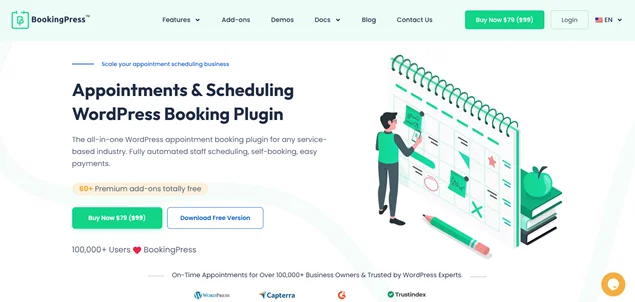
With BookingPress, you can manage multiple services, staff members, locations, pricing rules and even advanced workflows like deposits, recurring bookings or custom schedules. It’s a system that adapts as your business grows.
Simply Schedule Appointments, on the other hand, likes to keep things simple.
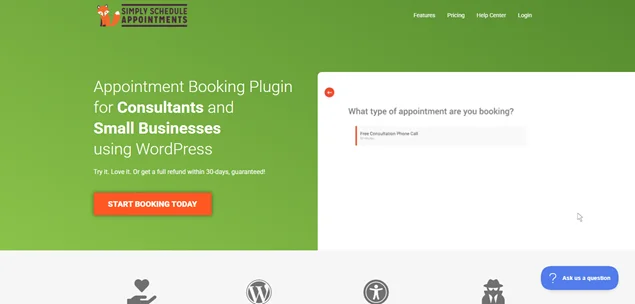
It’s quick to set up, easy to understand and works well if your booking system needs are straightforward like offering a few services or scheduling basic appointments without too many conditions.
That sounds great at first but this is where most people hit a wall. What feels “easy” at the start can become limiting when you need:
- More booking customization
- Multiple staff or services
- Advanced payment or scheduling options
Here’s the real difference:
BookingPress is built for flexibility and growth, while Simply Schedule Appointments is built for simplicity and speed.
This difference becomes more noticeable over time.
Which Plugin Is Best for Your Business Type?
Choosing between BookingPress and Simply Schedule Appointments isn’t just about features.
It’s about how your business runs today, and how it will grow tomorrow.
A plugin that feels “easy” now can slow you down later. At the same time, a powerful tool can feel like too much if your needs are simple.
So stop asking “Which plugin is better?”, because the right question is:
“Which plugin fits my business type and booking needs?”
Here are decision table to pick the best WordPress booking plugin for your service business:
| Business Type | Best Choice | Why It Fits |
| Solo professionals (coaches or consultants) | Simply Schedule Appointments | Fast setup, simple booking needs. |
| Small service businesses | Simply Schedule Appointments | Easy to manage with minimal setup. |
| Growing businesses with multiple services | BookingPress | Advanced features and scaling. |
| Teams with multiple staff members | BookingPress | Better staff and schedule management. |
| Agencies & advanced workflows | BookingPress | Flexible rules, automation, customization. |
At the end of the day, the best plugin isn’t the one with the most features but the one that fits your business without creating friction now or later.
My Experience Testing Both Plugins
To give you a real world look at how these two stack up, I tested both BookingPress and Simply Schedule Appointments (SSA) on a clean WordPress setup.
I focused on the four pillars that actually matter when you’re trying to run a service business, whether it be a salon, spa, clinic, rental, coaching, law firm, or fitness studio.
Here’s the expert breakdown of how that first “out of the box” experience felt for each:
Setup & Onboarding
When testing onboarding, I’m looking for one thing which is Time to Value. How fast can a non-techie go from “Plugin Activated” to “Ready to take a payment”?
Simply Schedule Appointments: The Guided Sprints
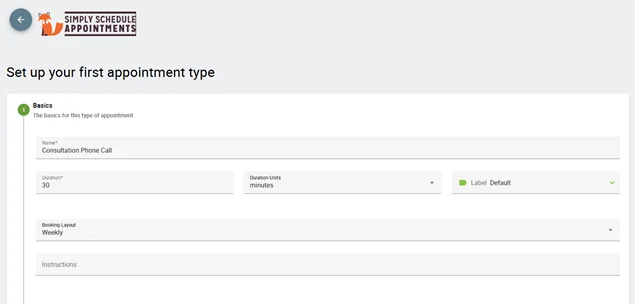
Simply Schedule Appointments feels faster right away. The onboarding wizard is incredibly easy-to-go.
It asks you the essentials like timezone, availability and appointment types, and then sets the foundation for you. It’s a “hand holding” experience in the best way possible; you never feel like you’re staring at a blank screen wondering what to click next.
If you’re a fan of minimalist UI, this wins because:
- The setup is guided and minimal.
- You can create your first booking flow in minutes.
- No complex configuration needed.
It’s clearly built for beginners as the setup barely takes 5 minutes.
BookingPress: The All-In-One Powerhouse
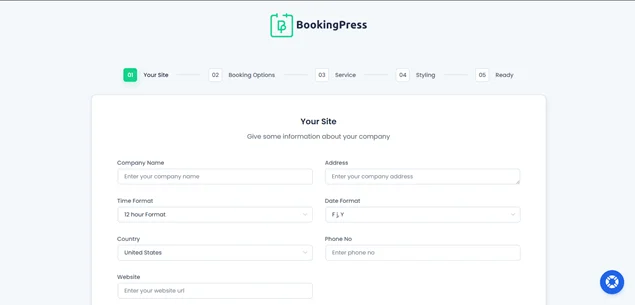
BookingPress, on the other hand, also comes with a smart setup wizard if your goal is to accept online appointment bookings right away.
However, if you want to set up advanced settings, it’s gonna take a bit more time. Because it aims to be an all-in-one solution (mostly replacing 3 or 4 other plugins), the setup feels a bit more “industrial.”
Overall, onboarding and getting started with BookingPress takes barely around 10 minutes because:
- There are more settings and options for personalize experience
- You set services, staff and availability in detail
- Customize booking form in your style
It’s not difficult; it just needs a few extra steps after the setup wizard. But if you want full control, I would say those extra few steps are worth it.
Winner (Based on Use Case)
- Simply Schedule Appointments wins for speed and beginner friendly setup.
- BookingPress wins for long term setup flexibility and control.
Expert Insight: Fast setup feels great early on but structured setup saves time later when your business grows.
Risk: Choosing a “quick setup” plugin may mean reworking your entire system later when your needs become more complex.
Dashboard & User Interface
Once the setup is done, you’ll spend the most time in the admin dashboard.
During my testing, the difference in “vibe” between these two became even more apparent. Although both are built for WordPress, they treat the WordPress interface very differently.
BookingPress: The “All-In-One” Command Centre
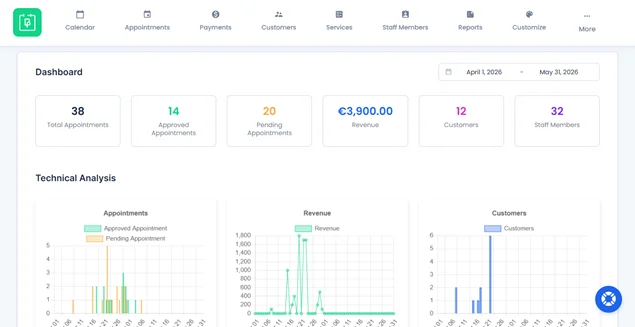
BookingPress feels like a high powered WordPress appointment booking plugin that has been made to look like a booking powerhouse. You can easily see everything at a glance.
- Centralized Analytics: The BookingPress Dashboard gives you graphical insights into total revenue, appointment trends, and a lot more right away along with upcoming appointments.
- Visual Organization: To make things simple, it gives you a modern calendar view to view services, status or customer names.
- Compact Mode: For staff who only need to check their schedule, it offers a “Compact Mode,” which simplifies the view to just essential metrics like total approved vs. pending appointments.
Overall, BookingPress shows you everything you need at a glance, making it easy to use and navigate around without needing any documentation (Although the documentation and excellent customer support is always there 24/7)
Simply Schedule Appointments: The “SaaS-Style” Experience
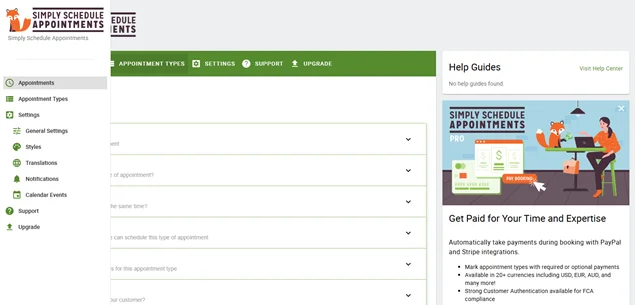
Simply Schedule Appointments (SSA) feels like using a high end external tool like Calendly or SavvyCal, but right inside your WordPress dashboard. The best part is you can’t even see the WordPress dashboard as it covers the full screen.
- The Look: It has a completely custom, “snappy” UI that is way faster and more responsive than the standard WordPress backend. It doesn’t look like WordPress; it looks like a modern web app.
- Navigation: The layout is minimalist. You won’t find yourself digging through nested menus; everything is organized into a few clear tabs like Appointments, Appointment Types, Settings and Support.
Overall, Simply Schedule Dashboard is great for beginners but limited when you need deeper control.
Winner (Based on Use Case)
- BookingPress wins for structured dashboard.
- Simply Schedule Appointments wins for ease of use.
Expert Insight: A simple UI lowers friction early but a structured UI helps you manage complexity without chaos.
Risk: A minimal dashboard (Like Simply Schedules Appointment plugin) can become limiting when your bookings, staff and services increase.
First Booking Setup
For the third stage of my testing, I wanted to see what it actually feels like to build your very first bookable service that lives on your WordPress site.
Simply Schedule Appointments: The “Linear” Logic
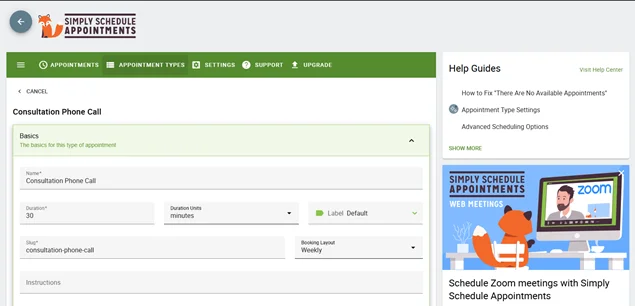
SSA keeps things on rails.
To set up your first service, you follow a very logical vertical path: name the appointment, set the duration, and pick your availability.
It’s incredibly hard to mess up. Because it’s just based on “Appointment Types,” it’s perfect for consultants or coaches who just need to block out time. It’s efficient I would say, but it stays within a specific lane only.
BookingPress: The “Service-First” Architect
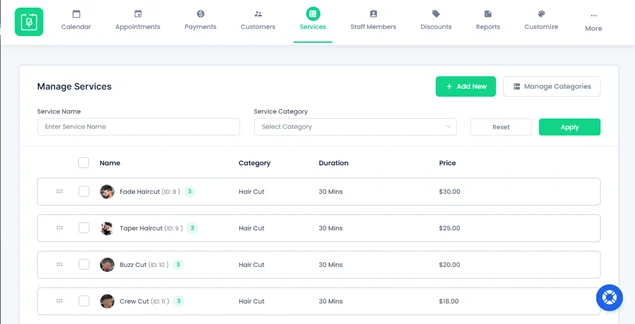
This is where BookingPress really started to flex its muscles during my trial. The Simply Schedule Appointments plugin feels like a scheduler while BookingPress feels like a complete service engine.
When I set up my first booking here, I noticed a few things that made it feel more “business ready” out of the gate:
Categorization by Default
Right from the jump, BookingPress encourages you to group services into categories. If you own a spa or gym, you don’t just have “an appointment”; you have “Massages” or “Personal Training.” This makes the setup feel organized for growth from day one.
The “Service vs. Staff” Synergy
The way it links a specific service to a specific staff member felt more integrated. I could easily toggle which employee was “active” for that booking without jumping between different settings menus.
Built-in Buffer Logic
While both allow for padding between meetings, BookingPress’s interface makes it feel like you’re building a professional workflow. You can set up “Before” and “After” buffers that are visually intuitive.
20+ Payment Gateways
You can literally offer 20+ payment gateways + POS System to your clients for accepting secure on-site or online payment, whether it be full or deposit payment.
My Takeaway:
If you are just selling “your time,” Simply Schedule Appointments is a breeze. But if you are selling a branded service that needs to look structured, BookingPress handles that with a bit more “Pro” flair.
Mobile Experience
In the final stage of my testing, I took both plugins away from the desktop and onto the smartphone.
In a world where 60% or more of your clients book while sitting on a bus or waiting in line, the mobile “flow” is the ultimate deal breaker.
Let’s see if your booking form only looks good or also optimized for all real conversion:
Simply Schedule Appointments: The Mobile Minimalist
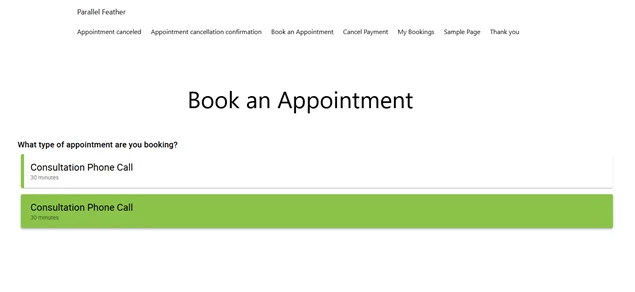
SSA’s mobile experience is exactly like its dashboard: fast and fluid.
Because the UI is so lightweight, the booking form appears beautifully. There’s no “horizontal scrolling” (the cardinal sin of mobile web design) and the buttons are “fat-finger friendly.” It feels like a native app.
If your clients are mostly tech-savvy who want to book a 15 minute call in three taps, SSA is incredibly hard to beat for pure speed.
BookingPress: The “App-Like” Powerhouse
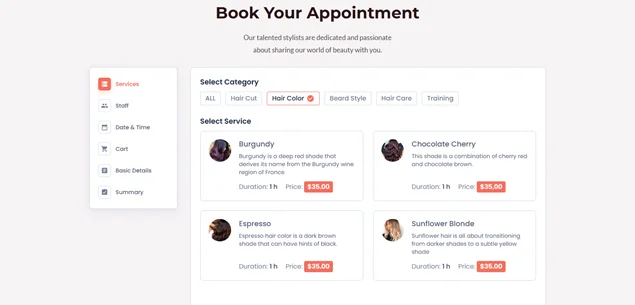
While SSA wins on speed, BookingPress stands out for creating a premium and branded experience on a small screen.
During my tests, it felt less like a “form on a website” and more like a dedicated booking system right inside the WordPress site.
BookingPress uses a step-by-step “booking form Wizard” interface that is tailor made for mobile. So clients who use smart phones don’t have to face long intimidating page of fields. It serves up one choice at a time: Select Service → Select Staff → Pick Date.
My Takeaway:
BookingPress is definitely the best mobile-friendly booking plugin if you want a booking form that’s fully personalized using extensive styling options. Yet, Simply Schedule Appointments plugin is also eyes close the best fastest booking form that gets the job done.
BookingPress vs Simply Schedule Appointments: Features That Actually Matter
1. Booking & Scheduling Flexibility
BookingPress works the best if you plan to manage multiple services, staff, locations, buffers, recurring & group bookings, and custom schedules without hacks.
Meanwhile, Simply Schedule Appointments is best for simple scheduling; single or limited services, fixed availability and straightforward booking flows.
What this means:
If your business has layers (staff, services and booking rules), BookingPress is the best of the best WordPress appointment booking plugins. However, if you’re just booking time slots, the Simply Schedule Appointment plugin keeps things simple.
2. Payment & Monetization Options
BookingPress comes with over 20+ payment gateways + POS System for accepting deposits or full online payments and on site payment.
On the flip side, Simply Schedule Appointments got only 2 payment gateways – PayPal and Stripe for accepting online payment; no other options.
What this means:
If revenue handling matters, BookingPress is the best pick. SSA works fine for simple “pay and book” setups.
3. Integrations & Automation
BookingPress comes loaded with 60+ premium addons, it syncs with all popular calendars like Google, Outlook and iCal. Plus, Sends automatic notification and reminders via Email, SMS, WhatsApp and Telegram. It also integrates with tons of more tools for marketing, conducting online sessions, and so on.
Simply Schedule Appointments gives you solid essentials like Google Calendar sync and many more integrations but fewer advanced automation options.
What this means:
BookingPress is better if you want a connected automated system. Yet, Simply Schedule Appointments covers all the basic integrations.
Pricing Breakdown: What You Actually Pay
Let’s be honest now. Pricing pages don’t tell the full story. What matters is how pricing behaves as your business grows.
Here’s a quick decision table to make it simple.
| Plan / Level | BookingPress | Simply Schedule Appointments | What It Really Means |
| Entry Level | Free version available | Free version available | SSA is easier to start, but limited fast. BookingPress is a feature-rich booking plugin. |
| Starter Paid Plan | $89/year (Standard) | $129/year (Plus) | BookingPress gives more features at lower entry cost |
| Mid Tier | $129/year (Professional) | $249/year (Professional) | BookingPress wins on value + features per dollar |
| Advanced / Business | $249/year (Enterprise) | ~499/year (Business) | SSA gets expensive as you scale |
| Lifetime Plan | Available; Starting from $229 | No | SSA has no lifetime plan |
| Core Add-ons | Mostly included (60+ add-ons free) | Many features locked in higher tiers | BookingPress bundles more value upfront |
Now here’s a twist: If you go and check out the Simply Schedule Appointment plugin pricing page, it’ll show you the starting price of $99/year for its Plus Edition. However, if you read the pricing page closely, you’ll notice that it’s only the introductory price. The renewals are always on full price.
However, BookingPress plays fair. It renews at the same price you get the first plan.
Straight Expert Verdict
- If you are testing or running a very small setup → SSA is acceptable.
- If you are building a real service business → BookingPress is more cost efficient long term.
Where Each Plugin Falls Short
No booking plugin is perfect. The real differences start showing when you go beyond basic scheduling and start running a real service business.
Here’s where each tool shows its limitations.
BookingPress: Where It Falls Short
- Overwhelming settings because it has 60+ premium addons for free.
- Needs initial planning (services, staff, pricing logic) before setup feels smooth.
- Can feel “too feature heavy” for very simple booking needs.
- Setup takes a little more time compared to Simply Schedule Appointments.
Key reality: BookingPress is designed for structure and growth, not instant simplicity
Simply Schedule Appointments (SSA): Where It Falls Short
- Advanced features (payments, automation, team scheduling) locked in higher expensive plans.
- Limited customization; the booking form design is rigid.
- Not built for large teams or multiple locations.
- Not ideal for businesses with layered booking rules or custom logic.
- Can feel too linear once operations expand.
Key reality: Simply Schedule Appointments is best for simplicity but not for business growth
Final Verdict: BookingPress vs Simply Schedule Appointments
If you strip away all the comparisons and focus on real business outcomes, the choice becomes very clear.
On one side, the Simply Schedule Appointment plugin helps you start quickly. BookingPress, on the other, helps you create a full-power online booking system that grows with your business.
So if your goal is to make a powerful booking system inside your WordPress site, or looking for a good Simply Schedule Appointments alternative, BookingPress is the best WordPress appointment scheduling plugin.
Take control of your bookings today with BookingPress and let your WordPress site do the scheduling for you.
Related articles:
- How to Access Calendar Drag-and-Drop View Features in BookingPress
- What Are the Best Appointment Booking Plugin Features
- BookingPress vs. Amelia: Which Is the More Affordable Booking Plugin?
FAQs
Simply Schedule Appointments is a good WordPress booking plugin for beginners, but as your business grows, it starts feeling limited. That’s why, you should consider the best Simply Schedule Appointments alternative like BookingPress that strikes the perfect balance of user friendliness and 60+ premium set of addons.
Yes, Of Course! BookingPress supports online payments, full or deposit, via 20+ payment gateways like PayPal, Stripe, RazorPay, Authorize.Net and a lot more.
Yes, Simply Schedule Appointment has a free version in the WordPress plugin directory.
BookingPress Lite is the best free booking plugin for WordPress due to its custom booking form, centralized analytics dashboard, user friendly interface and payment gateways like PayPal for accepting online payment.
 14-day money-back guarantee